Showing posts with label Skype. Show all posts

Apr 10, 2011

Immersive Cocoon Interaction: "It's people who are now the interface" (Updated, with videos, photos, links.)

"It's people who are now the interface." -Ole Bowman, cultural and architectural historian


I found the above quote from the Immersive Cocoon website and smiled.


When I first learned about the Immersive Cocoon in 2008, I thought it was just another technological fancy that probably would not come to market anytime soon.  Although it still is in the concept stage, I think it has a chance of making it, given the rapid advances in interactive technology over the past few years.

It wouldn't surprise me to see i-Cocoons finding a place in libraries, educational settings, museums, and other public spaces within the next 5-8 years, given an economic turnaround.


What is the Immersive Cocoon?
"The Immersive Cocoon is a future concept study by Tino Schaedler with design collective NAU; an idea to push the envelope and provoke a new conception of interface technology...Directed and 3D CG by Oliver Zeller. More info, behind the scenes and full credits at i-cocoon.com.-adNAU"


What is inside the cocoon?


Photo: arch.nau.coop

Photo: arch.nau.coop
Teaser Video:


"Please play fullscreen and LOUD! ...This spec teaser reveals an evolution in computing interaction, within a setting inspired by the penultimate scene from Stanley Kubrick's 2001: A Space Odyssey...Starring that film's lead actor, Keir Dullea; "2011" was developed over a two year period. Live action was filmed multi-camera, against green screen atop a backlit plexi floor on a shoestring budget. Mr. Dullea was then integrated into an entirely digitally created CG set rendered at 1080HD."


Here are some previous videos about the iCocoon concept:


RELATED
Immersive Cocoon Concept Website
Designers developing virtual-reality 'Cocoon'
Mark Tutton, 9/12/08, Telepresence Options /Human Productivity Lab
Immersive Cocoon-Facebook
"NAU is an international, multidisciplinary design firm, spanning the spectrum from architecture and interior design to exhibitions and interactive interfaces. As futurists creating both visual design and constructed projects, NAU melds the precision of experienced builders with the imagination and attention to detail required to create innovative exhibits, public events and architecture."
FYI:
Concerning interactive technology, things have changed a bit in my corner of the world - as I write this post, there is a Kinect beckoning me to dance in my bonus room. The Kinect was something that came to market much sooner than I expected.  I'll have an iPad2 sometime in the near future- another example of how rapidly things are evolving.   I skim the news by touch/swiping my now-outdated HTC Incredible.  My 88-year-old aunt, has used Skype more than once to "chat" with her baby great-nephew across the miles.


I use a Wii at work at least once a week to support social interaction skills with some students who have moderate-to-severe autism. Every classroom in the main school I serve has a huge, immersive, interactive whiteboard that relies on touch and kinesthetic interaction-my colleagues can't imagine going back to teaching without them.  


May 2, 2009

Like Neil Steinberg once said, "Dude, Where's My Video Phone?"

When I was a little girl, I was into science fiction, and one of the things I always wanted was my very own video phone. Long after I grew up, along came broadband Internet. I was disappointed. Skype was not exactly what I hoped for, and the newest "innovations", apparently designed to counter the decline in land-line phones, do not match my sci-fi dreams.

The following article provides a history about the video phone, and some insight about why this concept was never adopted by the masses:

"Dude, Where's My Video Phone" Neil Steinberg, 10/15/07, Forbes

Below are a few examples of the current state of affairs regarding the world of video phones:
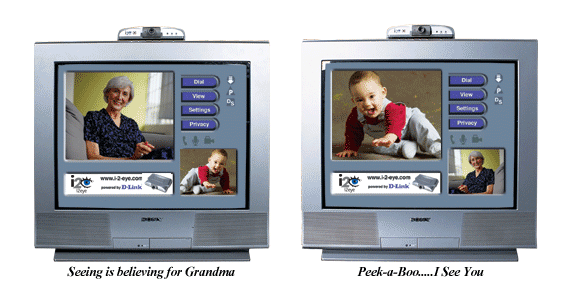
http://images.dlink.com/products/DVC-1000/grandma_baby_web.gif
i2eye, from D-Link, is a videophone that looks like it would be easy to use for a grandparent who doesn't have a computer.

The thing is, most grandparents of young babies are probably in their 50's, or maybe in their early 60's. According to study by Scarborough Research, conducted in 2006-07, about 74% of adults 55 years and older own a computer. All a grandparent needs to do is download something like Skype, plug in a $40.00 webcam, and things are good to go.


The ASUS Eee Videophone uses Skype. (For the uninitiated, Skype is available for free and is adequate for my video phone needs.) The following demonstration video provides information about the ways it can be used and how users interact with the interface. Please excuse the rather boring music looping in the background of the demo.


The ACN Videophone was recently featured on Donald Trump's Celebrity Apprentice. Below is a videoclip of the phone in action, along with it's advanced features that allow you to project audio and video to a larger screen.


I found the promo video for the ACN video phone, featuring Donald Trump, a bit amusing. Apparently the ACN video phone is distributed through multi-level marketing.


If you are a Verizon subscriber, you probably have heard of the "Hub". Verizon came out with the VerizonHub a couple of months ago, and I was hoping to get my hands on one before writing a review.
When I learned that it had a touch-screen interface, but did not provide direct access to the web, I was not in a hurry. My dream version of the "hub" would have this feature.


http://www.cellphonedigest.net/images/VerizonHubH4Web.jpg

For more information, you can "interact" with a simulation of the phone online: "Get a Feel for the Verizon Hub"

Detailed information about the Verizon Hub can be found on the product's home page: Welcome to the Home Phone Reinvented

Here is something I found that was a bit puzzling:


The above pictures are of the Amstrad videophone, which I think debuted in 2004. The touchscreen offers a variety of options. This phone looks like it was designed by a committee that decided to incorporate ALL the ideas that were brainstormed by the team. There is the traditional phone button interface, a set of qwerty buttons that mimic what you would find on a text-messaging teen's cell phone, and a slide-out qwerty keyboard for the elders and others who have pudgier fingers. Of course, you can always use the touch screen interface!


Mar 26, 2009

ElderGadget Blog

Via Technology-Supported Human World Interaction

Today I came across the ElderGadget Blog when I was searching for technology that might be helpful to my father, who recently spent the last few weeks in an intensive care unit.

Here are a few things I found on the blog, including what I found when I followed a link to the bindependent website:


Smart Table: A Broadband Communication System for the Elderly


ID Studiolab, Delft University of Technology, NL

"The smart system is aimed to prevent possible social isolation between elderly people and their social contacts. It consists of the Smart Table and the Smart Messenger, which provide easy and intuitive way for elderly people to benefit from the advantage of communication technology and improve the satisfaction of their social activities."

"During the design research, a working prototype is made and evaluated by a user test. The Smart Table offers people a way to use broadband communication without the need for a computer. The television will be used for video communication (web-cam) and the table as user-interface. On the table contact persons can be selected and images and video can be shared. The elderly person can capture images that will be shared instantly. The contact person can select images from his or her computer, which will be projected on the table of the elderly person". (TU Delft - Faculty Industrial Design Engineering - Master Design for Interaction - Project Interactive Technology Design - Vincent Steurs & Juin-Yi Huang)


http://www.eldergadget.com/wp-content/uploads/2009/03/recipe-reader.jpg
Demy Kitchen Safe Touchscreen Reader


http://www.eldergadget.com/wp-content/uploads/2009/01/photo-watch.jpg
Photo Watch

http://www.bindependent.com/hompg/images/snh-c900t1.jpg
Clarity-C900: Amplified Big Button Cell Phone
911 Guardian Phone
911 Guardian: "Tiny wearable speakerphone"

Big Digit TV remote
Extra Large TV Remote Control


SmartShopper electonic grocery-list maker


SmartShopper: Electronic grocery-list maker


http://www.eldergadget.com/wp-content/uploads/2009/01/hc-colormouse-2t.jpg
Bierley's ColorMouse Video Magnifier

Voice Pod: Digital recording and playback system

RELATED

Live from CES - Dakim's Brain Fitness Keeps Seniors Sharp

Dakim Brain Games


Previous post: Ubiquitous Computing - Grandpa and grandkids use a webcam and Skype across the miles


YouTube Vlogger: Geriatric1927

Geriatric Gripes and Grumbles


Dec 26, 2007

My Nokia n800 Internet Tablet!

I recently purchased a Nokia n800 Internet tablet for about $225.00. I'm impressed with all of the features for the price! It works well for making Internet calls via Skype, as it provides an integrated camera/ webcam.

The screen is crisp and easy to read, especially when zoomed in. The screen can be manipulated with a stylus or fingers, and the on-screen keyboard can be enlarged to allow for finger-typing.

Playing around with the device, I can see that it has potential for use in education.
In my opinion, the n800 the potential to support low-cost assisted technology and augmented communication applications.


Screen shot of pictures on flickr.

A few specs:

  • Direct access to shared media over Universal Plug and Play (UPnP) connectivity and Windows network shares
  • Rhapsody Music service client (only available in US)
  • Direct access to Nokia Internet Radio Directory with free internet radio stations available
  • Supported audio formats: AAC, MP3, WMA, AMR, AWB, M4A, MP2, RA (RealAudio), WAV
  • Supported video formats: 3GP, AVI, H.263, H.264, MP4, ASF, WMV, MPEG-1, MPEG-4, RV 7/8/9 (RealVideo)
  • Supported playlist formats: M3U, PLS, ASX, WAX, WVX, WPL
  • Desktop applet for internet radio
  • Storage support for memory cards up to 8GB
  • Additional specifications

Resources:

Nokia nSeries n800

Detailed Review of n800 running OS2008
(Tips, tricks, hacks, and news about Nokia Internet Tablets and related technology.)

Maemo Downloads for the n800

Internet Tablet Talk


Internet Tablet Wiki

The m-Learning potential of the n800

Linux on Board: Developing for the Nokia n800
Debian/Linux

Oct 4, 2007

About: Ubiquitous Computing- Grandpa and grandkids use a webcam and Skype across the miles; "EMR: The Movie".

A close relative was recently in the hospital that offered free WiFi. The youngest grandchild, my niece, brought out her flute and played Grandpa a tune.


The instant access to the Internet made it possible to quickly look up medical information as the doctors spoke, which made it easier to ask informed questions later on.

To make the time go faster during the 9 hour wait in the emergency room, YouTube comedy clips from old Johnny Carson shows really helped. All of the laughing during an otherwise somber situation caused a bit of a stir among the medical staff, other patients, and their families.

Why not put a few Wi-Fi enabled displays around the emergency room?

A new hospital near Grand Rapids, Michigan, has taken this concept a step further. The hospital will be offer patients Internet access from wide-screen displays in their rooms:

"Each room is private, with windows, and offers a foldout couch for overnight guests, individual temperature and lighting adjustments and a 37-inch TV screen that can show any of 30 recently released movies. The video component also provides Internet access and a portal to view a person's electronically stored medical records, even results from tests taken just the day before."

UPDATE (3/29/09)
Information about the hospital, Metro Health:
"Just what the doctor ordered": Metro Health puts video over IP network to educate and entertain its patients

"Because the entertainment system is IP based, Optimal installers were able to connect it to the hospital’s HL7 network, a nationally accepted protocol that allows health systems to talk to each other. By connecting the IP network to the HL7, the system can access all patient records, entertainment, educational videos, even admissions information."


Coincidentally, I found this link in one of my "Google Alerts" messages about electronic medical records, titled "EMR: The Movie".

The author of the post discussed how EMR - Electronic Medical Records - have the potential of providing a snapshot of the patient's medical history. He went on to muse about how EMR should be depicted as a movie- which I think is a good idea.

At least the record system should use a combination of text, icons, video-clips, and interactive 3D medical imaging. Of course, this would have to be displayed on a touch screen display such as a NextWindow Human Touch or Microsoft Surface.....