Showing posts with label Nokia. Show all posts

Jan 17, 2012

Jan 15, 2012

Off-topic: "Communication technology for human-dog interaction" and "The secret life of my dog: design and evaluation of paw tracker concept"...and my dog.

I was reading an article about interactive mobile video and along the way came across a couple of articles about "human-dog interaction" (see references and links below).  Maybe the research will lead to a solution regarding my dog, Tilly.  She does not want me to read or do anything related to technology!

Tilly's a quirky dog who always drops her chew toys on my lap when I am using my iPad or iPhone.  She likes to drop her bone on my iPad, too.

If I am doing something on my laptop, she will close it with her nose or paw.  If she doesn't close it, she will try to put her whole head on the keyboard. The following picture was taken while I was trying to write this post:


If I can find the time, I enjoy reading technical journals, but Tilly doesn't like it one bit. Here she's trying to take an issue of Pervasive and Ubiquitous Computing from me!


She chewed up the latest issue of IEEE Spectrum before I could read it:


In the picture below, she's chewing a chew-stick and making sure I don't get anywhere near my short stack of Communications of the ACM journals.  You can tell by her expression that she is probably thinking that the journals might make a tasty snack!


Tilly has NEVER chewed up a fashion or home decor magazine, and she NEVER bothers me when I am cooking or doing household chores.  


Articles:
Paasovaara, S., Paldanius, M., Saarinen, P., Häkkilä, J.,  and Väänänen-Vainio-Mattila, K.  The secret life of my dog: design and evaluation of paw tracker concept.  In Proceedings of Mobile HCI. 2011, 231-240.


Paldanius, M., Kärkkäinen, T., Väänänen-Vainio-Mattila, K., Juhlin, O.,  and Häkkilä, J.  Communication technology for human-dog interaction: exploration of dog owners' experiences and expectations.  In Proceedings of CHI. 2011, 2641-2650. 

Dec 12, 2011

Near Field Communication (NFC) for SmartPhones at the Museum of London, plus related video and NFC links

I recently came across the following video demonstrating the use of NFC (Near Field Communication) at the Museum of London.  I wouldn't be surprised if this technology takes root in a variety of applications in the very near future!


Museum of London's use of Near Field Technology with Nokia


London History Museum Adopts Technology of Future
Claire Swedberg, RFID Journal, 8/16/11
"Museum of London has installed NFC RFID tags in its two location, to provide the growing number of NFC-enabled phone users with additional exhibit information, access to social Web sites and vouchers."
Byte at the museum
Trevor, Conversations by Nokia, 9/26/11


RELATED 
Apple, Microsoft Reported to Include NFC in 2012 Smartphones
Christina Bonnington, Wired Gadget Lab, 11/22/11

Gamification and NFC top 2012 Digital Trends
Wenlei Ma, AdNews12/12/11
Microsoft: NFC already supported in Windows Phone
Gareth Beavis, TechRadar.com, 12/9/11

Near Field Communication
Android Developers
Intel joins NFC Forum board
Telcompaper, 12/8/11

Join the NFC (Near Field Communication) Revolution Today
NFC Data Inc, Sacramento Bee, 11/30/11
"Pledge support. Set a new mobile wallet standard for security, convenience, and affordability! Think outside the phone!"

NFC Near Field Communication Tutorial
Radio-Electronics.com
"A summary overview or tutorial of Near Field Communications, detailing what is NFC and its technology"
Vending Machines Now Take Google Wallet Payments

-Wall Street Journal, MarketWatch


Dec 6, 2010

ICE PAD: Interactive Multitouch Ice Sculpture by Art Below Zero (video)

ICE PAD: Interactive Multitouch Ice Sculpture by Art Below Zero


Here is the information about the interactive sculpture from the Art Below Zero YouTube Channel:

"Created by David Sauer & Max Zuleta for the Lake Forest Tree Lighting Festival.This Ice Crystal Display was the 1st to be created in the USA, Transforming 300 pounds of ice into the equivalent of a giant Ipad touch screen. "People always want to touch our Ice Sculptures, This Interactive Display gave them the perfect reason to get their hands cold." said Max Zuleta owner of Art Below Zero. The public response was amazement and interest in the workings of the touch screen in ice. Our favorite guess was "It must work by sensing body heat!"..."

"...The system is known as Rear Diffused Illumination or Rear DI. It works because an Infrared light is shone from the opposite side of the ice wall through the ice. When an object such as a finger, hand, or mitten stops the infrared light it reflects the light back to a custom camera built by Peau Productions. The illuminated objects are then converted to points of interaction using an open source program Community Core Vision which outputs TUIO data streams to a Flash program for animation. We like the look and feel of the Fluid Solver flash application. The output from the computer is then projected into the ice and ice diffracts the light into something beautiful. By this method the user can manipulate a visible light screen via an invisible light that only the camera can see..."


Thanks to Nolan Ramseyer, of PeauProductions, for the link!
PeauProductions Blog: Multitouch and Technology


RELATED
Ubice = Multi-touch On Ice at the Nokia Research Center in Finland (Video + Pic via Albrecht Schmidt)
Art Below Zero

Feb 7, 2010

Gigantic Social Interactive Direction Sign in London: Nokia's promotion of the free Ovi Maps application.

I meant to post this a while ago and forgot about it. A huge digital arrow sign was installed over London to promote Nokia's free Ovi map navigation system. It was up and active for two weeks. People could interact with the sign by sending it a message from their phones. See the videos below for more details!
SDC10688
-My Nokia Blog


The World's Biggest Signpost from adghost on Vimeo.

Notice how the people who see the signpost use their mobile phones to take pictures and share with their friends.

I found a similar video on the Infosthetics blog:


"This gigantic, interactive signpost sponsored by Nokia Ovi Maps in the form of a dynamically rotating electronic LED screen allows passers-by to send in their favorite location and coordinates via text or email. The giant pointer, hung on a 60 ton construction on height of 50m, then automatically rotates to the given direction and displays the submitted description to the world."

Jan 31, 2010

Flexible Interfaces & Useful Wearables for All - Combining Good Concepts: Slap Bracelet, flexible ePaper, Morph, Asus Waveface, the Porcupine, Sixth Sense, and the iPhone/iPad. (How about an iCuff?!)

One of the projects I toyed with for a Ubiquitous Computing class three years ago was an application that would work nicely on a PDA that I could somehow strap to my wrist. I wanted to something that would allow me to keep my hands free and support some of my work functions as a school psychologist, such as observing and assessing students, counseling young people, and consulting with teachers and parents. The application would also be useful to my colleagues.


The second part of this application would support teens and young adults with more severe disabilities who participate in a community-based vocational training program. The application would provide a means of giving the students feedback during on-site work activities as well as in work adjustment simulation activities at school.


I abandoned the idea early on, due to frustrating BlueTooth issues and the lack of a suitable way to secure the PDA to various types of wrists.


It is 2010 and now we have the iPhone, iPad, touch-screen netbook/slates, e-readers, 3GS, consumer-ready RFID, low-cost portable GPS devices, and in some places, ubiquitous free Wi-Fi, low-cost digital cameras, and a range of devices that have the potential to play together in some way. Below are a few examples of how far things have come.   

EXAMPLES

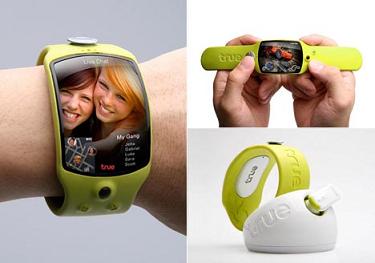
True Wearable, by Propeller (This was a prototype introduced in 2007, I think.)
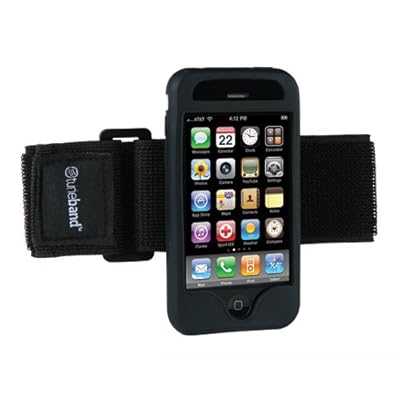
Marware SportShell Convertible Arm Band for iPhone 3G, 3G S (Black)
(Belkin Sports Armband for iPhone;  Trueband, by Grantwood Technology; MarewareSportShell)

RIDGELINE W200
The water-resistant Ridgeline has many of the features I'd like, such as the touch screen interface, a blacklit keypad, an adjustable strap, and range of I/Os. I kind of liked the wearable scanner and imager feature. The scanner/imager can be rotated.  If the imager also included a video camera, it would be a plus, since I use video quite a bit to develop video social stories for some of the students I work with who have autism spectrum disorders.  

The Ridgeline W200 is too ugly and clunky for me to consider wearing!   I'm sure price of the Ridgeline would be out of the question for public school employees and community mental health workers who work with young people with special needs.  

W200 Fingerscan
(Ridgeline W200 Wearable Touch-Screen Computer)

"Everybody had them or at least seen ‘em. Slap bracelets were usually made of thin piece of aluminum wrapped in fabric. Using the same form, Chocolate Agency came up with a mini multimedia device that snaps on with a slap. The entire surface is E-Paper and possesses all its thin, high contrast, power efficient qualities. The length can be adjusted by adding magnetic snaps to the ends. Best part is there’s no recharging needed. It gets all the power it needs via kinetic energy so go ahead, go slap happy."  -Yanko Design


Nokia Morph (Concept)
The Nokia Morph is a concept project that integrates nanotechnology into mobile devices. I posted about the Morph last year:  Last Night I Dreamt About Haptic Touch-Screen Overlays


Asus Waveface Smartphone (Video from CES 2010)


The Porcupine
This morning I devoted about 45 minutes skimming over the Proceedings for the Fourth International Conference on Tangible, Embedded, and Embodied Interaction, TEI '10, held January 25-27 in Cambridge, MA.  A paper related to the Porcupine, a wearable sensing device, caught my eye:  


Coming to Grips with the Objects We Grasp: Detecting Interactions with Efficient Wrist-Worn Sensors (Eugin Berlin, Jun Liu, Kristof van Laerhoven, Bernt Schield, TEI 2010) 


From what I can tell, the features of the Porcupine, if embedded in a wearable iPhone-type device, would be extremely useful in a variety of fields, including special education, rehabilitation/habilitation, health care, mental health, vocational training for people with more complex disabilities, and so on.

Porcupine 

Porcupine Project Documents
(The code for Porcupine is available on Sourceforge.net.)


Sixth Sense
sixsense


I posted about Sixth Sense earlier in 2009:
Pattie Maes TED Talk: Sixth Sense - Mobile Wearable Interface and Gesture Interaction (for the price of a cell phone?!)  Sixth sense allows you to use ANY surface for interaction, and can provide you relevant information about whatever is in front of you.   This would be a great feature for people with disabilities and in the future might also function as a cognitive prosthesis. 


Below is a TED Talk video of Pranav Mistry, the Ph.D student who invented Sixth Sense, discussing open-source Sixth Sense and related applications:


So now what?
After the iPad was unveiled, several people who blog about assistive technology and augmentative communication were curious to see if the new device had the potential for use with people who have disabilities.  

It does.
Here are a few links:
iPad for Our Rooms (Kate Ahern, Teaching Learners with Multiple Special Needs)

From what I understand, the iPad will work with Proloquo2Go, an alternative/ augmentative communication program for Apple's iPhone and iPod Touch. Proloquo2Go is priced at a level much lower than other PDA-based systems, and can be purchased at the iTunes App Store. It can be downloaded for use on the iPad once the iPad is available to consumers. 


This is great news.


Now someone just needs to get on the convergence train and develop a flexible, mobile device that incorporates the best features of the devices and applications that currently exist!

Jan 23, 2010

Ubice = Multi-touch On Ice at the Nokia Research Center in Finland (Video + Pic via Albrecht Schmidt)

Albrecht Schmidt posted a link to the following video on his User Interface Engineering blog -
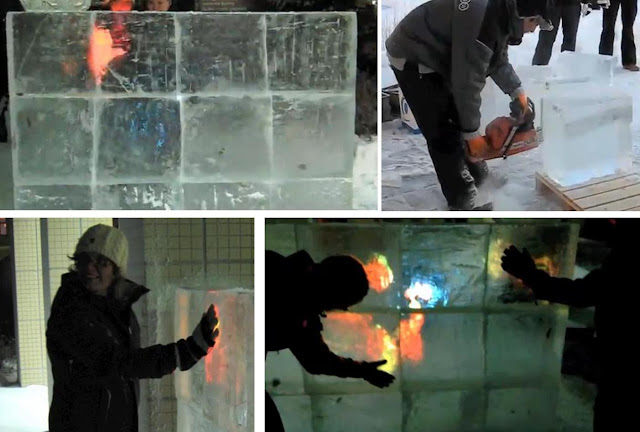
watch how the multi-touch surface is built from ice blocks:


The following pictures are from Albrecht Schmidt's User Interface Engineering blog:
[multitouc-on-ice.jpg]

What a great idea for a "Winterfest"!    They should take it to the next level:  Multi-touch ice sculpture.


(Cross-posted on The World Is My Interface blog.)

Jul 29, 2009

Update on Multi-Touch, Multi-User NuMTyPYsics

A few months ago, I wrote a post about multi-touch "NuMTyPYsics". Here is an update:

Below is a video that shows how two use two single-touch Nokia Internet tablets to provide an emulation of multi-touch input for NuMTyPYsics, a drawing game that based on Numpty Physics:


Here's the description from Perlinet's YouTube channel:
"Using two single-touch tablets and a laptop running NuMTyPYsics, it's possible to emulate multi-touch input (max. 2 cursors - one from each tablet). This allows for precise input control and testing multi-touch applications. More info: http://thpinfo.com/2009/mt/"

http://www.tuxi.com.ar/wp-content/uploads/numpty-physics-tuxi.jpg
The game is also based on Crayon Physics, using the Box2D engine.

Apr 9, 2009

Last night I dreamt about haptic touch-screen overlays...

Technology Dreams
I just haven't had enough time during the day to focus on my passion for interactive technology. I wish I could grab a picture from my dream about haptic overlays and share it here on my blog!   
To make sure this technology wasn't only in my dreams, I decided to google "haptic overlays", and here are some of the results:

Future Directions for Tactile Feedback (Peter Odum, Idlemode, 1/23/09)
"Current tactile solutions fall short either in reconfigurability or in pre-interaction feedback...And it’s easy to provide a physical sensation after the user interacts, but not to provide buttons that can be physically felt *before* the interaction is committed."

Some of the work regarding haptic or tactile feedback has focused on smaller screens and virtual reality:
Vinyl overlay for tactile feel on iPhone NES emulator
More Details on Nokia Haptikos Tactile Touchscreens
Haptic Overlay Device for Flat Panel Touch Displays (pdf)

Touchscreen Feedback Overview
Team Daimler-Chrysler Touch (pdf)
The Twelfth Haptic Symposium on Haptic Interfaces for Virtual Environment and Teleoperator Systems 2004
Patent: Method and apparatus for multi-touch tactile touch panel actuator mechanisms
Benali-Khoudja, M., Hafez, M., Alexandre, J., Kheddar, A. Tactile Interfaces: A State-of-the-Art Survey (pdf) ISR 2004, 35th International Symposium on Robotics

Here is the concept in the form of a "wearable" design:

The surface of this design looks very much like the overlay material that I was working with in my dream, except that the grid-sensors were the same translucent color as the overlay. (I was trying to program this overlay in my dream, but that is another story!)


Here is some technical information about these little haptic finger overlays- with a little tweaking, they could be transformed into something really cute...
"The key material to the display is an electroactive polymer that can stimulate the skin without using any additional electromechanical transmission. The polymer consists of eight layers of dielectric elastomer actuator films which have been sprayed with electrodes in a specific pattern. Along with a protective layer to separate the electrodes from the skin, the entire polymer sheet is about 210 micrometers thick. In their study, the researchers fabricated an 11 x 14 mm sheet with Velcro on the edges, and rolled it up in the shape of a thimble to be worn on the finger. The display can convey information to the wearer when the electrodes induce a voltage across the films. A voltage causes the films to compress down and expand outward. In doing so, the films put pressure on the wearer’s skin, inducing a “mild sensation.” Like most polymers, the device is hyper-elastic, meaning that it can experience large amounts of elastic strain and recover its original shape.This simple stimulation mechanism, which doesn’t require complex electronics, is one of the greatest advantages of the soft tactile display compared with current displays. Its other benefits include efficient power usage, cost-effectiveness, and easy fabrication. As the researchers note, the new display has lower power and displacement values than is considered optimal, which may limit its applications to specific areas"


The Search Continues...
This journey led me to Nokia's "Morph", a device using nano-materials, something I think I posted about a while ago in one of my blogs. (This video reminds my of some of my more vivid technology dreams. It must be nice to be paid to transform technology dreams into prototypes and demonstration videos!)

The Video:


"Launched alongside The Museum of Modern Art “Design and The Elastic Mind” exhibition, the Morph concept device is a bridge between highly advanced technologies and their potential benefits to end-users. This device concept showcases some revolutionary leaps being explored by Nokia Research Center (NRC) in collaboration with the Cambridge Nanoscience Centre (United Kingdom) – nanoscale technologies that will potentially create a world of radically different devices that open up an entirely new spectrum of possibilities."

More haptic/tactile feedback touch interaction:

Nokia's Haptikos Touch Screen Handheld Web Browser


Immersion's Touch Screen: Mimics feel of real buttons
How it works:

Immersion's Fitness Market Brief (pdf)

UPDATE 7/4/09
Apple is working on this sort of thing, in a way. See my recent post:
Haptic/Tactile Feedback for the iPhone? MacRumors says, "YES!"


Dreams about haptic overlays: Part Two: Bridging the gap between virtual and physical controls on tabletops.

May 31, 2008

Dec 26, 2007

My Nokia n800 Internet Tablet!

I recently purchased a Nokia n800 Internet tablet for about $225.00. I'm impressed with all of the features for the price! It works well for making Internet calls via Skype, as it provides an integrated camera/ webcam.

The screen is crisp and easy to read, especially when zoomed in. The screen can be manipulated with a stylus or fingers, and the on-screen keyboard can be enlarged to allow for finger-typing.

Playing around with the device, I can see that it has potential for use in education.
In my opinion, the n800 the potential to support low-cost assisted technology and augmented communication applications.


Screen shot of pictures on flickr.

A few specs:

  • Direct access to shared media over Universal Plug and Play (UPnP) connectivity and Windows network shares
  • Rhapsody Music service client (only available in US)
  • Direct access to Nokia Internet Radio Directory with free internet radio stations available
  • Supported audio formats: AAC, MP3, WMA, AMR, AWB, M4A, MP2, RA (RealAudio), WAV
  • Supported video formats: 3GP, AVI, H.263, H.264, MP4, ASF, WMV, MPEG-1, MPEG-4, RV 7/8/9 (RealVideo)
  • Supported playlist formats: M3U, PLS, ASX, WAX, WVX, WPL
  • Desktop applet for internet radio
  • Storage support for memory cards up to 8GB
  • Additional specifications

Resources:

Nokia nSeries n800

Detailed Review of n800 running OS2008
(Tips, tricks, hacks, and news about Nokia Internet Tablets and related technology.)

Maemo Downloads for the n800

Internet Tablet Talk


Internet Tablet Wiki

The m-Learning potential of the n800

Linux on Board: Developing for the Nokia n800
Debian/Linux