Not long ago I visited a Best Buy. While I was there, I wanted to play around with the Kinect, but the demo system hadn't arrived. As I wandered around the store, I encountered quite a few digital displays, part of Best Buy's recent in-store digital media marketing effort. I later shared my experience in a blog post, Close Encounter with "Best Buy On": Example of a multi-channel marketing approach using in-store digital media that includes an on-line magazine.
During today's visit to Best Buy, I noticed that there were more display centers in various departments in the store, and many of the displays had useful and informative content. The Kinect demo was up and running, too.
Within the store, I noticed a strong emphasis on HDTVs with internet capabilities. I was hoping that the new Internet HDTVs would come with user-friendly touch-screen controllers, or at least an app for use on touch-screen smartphones, iPads, or other touch-screen tablets.
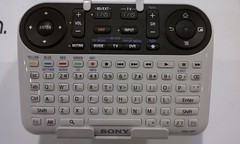 What I found was disappointing. On display were traditional-looking multi-button remote controllers, controllers that looked like PC keyboards, and of course, Sony's confusing multi-featured contribution to the Internet TV scene.
None of the controllers seemed to be easy-to-use, or capable of supporting web-navigation and other web interactions on HDTVs from a distance, especially when the goal is to watch movies and video from a recliner in a darkened family room.
What sort of user-centered design or usability studies were in place during the hatching of Sony's Internet TV controller?! (For more about bad remote controls, one of my pet peeves, see "Oh! No! Sony's "Mother of Remote Controls" for Google TV, 74 Buttons and Counting")
Below is a partially annotated slideshow of pictures I took of some of the displays and other things I encountered at Best Buy. Enjoy!
Close Encounter with Kinect Bowling
It wasn't easy trying to bowl and take video with a phone at the same time!
(Please excuse the shaky video effects and the view of my fingers.)
During today's visit to Best Buy, I noticed that there were more display centers in various departments in the store, and many of the displays had useful and informative content. The Kinect demo was up and running, too.
Within the store, I noticed a strong emphasis on HDTVs with internet capabilities. I was hoping that the new Internet HDTVs would come with user-friendly touch-screen controllers, or at least an app for use on touch-screen smartphones, iPads, or other touch-screen tablets.
None of the controllers seemed to be easy-to-use, or capable of supporting web-navigation and other web interactions on HDTVs from a distance, especially when the goal is to watch movies and video from a recliner in a darkened family room.
What sort of user-centered design or usability studies were in place during the hatching of Sony's Internet TV controller?! (For more about bad remote controls, one of my pet peeves, see "Oh! No! Sony's "Mother of Remote Controls" for Google TV, 74 Buttons and Counting")
Below is a partially annotated slideshow of pictures I took of some of the displays and other things I encountered at Best Buy. Enjoy!
Close Encounter with Kinect Bowling
It wasn't easy trying to bowl and take video with a phone at the same time!
(Please excuse the shaky video effects and the view of my fingers.)


