Martin Kaltenbrunner pointed me to an interesting link SLAP: Silicone Illuminated Active Peripherals "Bridging the Gap Between Virtual and Physical Controls on Tabletops". SLAP is a project of the Media Computing Group at RWTH Aachen University, headed by Dr. Jan Borchers.
FYI - Information from the Media Computing Group website:
- Grounded in Computer Science, we develop and study new interaction theories, techniques, and systems in the areas of interaction with multimedia, ubiquitous computing environments, tangible user interfaces, and HCI design patterns. Our goal is to make the Brave New World of ubiquitous multimedia technologies useful by making it usable. A recent overview of our research approach and research directions can be found here.
Here are some pictures and related information from the SLAP website:
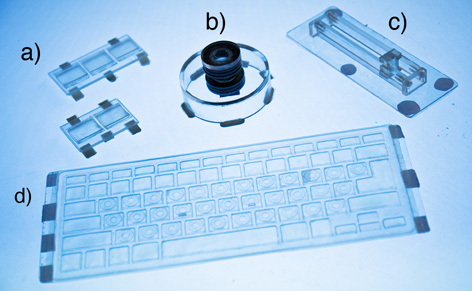
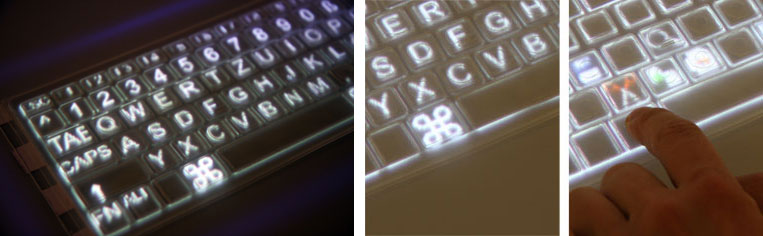
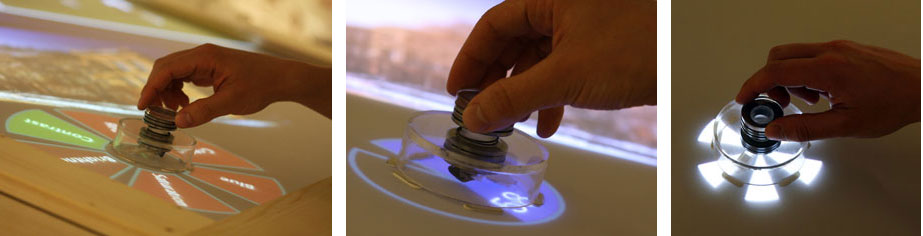
- CHI 2009 Video on YouTube or as QuickTime video (21 MB).
- Presentation of our SLAP demo at TEI 2009 (YouTube)
Publications
2009
Malte Weiss, Julie Wagner, Yvonne Jansen, Roger Jennings, Ramsin Khoshabeh, James D. Hollan, and Jan Borchers. SLAP Widgets: Bridging the Gap Between Virtual and Physical Controls on Tabletops. In CHI '09: Proceeding of the twenty-seventh annual SIGCHI conference on Human factors in computing systems, New York, NY, USA, 2009. ACM.   . . | |
| Malte Weiss, Julie Wagner, Roger Jennings, Yvonne Jansen, Ramsin Khoshabeh, James D. Hollan, and Jan Borchers. SLAP Widgets: Bridging the Gap Between Virtual and Physical Controls on Tabletops. In CHI '09: Extended Abstracts on Human Factors in Computing Systems, New York, NY, USA, 2009. ACM Press. . | |
Malte Weiss, Julie Wagner, Roger Jennings, Yvonne Jansen, Ramsin Khoshabeh, James D. Hollan, and Jan Borchers. SLAPbook: Tangible Widgets on Multi-touch Tables in Groupware Environments. In TEI '09: Proceedings of the 3rd international conference on Tangible and embedded interaction, New York, NY, USA, 2009. ACM. . |
2008
| Malte Weiss, Roger Jennings, Julie Wagner, James D. Hollan, Ramsin Khoshabeh, and Jan Borchers. SLAP: Silicone Illuminated Active Peripherals. In Extended Abstracts of Tabletop '08, 2008. . |
MORE FYI:
(Dr. Jan Borchers, the head of the Media Computing Group, recommends the following list of books, and I agree with his list, 100%.)
Dr. Jan Borchers' (Annotated) Top Ten List of Books on Human-Computer Interaction:
Note: I have read many of these books and I agree that they should be required reading anyone who plans to design, develop, program, or implement anything related to technology and people.
- Alan Dix, Janet Finlay, Gregory D. Abowd, and Russell Beale: Human-Computer Interaction, 3rd ed., Prentice Hall, 2004. Currently the best, most well-rounded book I know to teach introductory HCI if you need to limit yourself to a single title. Technical enough, good breadth, not too fuzzy for a CS curriculum, very current, with a web site that includes resources such as sample programs, slides, etc.
- Ben Shneiderman and Catherine Plaisant: Designing The User Interface, 4th ed., Pearson Addison-Wesley, 2004. Best overall reference book for all areas of HCI, providing an introduction and great up-to-date pointers to most sub-fields of HCI research and practice, especially different interaction techniques. His Golden Rules of User Interface Design and sample questionnaires for user testing are very useful in an introductory class. Unfortunately, the companion web site costs money after an initial trial period.
- Donald A. Norman, The Design Of Everyday Things, Basic Books, 2002. A classic text from 1988 with an updated introduction that, while some of the technologies described or envisioned seem somewhat outdated now, still provides the best introduction to the spirit of good human-centered design. A not too technical read with hilarious stories of badly designed everyday technology, it provides some very useful basic models for human cognition, such as the Seven Stages of Action. This book also introduced the fundamental concept of affordances to HCI. Changed my view of the world of technology around me, and is probably the best initial brainwash for engineering students to "get" user-centered design.
- Jenny Preece, Yvonne Rogers, and Helen Sharp: Interaction Design, 2nd ed., Wiley, 2007. This title focuses more on the process of designing good user interfaces, and is less technical, but excellent and up-to-date in the area it addresses. The companion web site has slides, case studies, and other materials.
- Bill Moggridge, Designing Interactions, MIT Press, 2008. A truly beautiful "coffee-table style" book on interaction design, also covering product and industrial design of digital technology (Moggridge is a founder of IDEO). It has wonderful short essays about seminal digial product designs, from Engelbart's mouse, to the Mac and Palm, to Google and other internet services, as well as articles on digital product design theory. My own Sweet Sports and Baroque Technology article was based on one of the theory articles. Special treat: video interviews and chapters are available for free, on a weekly rotation, at http://www.designinginteractions.com/.
- Bill Buxton, Sketching User Experiences, Elsevier, 2007. Similar to Moggridge's book in style, this book focuses on the early stages of product design. It also includes very interesting stories of key interactive products, such as Apple's iPod. And of course it's written by one of the long-time key players in HCI. More at http://www.billbuxton.com/.
- Terry Winograd (ed.): Bringing Design to Software, Addison-Wesley, 1996. An excellent and very well edited collection of contributions from key players in HCI, from Kapor's Software Design Manifesto to Rheinfrank's Design Languages. Its particular value also comes from the profiles that link chapters and give an insider's view of how some of the most seminal UI designs came to be, from the Xerox Star to VisiCalc and HyperCard. Terry has some information about his book at http://hci.stanford.edu/bds/, and I used it with great success when I had the fortunate opportunity to teach an introductory HCI class in his program at Stanford in 2002.
- Brenda Laurel (ed.): The Art of Human-Computer Interaction, Addison-Wesley, 1990. While ancient by today's standards, this book is another carefully compiled and very coherent collection of highly relevant articles on HCI by some of the most influential people in the field. I particularly like the article by Scott Kim on interdisciplinary design, and Tom Erickson's chapter.
- Apple Computer: The Apple Software Design Guidelines, latest edition 2005. OK, I'm a Mac head, but then many HCI people are because Apple has such an excellent sense of doing the right thing when it comes to user interface design. These guidelines have been around since the 90's, with several new editions since then, and especially Part I ("Application Design Fundamentals") contains excellent, system-independent, hands-on advice for anybody developing interactive software, especially desktop applications. And it's free! Apple's developer website has the latest version both online and as downloadable PDF. I often recommend this as a quick read for engineering types that just want the bare essentials to help avoid major UI design catastrophes.
- Jef Raskin, The Humane Interface, Addison-Wesley, 2000. Similar to Norman's book above, but more recent and more technical, this is another good first read to start thinking about user interface design, written by the father of the original Apple Macintosh. Some of the ideas presented here are quite unusual, and that's intended. Some related materials, such as demos of his Zoomable User Interface and The Humane Environment are at http://www.jefraskin.com/.


