Showing posts with label computing. Show all posts

May 5, 2013

Leap Motion Update: Slow-going progress for me, at least for now!

Leap Motion Progress

My Leap Motion dev kit arrived in March. With excitement,   I installed it on my new 27-inch iMac. I decided that this would be the time to take the "leap" into Objective-C and explore the mysteries of Xcode.  I had planned to make a simple  iPad app for my 2-year-old grandson, but this inspired me to change my plans.


Why not learn Objective-C to make a simple music/art/dance Leap Motion app for little ones?  

My progress so far?  Slow.

I updated Xcode. I installed the Leap Motion SDK.  I updated the Leap Motion SDK.  I played with the samples that came with the Leap Motion kit.   

When it came time for me to try something on my own, I thought I had everything set up in Xcode.  I got error messages that I did not understand. My attempt to figure things out led me to the Stack Overflow website, and by then, I had to get back to my paperwork in order to prepare for the next work day.

Today I realized that I missed the link about installing the Leap API docs for Objective-C in XCode.  Other things needed to be updated, so at that point, I decided to write this post....


Reflection:
After writing some code and making repeated errors, I realized how much I had let Microsoft take root in my head.  Until 2003, the coding part of my brain was a pristine slate. It wasn't cluttered with bits and pieces previous coding languages.

Since I tend to be a knowledge junkie, my brain soaked up more than I needed when I was taking computer courses.  If you could peek inside,  you'd see C# code snippets for multi-touch and NUI, a few algorithms for A.I. and data visualization, trivia from MSDN,  and images of the Visual Studio workspace. There would be odds and ends from VB.Net, JavaScript, ActionScript, CSS, Java, C++, and pseudocode for a variety of computational thought experiments.    

A lot of stuff, and for most of it, no place to go, except for an occasional technology dream.


What's ahead?
In the short term, I'll be doing what I always do this time of year.  For many school psychologists, the last couple of months of the school year is sort of like tax season for accountants.  I have lots of students to see, lots of psychological evaluation reports to write, and meetings to attend.  The paperwork will crowd up many evenings and weekends, but  there is an end in sight.   

Summer.  This will be my summer of code.

I'll be in NYC for one week in June, attending the Interactive Design for Children conference (IDC 2013).  Many of the workshops I'd like to attend will be held at the same time.  Take a look at the program and you'll see why!  I

Decisions to be made... 
Although I am pretty good at keeping a lid on my desire to design and code during my day-to-day life as a school psychologist,  I'm finding that it is getting more difficult to ignore. I have some thinking to do. In the not too distant future, it is possible that I'll leap out of my K-12 cocoon.  

I don't think I'll leap too far, because I'd like to focus my work on projects that enhance the lives of children and families.  I will ensure sure that some of my work will benefit people of all ages who have disabilities or encounter barriers in their lives.


SOMEWHAT RELATED
Joy of Computing, 1985


My daughter, who was just two years old in the above picture, returned to school to take computer courses after working in the non-profit arts management field.  I'm happy about this, but I know that she'll face many hidden barriers when she starts working in a male-dominated environment. She is not alone.

I'm working on a future post about computer and technology-related careers.  Things have changed rapidly over the past several years and there are many new ways to learn how to code, and over time, more opportunities for creative computational thinkers - male and female, to take the lead.

In Google's Inner Circle, a Falling Number of Women
Claire Cain Miller, NYT, 8/22/13

So You Don't Want to be a Programmer After All
Jeff Attwood, Coding Horror, 4/29/13

StackExchange  (Includes StackOverflow, helpful when I troubleshoot coding problems)

An Overview of HTML 5, PhoneGap, and Mobile Apps: Understanding how web languages are used for apps and how they work with native code
Dan Bricklin


Dec 1, 2012

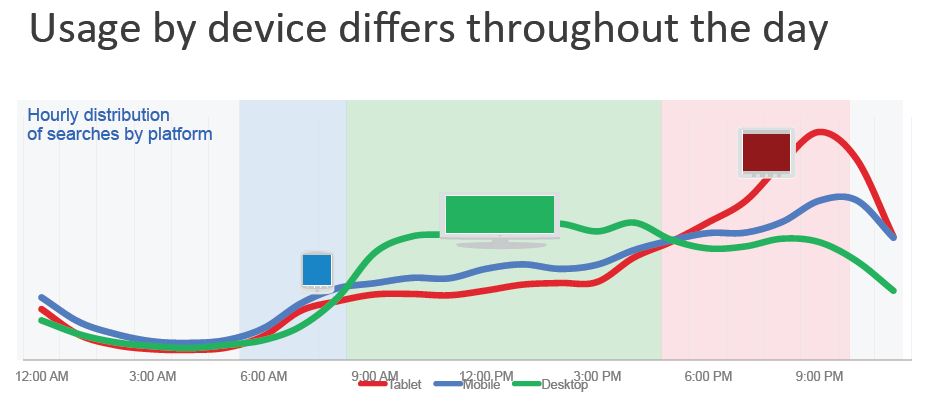
LINK: Mobile's Role in a Consumer's Media Day: Smartphones and Tablets Enable Seamless Digtal Lives -Study by ABIresearch (IAB Mobile)

I've been reflecting on how much I do things differently, now that I'm surrounded by digital devices throughout the day - and also surrounded by other people, who are also linked to more than one device or screen.

More often than not, we are all connected to the web, or at least one person/device away!

I don't think we've figured out the "seamless digital lives" part!

MOBILE'S ROLE IN A CONSUMER'S MEDIA DAY: Smartphones and Tablets Enable Seamless Digital Lives (pdf)
(An IAB Mobile Center of Excellence Research Project)

Web Version

Press Release:
Tablets & Smarphones Generate Strong Ad Engagement, According to IAB Mobile Research
IAB Media Contact:  Laura Goldberg  7/16/12


Credit:  IAB, via Flat World Business


Nov 19, 2011

Camera-less Tabletop Computing with Samsung SUR40 for Microsoft® Surface® with PixelSense™

Here is the press release: 
Next Generation of Microsoft Surface Available for Pre-Order in 23 Countries
"Software developers interested in creating solutions for the Samsung SUR40 can get started immediately by visiting the Surface Developer Center. The site provides free and easy access to the Surface 2.0 software developer kit, featuring the Input Simulator, which enables developers to write Surface applications on any Windows 7 machine, as well as other helpful developer-related resources. There are already hundreds of highly skilled Surface software development partners that can be found at http://www.surface.com."


(I've listed Microsoft Surface partners at the end of this post and plan to share more about the latest applications for surface computing in the near future.)


The following product information was taken from the Samsung website:
40" Surface Experience 
"Samsung SUR40 is the new generation of Microsoft® Surface® experience featuring PixelSense™ technology, which gives LCD panels the power to see without the use of cameras. Building from the innovation of the first version of Microsoft® Surface® and Samsung’s leading display technology, it is now possible for people to share, collaborate and explore together using a large, thin display that recognizes fingers, hands and other objects placed on the screen." 


PixelSense™ 
"PixelSense™ allows an LCD display to recognize fingers, hands, and objects placed on the screen, including more than 50 simultaneous touch points. With PixelSense™, pixels in the display see what’s touching the screen and that information is immediately processed and interpreted."


Resolution:             1920 x 1080 
Viewing Angle:       (H/V) 178 / 178° (CR ≥ 10) 
CPU:                     Athlon X2 Dual-Core 245e (2.9GHz) 
Operating System: Windows 7 Professional  x64 


GPU:        AMD HD6750M 
N/B:         AMD RS780E 
S/B:         AMD SB710 


Storage:                  SATA2 320 GB 
Memory:                 DDR3 4 GB
USB:                      4 USB 2.0 
VGA:                     Out HDMI Ethernet: 100 / 1000 
Audio Codec:         Realtek ALC262 Azalia CODEC


Product Dimensions (With Stand):            1,095 x 728 x 707.4 mm 
Product Dimensions (Without Stand):       1,095 x 102.5 x 707.4 mm 
Shipment Dimensions:                            1,214 x 299 x 832 mm 


Product Weight:     35 Kg 
Shipment Weight:  45.4.Kg


RELATED
Samsung
Microsoft Surface
Microsoft Surface "What's New"
Microsoft Surface Partners:
Aftermous.com
AKT
AM Production
Black Marble
ETT
Headcandy
IdentityMine
Information Strategies
Infusion
Inhance Digital
Interknowlogy
Intuilab
nSquared
Object Consulting
Onwijs
Razorfish
Sevensteps
Stimulant
Touchtech
T-Systems
MultiMedia
UID
Vectorform
XFace

Jun 17, 2011

An Internet of Old Things as an Augmented Memory System: "Tales of Things" allows people to record multimedia stories about objects, linked via QR or RIFD tags.

The following article about "Tales of Things", an interesting augmented memory app, was recently selected for review by Personal and Ubiquitous Computing:

An Internet of Old Things as an Augmented Memory System
Ralph Barthel, Kerstin Leder, Andrew Hudson-Smith, Angelina Karpovich, Martin de Jode, Chris Speed, University College London /  Loughborough University
After watching the following videos and exploring the Tales of Things website, I am sure that this sort of technology will have many uses in education.  Wouldn't it be fun to have a "tales of things" project for a homework assignment?!

In the following video, Chris Speed discusses the Tales of Things project:


Tales of Things Beta: Connecting anything with any media, anywhere!


Below is a video of how an old Fisher Price teaching clock can become part of a "tale of things":


RELATED
Tales of Things: The Internet of "Old" Things:  Collecting Stories of Objects, Places, and Spaces (pdf)  Ralph Barthel, Andrew Hudson-Smith, Martin de Jode, Benjamin Blundell, CASA Centre For Advanced Spatial Analysis, University College London, London, United Kingdom


Mar 29, 2011

Program- CHI 2011 Child Computer Interaction: 2nd Workshop on UI Technologies and Educational Pedagogy

CHILD COMPUTER INTERACTION: 2ND WORKSHOP ON UI TECHNOLOGIES AND THEIR IMPACT ON EDUCATIONAL PEDAGOGY
May 7, 2011
In conjunction with CHI 2011, Vancouver, Canada
PROGRAM (Draft)


9:00am – 09:05am       Introduction


9:05am - 10:05am        Paper Session I (8min presentation, 4min Discussion)


Evaluating Pervasive Classrooms


• Son Do-Lenh et al.:   Classroom-experience evaluation: An ecological approach to evaluating pervasive technologies in classroom
• Kathryn Rounding et al.:   Evaluating Interfaces with Children
• Dan Morris et al.:   Using Machine Learning to Scaffold Artistic Creativity in Education
• Tamara Polajnar et al.:   Enabling Picture-based Querying and Learning with the JuSe Interface
• Hamed Alavi et al.:   Lantern 2.0: A Pervasive Scripting Tool


10:05am - 11:00am  Coffee Break and Preparation time for short talks


11:00am - 12:10pmPaper Session II (8min presentation, 4min Discussion)


Collaboration in Math: Fears, Myths, and Insights


• Nicola Yull et al.: Pass the iPad: Comparing collaboration on paper and screen
• Veronika Irvine et al.: Math Education: A Creative Approach


Group talk: Math and Embodied Agents
a.  Kristina Richter et al.: Bridging Diagnosis and Learning for Mathematics Education in Classroom Setting
b.  Lisa Anthony et al.: Handwriting Interaction for Math Tutors: Lessons for HCI in Education
c.  Andrew Jensen et al.: Using Embodied Pedagogical Agents and Direct Instruction to Augment Learning for Young Children with Special Needs


Group talk: Dispelling Myths About the Next Generation Classroom
a.   Alex Thayer et al.: The Myth of the Paperless School: Replacing Printed Texts with E-readers
b.  Sharon Oviatt: Designing Digital Tools for Thinking, Adaptive Learning and Cognitive Evolution
c.  Alexandra Dunn et al.: Designing Classroom Technology to Meet the Needs of All


Group talk: Games, Wearables and Fun Learning.
a.  Christiane Moser et al.:    Child-Centered Game Development
b.  Lizbeth Escobedo et al.:  Blue’s Clues: An Augmented Reality Positioning System
c.  Si Jung Kim et al.:   Wearable Story: A Story Telling Jacket for Young Children to Improve Their Independent Physical and Learning Activities


12:10pm - 1:30pm Lunch


1:30pm - 2:30pm Paper Session (10 min presentation, 5min Discussion)


Tangibles and Tabletops
•   Izdihar Jamil et al.: Communication Patterns in Collaborative Peer Learning around Interactive Table
•   Aura Pon et al.: Graspable Music and Vuzik: Music Learning and Creativity using an Interactive Surface
•   Ahmed Kharrufa et al.: Learning at interactive surfaces and designing for reflection
•   Cristina Sylla et al.: TOK – a Tangible Interface for Storytelling


Group talk: Tables and Tangibles
• a.Robert Sheehan: Constructionism, Programming and Touch Interfaces
• b.  Orit Shaer et al.: Making the Invisible Tangible: Learning Biological Engineering in Kindergarten
• c.  Sebastien Kubicki: Evaluation of an interactive table with tangible objects: Application with children in a classroom
• d.  Cristina Emilia Costa et al.: I-Theatre: developing narratives skills in kindergarten children
• e.  Wooi Boon Goh et al.: Potential Challenges in Collaborative Game Design for Inclusive Settings


2:30pm - 3:00pm  Coffee Break


3:00pm - 4:00pm  Breakout Discussion (What are future challenges? Next years workshop?)


4:00pm - 4:45pm  Closing Keynote  TBA


4:45pm - 5:00pm  Closing Remarks


7:00pm   Optional Workshop Dinner


RELATED
Workshop Website
ACM-CHI 2011 Conference Website


Mar 8, 2011

Designing For Children: Good article by Catalina Naranjo-Bock, UX Matters


Here is the link - it is the first installment of Catalina Naranjo-Bock's column for UX Matters:


Approaches to User Research When Designing For Children
Catalina Naranjo-Bock,  UXMatters  3/7/11


When I get a bit more time, I'll follow with my comments related to Catalina's column-- I'm a school psychologist and HCI techie, so this one of my interests!


Jan 24, 2010

IEEE One Voice: Sharing the accomplishments and potential of people involved in technology and engineering. Great for sharing with students to encourage STEM studies!

John R. Vig, IEEE President and CEO, recently wrote a column about the need to share with the world the importance of the accomplishments of people who work in technological fields. In his column, he refers to the IEEE One Voice video, which I think is something all young people should view as they gather information for making important decisions for the future.

IEEE is a professional organization that is not limited to the stereotype of an "engineer". If you are a parent, teacher, school counselor, or mentor to a young person, take the time to learn more about the range of careers related to engineering and technology.

If you know a seventh or eighth grade student, take a look at IEEE's Future City Competition, designed to provide young people an opportunity to learn more about STEM (Science, Technology, Engineering and Mathematics) fields while teaming with engineers who are volunteer mentors to create computer models, then three dimensional models, of a future city. The Future City program is part of the National Engineers Week foundation.

RELATED

Engineering Your Life ( This is a great site for encouraging girls to consider engineering and related fields, great for career exploration activities, as it covers a variety of engineering disciplines.)

Below is a list of the various IEEE societies, taken from the IEEE website.  If we want to encourage our young people to consider STEM fields, it is important that we know we're talking about!


IEEE Aerospace & Electronic Systems Society
IEEE Antennas and Propagation Society
IEEE Broadcast Technology Society
IEEE Circuits and Systems Society
IEEE Communications Society
IEEE Components Packaging and Manufacturing Technology Society
IEEE Computational Intelligence Society
IEEE Computer Society
IEEE Consumer Electronics Society
IEEE Control Systems Society
IEEE Dielectrics and Electrical Insulation Society
IEEE Education Society
IEEE Electromagnetic Compatibility Society
IEEE Electron Devices Society
IEEE Engineering in Medicine and Biology Society
IEEE Geoscience & Remote Sensing Society
IEEE Industrial Electronics Society
IEEE Industry Applications Society
IEEE Information Theory Society
IEEE Instrumentation and Measurement Society
IEEE Intelligent Transportation Systems Society
IEEE Magnetics Society
IEEE Microwave Theory and Techniques Society
IEEE Nuclear and Plasma Sciences Society
IEEE Oceanic Engineering Society
IEEE Photonics Society
IEEE Power and Energy Society
IEEE Power Electronics Society
IEEE Product Safety Engineering Society
IEEE Professional Communication Society
IEEE Reliability Society
IEEE Robotics & Automation Society
IEEE Signal Processing Society
IEEE Society on Social Implications of Technology
IEEE Solid-State Circuits Society
IEEE Standards Association
IEEE Systems Man and Cybernetics Society
IEEE Technology Management Council
IEEE Ultrasonics Ferroelectrics and Frequency Control Society
IEEE Vehicular Technology Society
IEEE Women in Engineering


Sep 7, 2009

Stantum's Mobile Phone Multi-touch Interface: Demonstration of Precise Interactions on a Resistive Touch Screen


For more information, read Paul Miller's article (Engadget), Stantum's mind-blowing multitouch interface on video!

http://www.blogcdn.com/www.engadget.com/media/2009/02/stantum-top-001.jpg

Paul Miller says:

"The PMatrix multitouch firmware allows for unlimited inputs, detection of any contacting object (a finger, a stylus or even a paintbrush) and pressure sensitivity. We played with the demo unit for a bit and were frankly blown away, it's far and away the best touch experience we've ever seen or felt, and the multitouch functionality is just gravy on top. Stantum is targeting resistive touchscreens because they're still considerably cheaper to build than capacitive ones, and from our perspective there seems to be zero tradeoff -- for sensitivity and accuracy this destroys everything else we've seen on the market, capacitive or not."

How it works:  Tech Specs from Stantum:

PMatrix: The unparalleled Multi-Touch IP core and detection firmware (pdf)


"PMatrix™ is the most powerful software engine for Multi-Touch technology. It runs as a chip firmware or software on controllers orany embedded processing devices. PMatrix scans and delivers an exact representation of what’s happening on the touch-panel. The Multi-Touch driver dynamically updates the cursor list, enabling any application to control the Graphical User Interface objects."

Stantum's rational behind the company's choice of using resistive rather than capacitive touch technology:

Why resistive? :
In comparison to capacitive sensing, resistive technology brings :

• Versatility : it detects fingers, gloves, stylus and any contact object
• A lower solution cost
• Lower power consumption
• Faster scanning rate
• Lower overall latency
• Precision is linear (same in the center and at the borders)
• Performance is not affected by the size of the touch-panel or the number of touches
• Transparency and soft touch enabling user experience equivalent to the best capacitive touch-panels

I'll update this post when I have more information!


RELATED

For in-depth, detailed information about resisitive multi-touch technology,  read the following posts via Touch User Interface:

How the Stantum's Resistive Multi-Touch Screen Works 
Pressure Sensitive Multi-touch Surfaces


Apr 10, 2009

Dreams about haptic overlays: Part Two- SLAP: Bridging the Gap Between Virtual and Physical Controls on Tabletops

In response to my previous post about my dream about haptic touch-screen overlays,
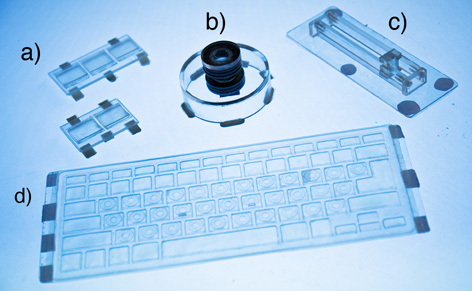
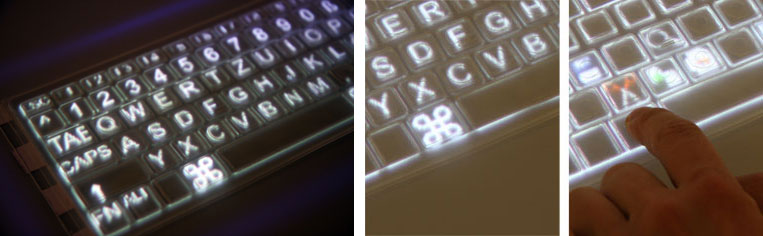
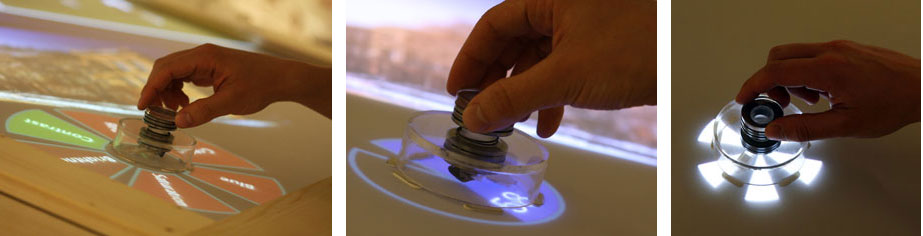
Martin Kaltenbrunner pointed me to an interesting link SLAP: Silicone Illuminated Active Peripherals "Bridging the Gap Between Virtual and Physical Controls on Tabletops". SLAP is a project of the Media Computing Group at RWTH Aachen University, headed by Dr. Jan Borchers.


FYI - Information from the Media Computing Group website:
  • Grounded in Computer Science, we develop and study new interaction theories, techniques, and systems in the areas of interaction with multimedia, ubiquitous computing environments, tangible user interfaces, and HCI design patterns. Our goal is to make the Brave New World of ubiquitous multimedia technologies useful by making it usable. A recent overview of our research approach and research directions can be found here.
SLAP: The Movies


Here are some pictures and related information from the SLAP website:


Publications

2009


Malte Weiss, Julie Wagner, Yvonne Jansen, Roger Jennings, Ramsin Khoshabeh, James D. Hollan, and Jan Borchers. SLAP Widgets: Bridging the Gap Between Virtual and Physical Controls on Tabletops. In CHI '09: Proceeding of the twenty-seventh annual SIGCHI conference on Human factors in computing systems, New York, NY, USA, 2009. ACM. PDF Document BibTeX Entry.


Malte Weiss, Julie Wagner, Roger Jennings, Yvonne Jansen, Ramsin Khoshabeh, James D. Hollan, and Jan Borchers. SLAP Widgets: Bridging the Gap Between Virtual and Physical Controls on Tabletops. In CHI '09: Extended Abstracts on Human Factors in Computing Systems, New York, NY, USA, 2009. ACM Press. PDF Document BibTeX Entry.


Malte Weiss, Julie Wagner, Roger Jennings, Yvonne Jansen, Ramsin Khoshabeh, James D. Hollan, and Jan Borchers. SLAPbook: Tangible Widgets on Multi-touch Tables in Groupware Environments. In TEI '09: Proceedings of the 3rd international conference on Tangible and embedded interaction, New York, NY, USA, 2009. ACM. PDF Document BibTeX Entry.

2008


Malte Weiss, Roger Jennings, Julie Wagner, James D. Hollan, Ramsin Khoshabeh, and Jan Borchers. SLAP: Silicone Illuminated Active Peripherals. In Extended Abstracts of Tabletop '08, 2008. PDF Document BibTeX Entry.

MORE FYI:

(Dr. Jan Borchers, the head of the Media Computing Group, recommends the following list of books, and I agree with his list, 100%.)

Dr. Jan Borchers' (Annotated) Top Ten List of Books on Human-Computer Interaction:


Note: I have read many of these books and I agree that they should be required reading anyone who plans to design, develop, program, or implement anything related to technology and people.


  1. Alan Dix, Janet Finlay, Gregory D. Abowd, and Russell Beale: Human-Computer Interaction, 3rd ed., Prentice Hall, 2004. Currently the best, most well-rounded book I know to teach introductory HCI if you need to limit yourself to a single title. Technical enough, good breadth, not too fuzzy for a CS curriculum, very current, with a web site that includes resources such as sample programs, slides, etc.

  2. Ben Shneiderman and Catherine Plaisant: Designing The User Interface, 4th ed., Pearson Addison-Wesley, 2004. Best overall reference book for all areas of HCI, providing an introduction and great up-to-date pointers to most sub-fields of HCI research and practice, especially different interaction techniques. His Golden Rules of User Interface Design and sample questionnaires for user testing are very useful in an introductory class. Unfortunately, the companion web site costs money after an initial trial period.

  3. Donald A. Norman, The Design Of Everyday Things, Basic Books, 2002. A classic text from 1988 with an updated introduction that, while some of the technologies described or envisioned seem somewhat outdated now, still provides the best introduction to the spirit of good human-centered design. A not too technical read with hilarious stories of badly designed everyday technology, it provides some very useful basic models for human cognition, such as the Seven Stages of Action. This book also introduced the fundamental concept of affordances to HCI. Changed my view of the world of technology around me, and is probably the best initial brainwash for engineering students to "get" user-centered design.

  4. Jenny Preece, Yvonne Rogers, and Helen Sharp: Interaction Design, 2nd ed., Wiley, 2007. This title focuses more on the process of designing good user interfaces, and is less technical, but excellent and up-to-date in the area it addresses. The companion web site has slides, case studies, and other materials.

  5. Bill Moggridge, Designing Interactions, MIT Press, 2008. A truly beautiful "coffee-table style" book on interaction design, also covering product and industrial design of digital technology (Moggridge is a founder of IDEO). It has wonderful short essays about seminal digial product designs, from Engelbart's mouse, to the Mac and Palm, to Google and other internet services, as well as articles on digital product design theory. My own Sweet Sports and Baroque Technology article was based on one of the theory articles. Special treat: video interviews and chapters are available for free, on a weekly rotation, at http://www.designinginteractions.com/.

  6. Bill Buxton, Sketching User Experiences, Elsevier, 2007. Similar to Moggridge's book in style, this book focuses on the early stages of product design. It also includes very interesting stories of key interactive products, such as Apple's iPod. And of course it's written by one of the long-time key players in HCI. More at http://www.billbuxton.com/.

  7. Terry Winograd (ed.): Bringing Design to Software, Addison-Wesley, 1996. An excellent and very well edited collection of contributions from key players in HCI, from Kapor's Software Design Manifesto to Rheinfrank's Design Languages. Its particular value also comes from the profiles that link chapters and give an insider's view of how some of the most seminal UI designs came to be, from the Xerox Star to VisiCalc and HyperCard. Terry has some information about his book at http://hci.stanford.edu/bds/, and I used it with great success when I had the fortunate opportunity to teach an introductory HCI class in his program at Stanford in 2002.

  8. Brenda Laurel (ed.): The Art of Human-Computer Interaction, Addison-Wesley, 1990. While ancient by today's standards, this book is another carefully compiled and very coherent collection of highly relevant articles on HCI by some of the most influential people in the field. I particularly like the article by Scott Kim on interdisciplinary design, and Tom Erickson's chapter.

  9. Apple Computer: The Apple Software Design Guidelines, latest edition 2005. OK, I'm a Mac head, but then many HCI people are because Apple has such an excellent sense of doing the right thing when it comes to user interface design. These guidelines have been around since the 90's, with several new editions since then, and especially Part I ("Application Design Fundamentals") contains excellent, system-independent, hands-on advice for anybody developing interactive software, especially desktop applications. And it's free! Apple's developer website has the latest version both online and as downloadable PDF. I often recommend this as a quick read for engineering types that just want the bare essentials to help avoid major UI design catastrophes.

  10. Jef Raskin, The Humane Interface, Addison-Wesley, 2000. Similar to Norman's book above, but more recent and more technical, this is another good first read to start thinking about user interface design, written by the father of the original Apple Macintosh. Some of the ideas presented here are quite unusual, and that's intended. Some related materials, such as demos of his Zoomable User Interface and The Humane Environment are at http://www.jefraskin.com/.

"So that's my top 10 list. I may add some more in the future. But I figure it's more important to restrict myself to those books I think are really outstanding than bother you with additional titles that don't really have that special something....For a good current PhD-level HCI reading list that is based more on papers and individual chapters than single books, see Terry Winograd's HCI reading list at Stanford University." -Dr. Jan Borchers

Sep 27, 2008

If you like Spore, you'll appreciate the Genetic Algorithm website!

Since I've been playing Spore and thinking about the the artificial life/genetic algorithm used to create the Black Shoals Stock Market Planetarium (see my previous post), I thought I'd visit the
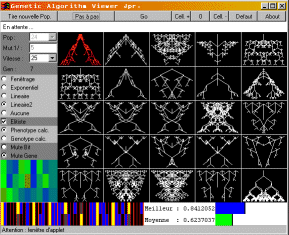
Philippe Rennard's interactive genetic algorithms website I first visited his site when I was taking a course in artificial intelligence for game design.

http://www.rennard.org/alife/img/ga/gav.gif

The first time I visited the site, I viewed it from a small laptop screen. This time, I expored the site on my 22-inch HP Touchsmart. What a difference! I can't wait until the school week to see how this looks on an interactive whiteboard.

Although the website was created several years ago, it still is fun site to visit, especially when you watch all of your little things morph according to the variables you choose.

Another website I recently revisited was the NERO website.
NERO stands for Neuro-Evolving Robotic Operatives. The original NERO project was developed at the University of Austin a few years ago. The latest version can be found on the NERO 2.0 website.

If you have some time on your hands, visit the site and download the program. You use genetic algorithms to train up soldiers in using real-time neuro evolution. See what happens if you let them evolve overnight on your computer!

http://z.cs.utexas.edu/users/nn/nero/images/territory_screen2_detail.png
"Evolve your own robot army by tuning their artificial brains for challenging tasks, then pit them against your friends' teams in online competitions"

Somewhat Related


While I was at Rennard's website, I linked to his page about a book he edited in 2006 that I want to run out and read ASAP. "Handbook of Research on Nature Inspired Computing for Economics and Management". I think this will help book might help me with my quest to better inform myself about the events surrounding the economic situation.

I'm sharing what I find on my Technology Supported Human-World Interaction blog using one of my recent posts to store my collection of pictures, media, quotes, articles, references, and links related to the quest. I hope to incorporate this, hopefully with the help of others, into a dynamic, interactive web-based time-line of the history we are living through right now. For now, here is the link to the "repository":

The Celestial Economic Sphere, DataViz for the Finance Biz, Truthiness, Behavioral Finance, and Greed

Jul 14, 2007

Women in Technology: My editorial on the NCWIT blog -UPDATE

The above link is to my editorial, "Gender Beneath the Surface", posted on the NCWIT blog.

Although women make up half the population, they are under-represented in computer science and related technological fields. If your are interested in issues related to women and technology, the National Center for Women in Information Technology -NCWIT- is a great place to start.

I wrote the post on the day I learned that all of the members of the executive team for Microsoft Surface (Madrid) were male.

UPDATE:

The Microsoft Surface website now includes photos and bios of other team members, including women.  One woman,  Gretchen R., was originally hired to develop games for children on the Surface. 


(dually posted - techpsych and interactive multimedia technology blogs)

Jul 5, 2007

Interesting discussion about interactive multi-touch displays and surfaces

The above link is to an interesting discussion about scenarios for multi-touch displays.

IxDA is an organization of people involved in interactive design. Although this group's focus is not primarily on interaction design for technology used in education or psychology/counseling, many of the ideas shared by the groups membership are worth some thought.

This is from the Interactive Design Association's website:

What is Interaction Design?

"Interaction design (IxD) is the branch of user experience design that defines the structure and behavior of interactive products and services. Interaction designers strive to create useful, usable and desirable products and services that satisfy specific user needs, business goals, and technical constraints."

May 31, 2007

Microsoft Surface multi touch screen table - I wish I had one for my projects last semester!

Microsoft Research recently unveiled Microsoft Surface: http://microsoft.com/surface

This multi - touch table can be used for a variety of applications, as outlined in the video from CNET and YouTube below:


I'd like to work on applications for use on a touch-table to support students with special needs, especially those who have autism spectrum disorders.

Last semester, I worked on prototype applications for use on a touch-screen surface -here is a photo. We used a
NextWindow Human Touch large-screen display, which provided great screen resolution and touch-response.


This application was part of a travel-planning prototype developed for a course in Human-Computer Interaction. The application was demonstrated on a NextWindow Human Touch large screen display. Would it work on the iPhone?


Update: Examples from some of my other posts:


Here is another demo videoclip of a globe created in GoogleEarth using photo-overlays, with links to video clips uploaded to YouTube and embedded in individual posts on a blog. The above photo and the video clip show the application on a NextWindow Human Touch large-screen display.

This application would be great on a touch-table or touch-table set up on a drafting board. Although it was designed for a travel-planning application, it would work well in educational settings in subjects such as geography.


Poetry Picture Share


This was my first attempt at a "poetry picture share" application. It was designed for use on a multi-touch table and can be accessed remotely so people in different places can move things around on the screen. The video shows how the application works on a NextWindow Human Touch interactive large-screen display.

I am planning on adapting this application for use with students with special needs, such as those who have autism or other communication disorders.