I promised my colleagues at Wolfe School that I'd share something new and cool upon my return from a recent CHI 2011* conference.
StoryVisit was one of the "take-aways" I brought back.
StoryVisit is a web-based application developed to promote interaction between grandparents (or parents) and children who are remotely located. It is available on-line for free as part of a collaborative project between researchers from the Nokia Research Center, the Sesame Workshop, the University of Arkansas, and the MIT Media Lab
As soon as I saw the StoryVisit demonstration, I knew that the concept had potential to be useful to promote literacy and social communication among students with special needs, such as those who have autism spectrum disorders. (My story of how I tweaked StoryVisit for use with students is located near the end of this post.)

Credit: Nokia Research
One of the good features of the StoryVisit website is that it supports dialogic reading between the adult and child, by providing a Sesame Street character embedded in the story to help guide the process.
According to Grover J. Whitehurst, this method can support language development in young children. In dialogic reading, the adult who reads with a child helps the child take a more active role in the process by following what is known as "PEER": Prompting the child to talk about the story, evaluating the child's response, expanding the response by rephrasing and elaborating on what the child has said, and repeating the prompt to assess what the child has learned or grasped from the story. This can include a discussion about the pictures that accompany the story, and questions that guide the child to think about the relationships between the characters, or prompts that help the child make predictions and draw inferences.
To get an understanding of the StoryVisit application, first take a look at how it works with adults and children - below are two related videos and an abstract from the StoryVisit presentation at CHI 2011 and a couple of related videos:
Here is short preview:
Here's how I tweaked Storyvisit to work in a school setting:
On my first morning back at Wolfe, I decided to use StoryVisit with two high school-level students who have autism and cognitive delays. My goal was to familiarize the students with Storyvisit so they could use it to read stories to younger elementary-level students with autism who are in a self-contained classroom. I went to the Storyvisit website and registered Wolfe school as the "Wolfe family", using some of the teacher's email addresses as "family members".
RELATED
Try StoryVisit by signing up at Storyvisit.org
NRC (Nokia Research Center) launches Story Visit pilot in association with Sesame Workshop
Intervention: Dialogic Reading (2/8/07), US Department of Education, Institute of Education Sciences (What Works Clearinghouse)
Dialogic Reading Video Series, NCLD Editorial Staff, 11/1/09
Dialogic Reading: An Effective Way to Read to Preschoolers (Grover J. Whitehurst -1992, Reading Rockets Archive)
Hayes Raffle's website
Family Story Play (First version of StoryVisit)
Family Story Play pdf (CHI 2010 presentation)
SOMEWHAT RELATED
Since the Storyvisit activity was so positive with my students, I decided to dig a little deeper. I use video quite a bit with students with autism spectrum disorders, and work with students to establish joint-attention skills and behaviors. My hunch is that this is an area that warrants further exploration, especially for children and teens with autism spectrum disorders, their classmates, peers, and families.
The Co-Viewing Connection: "A blog for grown-ups about using media and technology with kids"
The New Coviewing: "Promoting Children's Learning Through Joint Media Engagement"
Interesting:
Game On.... Girls: Associations Between Co-playing Video Games and Adolescent Behavioral and Family Outcomes (Sarah M. Coyne, Laura M. Padilla-Walker, Laura Stocdale, Randal D. Day, Brigham Young, School of Family Life, in Journal of Adolescent Health, 2/3/11)
Why this is important:
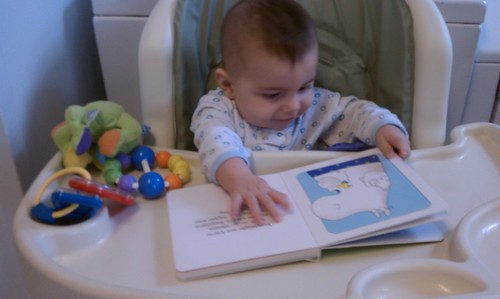
My grandson, "reading" at 6 months old:
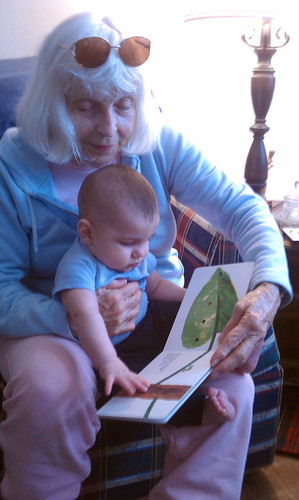
My mom and my grandson reading together:
*"The ACM Conference on Human Factors in Computing Systems is the premier international conference of human-computer interaction. CHI 2011 focuses on leveraging our diversity and connecting people, cultures, technologies, experiences, and ideas."
Cross-posted on the TechPsych blog.
StoryVisit was one of the "take-aways" I brought back.
StoryVisit is a web-based application developed to promote interaction between grandparents (or parents) and children who are remotely located. It is available on-line for free as part of a collaborative project between researchers from the Nokia Research Center, the Sesame Workshop, the University of Arkansas, and the MIT Media Lab
As soon as I saw the StoryVisit demonstration, I knew that the concept had potential to be useful to promote literacy and social communication among students with special needs, such as those who have autism spectrum disorders. (My story of how I tweaked StoryVisit for use with students is located near the end of this post.)
Credit: Nokia Research
One of the good features of the StoryVisit website is that it supports dialogic reading between the adult and child, by providing a Sesame Street character embedded in the story to help guide the process.
According to Grover J. Whitehurst, this method can support language development in young children. In dialogic reading, the adult who reads with a child helps the child take a more active role in the process by following what is known as "PEER": Prompting the child to talk about the story, evaluating the child's response, expanding the response by rephrasing and elaborating on what the child has said, and repeating the prompt to assess what the child has learned or grasped from the story. This can include a discussion about the pictures that accompany the story, and questions that guide the child to think about the relationships between the characters, or prompts that help the child make predictions and draw inferences.
To get an understanding of the StoryVisit application, first take a look at how it works with adults and children - below are two related videos and an abstract from the StoryVisit presentation at CHI 2011 and a couple of related videos:
Here is short preview:
Abstract
"StoryVisit allows children and long-distance adults to experience a sense of togetherness by reading children's story books together over a distance. StoryVisit combines video conferencing and connected books: remote grown-up and child readers can see and hear each other, and can also see and control the same e-book. We report on research with 61 families - over 200 users including parents, children and long-distance readers - who used StoryVisit in their homes with a long-distance reader for at least one reading session. In addition, we report qualitative findings regarding nineteen of the families who participated in telephone interviews and four families who were monitored and interviewed by researchers at home. Results show that connected e-book video chat sessions last about five times as long as the typical video chats reported in previous research on families with young children. Moreover, the addition of an animated character increased session lengths by another 50%. StoryVisit usage peaked for families with three year olds, showing that sustained distance interactions with very young children are possible if communication technologies incorporate joint activities that engage children and adults."
"StoryVisit allows children and long-distance adults to experience a sense of togetherness by reading children's story books together over a distance. StoryVisit combines video conferencing and connected books: remote grown-up and child readers can see and hear each other, and can also see and control the same e-book. We report on research with 61 families - over 200 users including parents, children and long-distance readers - who used StoryVisit in their homes with a long-distance reader for at least one reading session. In addition, we report qualitative findings regarding nineteen of the families who participated in telephone interviews and four families who were monitored and interviewed by researchers at home. Results show that connected e-book video chat sessions last about five times as long as the typical video chats reported in previous research on families with young children. Moreover, the addition of an animated character increased session lengths by another 50%. StoryVisit usage peaked for families with three year olds, showing that sustained distance interactions with very young children are possible if communication technologies incorporate joint activities that engage children and adults."
-Raffle, H., Revelle, G., Mori, K., Ballagas, R., Buza, K., Horli, H., Kaye, J., Cook, K., Freed, N., Go, J., Spasojevic, M. Hello, is grandma there? let's read! StoryVisit: family video chat and connected e-books CHI '11 Proceedings of the 2011 annual conference on Human factors in computing, ACM New York, NY, USA
On my first morning back at Wolfe, I decided to use StoryVisit with two high school-level students who have autism and cognitive delays. My goal was to familiarize the students with Storyvisit so they could use it to read stories to younger elementary-level students with autism who are in a self-contained classroom. I went to the Storyvisit website and registered Wolfe school as the "Wolfe family", using some of the teacher's email addresses as "family members".
During my session with the two young men, I placed them far apart in a large therapy room where my office is located. Each student used earphones, since I was aware that there might be an audio feedback problem (which will be fixed, according to the Storyvisit folks). Since the two students were not too far apart, I simply ran back and forth between them to make sure things were going OK and prompt them if needed.
I coached one student to play the role of the reader (grandparent) and the other to play the role of a younger child. We got this accomplished successfully within our 1/2 hour session, an amazing feat, given the nature of the students' disabilities. They especially liked the video conferencing part, something that they've done at school in the past. They communicated with each other better through this medium than in person, as the required less prompting.
The two young men were so excited about this process that after they returned to class, they suggested to their teacher that they wanted to practice with the application with their classmates. They wanted to use Storyvisit to read to the younger students as soon as possible.
The teacher, without much prior knowledge about the application, was able to set it up quickly. She used the application during her morning group reading activity, displaying the Storyvisit website on a SMARTBoard. She was impressed with the "Block Party" story - especially the great recipes included at the end of the story.
The teacher mentioned that the recipes could be used to create snacks for a "block party" between the two classes after the StoryBook session. The students could use the recipes to create shopping lists for a community outing to a local supermarket, and then prepared during Activities of Daily Living class (the classroom is equipped with a kitchen.)
To see how the elementary-level students would respond to the Storyvisit website, I visited the classroom and demonstrated the Block Party book to the students using a SMARTboard. I used "Grandparent" mode, without the webcam, since I was with the students. As I went through the story, the teacher mentioned that the webcam feature would be ideal for including students who use sign language in Storyvisit activities. (She happens to be the mother of daughters who have hearing impairments.)
RELATED
Try StoryVisit by signing up at Storyvisit.org
NRC (Nokia Research Center) launches Story Visit pilot in association with Sesame Workshop
Intervention: Dialogic Reading (2/8/07), US Department of Education, Institute of Education Sciences (What Works Clearinghouse)
Dialogic Reading Video Series, NCLD Editorial Staff, 11/1/09
Dialogic Reading: An Effective Way to Read to Preschoolers (Grover J. Whitehurst -1992, Reading Rockets Archive)
Hayes Raffle's website
Family Story Play (First version of StoryVisit)
Family Story Play pdf (CHI 2010 presentation)
SOMEWHAT RELATED
Since the Storyvisit activity was so positive with my students, I decided to dig a little deeper. I use video quite a bit with students with autism spectrum disorders, and work with students to establish joint-attention skills and behaviors. My hunch is that this is an area that warrants further exploration, especially for children and teens with autism spectrum disorders, their classmates, peers, and families.
The Co-Viewing Connection: "A blog for grown-ups about using media and technology with kids"
The New Coviewing: "Promoting Children's Learning Through Joint Media Engagement"
Interesting:
Game On.... Girls: Associations Between Co-playing Video Games and Adolescent Behavioral and Family Outcomes (Sarah M. Coyne, Laura M. Padilla-Walker, Laura Stocdale, Randal D. Day, Brigham Young, School of Family Life, in Journal of Adolescent Health, 2/3/11)
Why this is important:
My grandson, "reading" at 6 months old:
My mom and my grandson reading together:
*"The ACM Conference on Human Factors in Computing Systems is the premier international conference of human-computer interaction. CHI 2011 focuses on leveraging our diversity and connecting people, cultures, technologies, experiences, and ideas."
Cross-posted on the TechPsych blog.


