The SieMatic S1 Kitchen incorporates the internet-of-things in your home. It's my dream kitchen!
SieMatic won the Microsoft Windows Presentation Foundation (WPF) Client Innovation Award in the lifestyle category last March (2009) at CeBIT for the SieMatic S1. The SieMatic S1 is internet and home-network ready, and can integrate television, the DVD player, Internet radio, PC's, laptops, iPods, audio systems, etc. In addition to WPF, the S1 system also incorporates Windows Embedded Systems.
The S1-Grid, an infotainment control/display unit, can display information and content from the Internet, including RSS feeds, weather reports, e-mail, and personal content, such as recipes and photos. If you are watching a television program or a movie from a DVD on the display, you can stop it to view information about the progress of your networked Miele@home series appliances. Networked appliances can also be controlled from this display. You can interact with everything via a touch screen or an Air Mouse.
For techies and the tech-curious who like technologies that support collaboration and multi-touch interaction, this is great news!
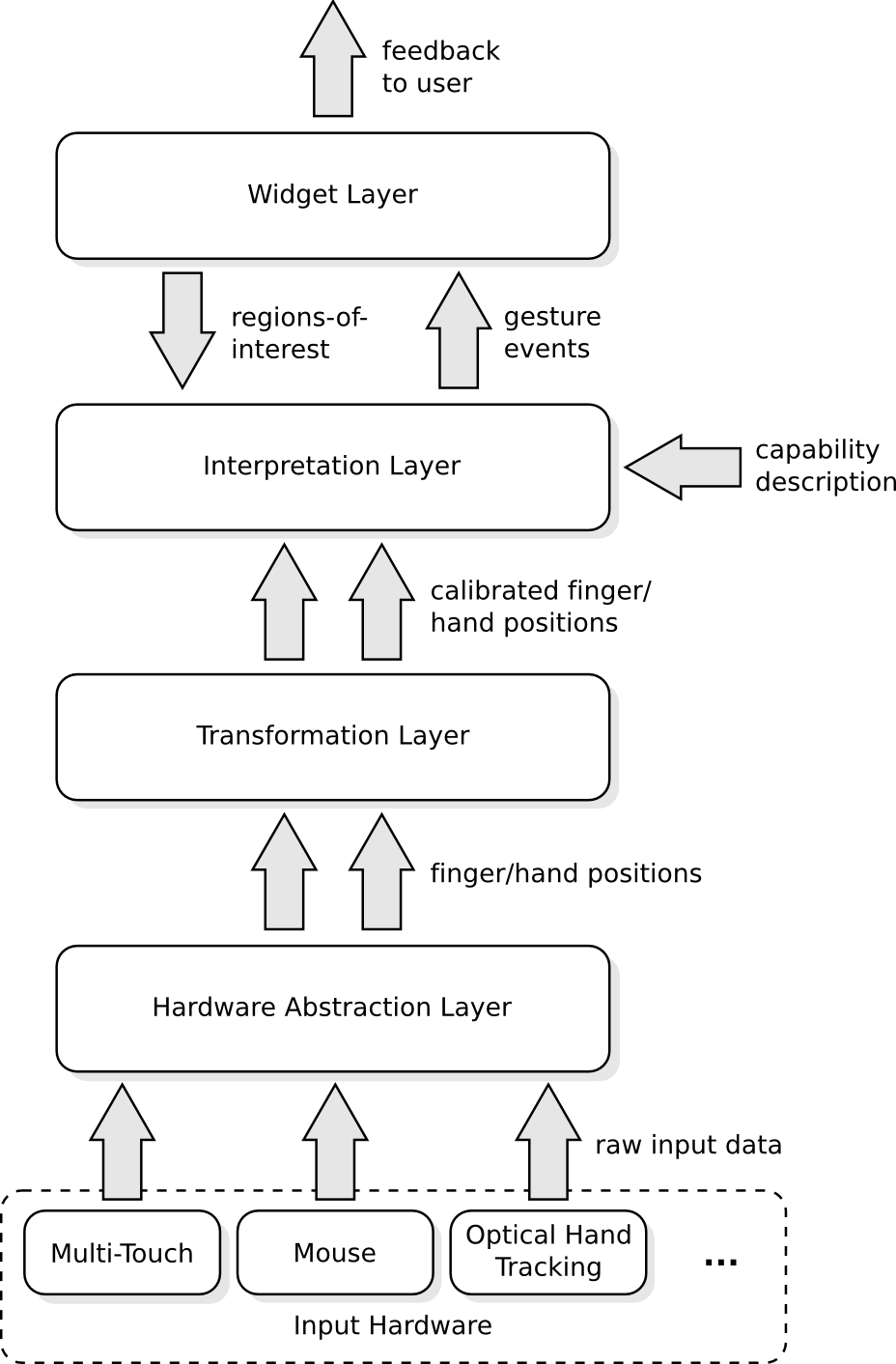
Florian Echtler announced the first stable releas of libTISCH, a multi-touch development framwork, which can be found on Sourceforge. TISCH stands for Tangible Interaction Surfaces for Collaboration between Humans. libTISCH, a C++ software framework, is included in this project. It provides a means for creating GUIs based on multi-touch and/or tangible input devices.
Here is how it works:
Here is information from libTISCH announcement:
Highlights of this release are, among others, the following features:
- ready-to-use multitouch widgets based on OpenGL
- reconfigurable, hardware-independent gesture recognition engine
- support for widely used (move, scale, rotate..), pre-defined gestures
as well as custom-defined gestures
- hardware drivers for FTIR, DI, Wiimote, DiamondTouch..
- TUIO converters: source and sink
- cross-platform: Linux, MacOS X, Windows (32 and 64 bit)
- cross-language: C++ with bindings for C#, Java, Python
libTISCH has a lot to offer for the multitouch developer. For example, the textured widgets enable rapid development of applications for many
kinds of multi-touch or tangible interfaces. The separate gesture
recognition engine allows the translation of a wide range of highly
configurable gestures into pre-defined or custom events which are then
acted on by the widgets. While the lower layers of libTISCH provide
functionality similar to tbeta, touche etc. (you can interface existing
TUIO-based software with libTISCH in both directions), it goes far
beyond.
From the HelpYouPlay IDPedia (Interaction Design Patterns for Games Library) website:
"Design patterns are ways to describe best practices, explain good designs, and capture experience so that other people can reuse these solutions. The idea of a pattern was introduced by the architect Christopher Alexander for use in urban planning and building architecture, but since then a pattern community has emerged that specifies patterns for all sorts of problems. Interaction design patterns aim to capture optimal solutions to common usability or accessibility problems in a specific context. Typically best practices concerning interaction design are described as guidelines or heuristics. We consider interaction design patterns to be more descriptive than guidelines as it tells a designer exactly when, how and why the solution can be applied."
SOMEWHAT RELATED Game Usability and Accessibility
Donate to the AbleGamers Fundraiser!
The funds will support the work of the AbleGamers Foundation, and donations are tax-deductible.
"The AbleGamers Foundation's mission is to empower the disabled population to enjoy the digital revolution that is taking place in gaming... We believe in harnessing the power of many people's voices to solve the problems of the not so few. The AbleGamers Foundation strives to bring together individuals from every lifestyle with a common goal of improving the lives of the disabled. Everyone has the right to enjoy the world, and together, we can make that possible. Together, we can make it possible for everyone to enjoy the rich content of digital entertainment with his or her friends and family regardless of disability."
"...So it works out more cost effective for the films to actually have someone put the graphics on the screens for real. It also greatly enhances the performance of the actors. You only have to watch any of the Star Wars Eps 1-3 to see how wooden acting is when you don’t actually know what is in front of you. Actors love to be able push buttons and bang touch screens during their scenes. Having to actually do it in a certain order can stretch their capabilities mind you, and I am pretty gob smacked at how absolutely computer illiterate some of them are. Don’t they use email?
Anyway, due to this diminished ability to hit and bang things in any certain order, it is our job to make it impossible to mess things up. That’s why they are all genius typers. We make it so they can type any old thing and the letters still come out the way they are meant to each time. We also put little locking codes into our programming so they can’t accidentally escape the graphic mid job. It’s amazing how many of them can type the Esc button when they are meant to be spelling LOGIN."
Thanks, Tim!
SOMEWHAT RELATED
Coincidentally, when I was visiting the NUI-Group forums this morning, I came across a link to Jakob Nielsen's "Usability in the Movies -- Top 10 Bloopers", which are worth taking a look at. I've posted the list, but you'll need to go to Nielson's web page to read the descriptions. You'll smile.
1. The Hero Can Immediately Use Any UI
2. Time Travelers Can Use Current Designs
3. The 3D UI
4. Integration is Easy, Data Interoperates
5. Access Denied/Access Granted
6. Big Fonts
7. Star Trek's Talking Computer
8. Remote Manipulators (Waldo Controls)
9. You've Got Mail is Always Good News
10."This is Unix, It's Easy"
I just came across Lauren Hayne's blog about her experience developing the Accenture Interactive Wall for the Louvre exhibit at the High Museum in Atlanta during the first part of 2009. Lauren is an analyst at Accenture. FYI
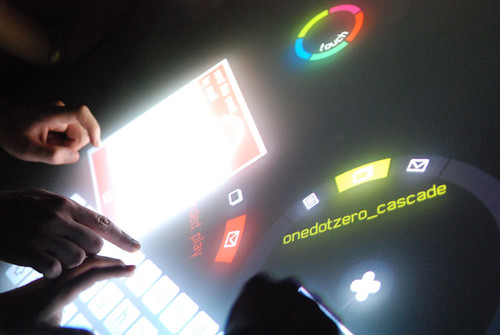
SoTouch and onedotzero collaborated to create a multi-touch, multi-user application that ran on a Mindstorm Aurora table at the onedotzero Adventures in Motion Festival at the BFI Southbank in London during in September 2009. The interactive application provided festival participants enjoyable ways to filter and search the festival program. The art director for this project was Alex Le Guillou.
(Music: Raindrops, by Basement Jaxx)
How it works
How does it work?
According to information provided by So Touch, users can search by dragging and dropping keywords in personal search discs. Physics rules incorporated into the SoTouch application allow the manipulated objects bump and react to each other, encouraging social interaction among the people at the table. For this particular application, each even could be viewed in a description panel, including timing, description, pictures, and videos, enabled for multi-touch gesture interaction. Additionally, people could use the table to send emails to friends, using a scalable keyboard.
The application was designed for flexibility, using the TUIO protocol, and allowing it to be customized for use at other festivals or shows through xml.
Detail
About SoTouch "Intelligent Surfaces" "We deliver complete solutions to turn passive environment into active business contributor in retail, show room and trade show, leveraging multi-touch and touch-less technology."
Julien Lescure, CEO, and Florian Bernard, CTO, founded SoTouch, an advanced digital agency, in early 2009. The company is based in the U.K.
About onedotzero "Onedotzero is a contemporary, digital arts organisation with a remit to promote innovation across all forms of moving image and motion arts, activities encompass public events, artist + content development, publishing projects, education, production, creative direction, and related consultancy services ... onedotzero was conceived at the start of the desktop digital revolution in the mid-1990s out of a desire to explore moving image across single screen, interactive and live audio-visual work. today, onedotzero remains committed to providing a home for visionary moving image experimentation and contemporary creative collisions."
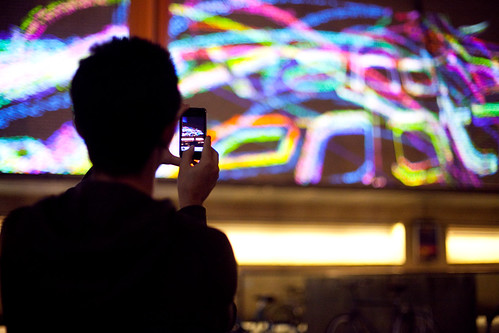
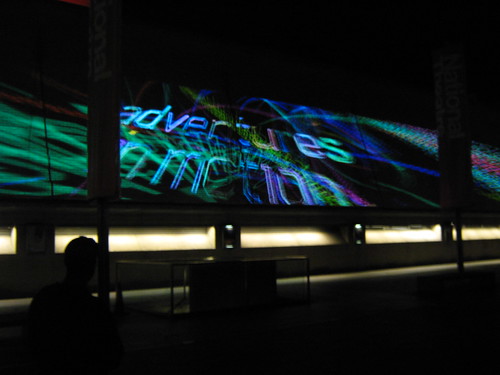
Interactive Urban Screen
The interactive urban screen installation, also known as the 2009 onedotzero identity, was made interactive by a Nokia n900 mobile phone, as shown in the pictures and video clips below.
Nokia n900 onedotzero Installation- Behind the Scenes
Onedotzero - Watch the interaction with an urban screen with a Nokia n900 (Story behind the scenes story).
RELATED N900 to appear in London next week! (JBC, Nokia Conversations, 9/4/009)
According to the article, the application for the installation was developed by digital artists/computational designers Karsten Schmidt and Gary Birkett. (I think the ad agency Wieden + Kennedy London was also involved with this project, since Nokia is their client.)
The Medion x9613 is a Windows 7, multi-touch all-in-one that has all of the features needed for playing games, working collaboratively with a colleague or classmate, watching HD video content, and more.
The following YouTube video is from Gizmodo, via Engadget.
According to Cali Lewis, of GeekBrief TV, this all-in-one will be available in the US. (Cali also previews other interesting gadgets and tech on the GeekBrief TV clip below.)
I haven't set eyes on this one yet. If anyone has played with a Medion X9613 a bit, or even used it for work, please leave a comment! How do YOU use your "All-in-One?"
I've been following Yvonne's research for some time now, and I thought I'd take this opportunity highlight her work. (I've provided additional information for those of you who are new to this blog.)
Background (from my perspective)
Back in the early 1990's, I ran a "paired learning" study skills/social skills group three mornings a week in a computer lab, for a crew of fourth grade students referred to me (the school psychologist) for support for behavior, learning, and social skills problems. Since many of the students needed to work on social skills such as waiting turns, cooperating, and working nicely with others, I decided to pair the students up, two to a computer.
Some of the applications were designed for two students, taking turns, but other applications were designed for only one person, and for those applications, the student's were encouraged to forget about the "rules" and help each other out, in other words, one student would control the mouse, and the other would be the "mouse-seat driver". I spent some time teaching "mouse-sharing" skills. One of the students was trying to grab the mouse when it wasn't his turn, and his partner whacked him over the head with it!
Moving on...
When I first touched an interactive whiteboard, it was 2002 or 2003. It was a SmartBoard, and I was fascinated by the possibilities that it held. Since I used it as a tool for group counseling and study skills in my role as a school psychologist, I couldn't help but hope that a new version would come out that would allow at least two students to interact with the screen at the same time.
Better yet, wouldn't it be cool to have the group table offer the same sort of functionality? I realize when people envision a learning environment, they are likely to think of students seated in single desks. While this is the case in many classrooms, many teachers manage to focus on group work, such as group projects, collaborative/cooperative learning lessons, or science experiments...even if they DON'T have tables. They push the desks together to form a "table".
In my life as a school psychologist, particularly during my days at an elementary school, I spent a good part of my day sitting at a table, with 3-6 students, for the purpose of group counseling, social skills training, and so forth. (The speech and language therapist worked with groups of children around a table, too.) You can imagine that something like the SMARTTable or the Surface would have been a godsend, provided that it came with a wealth of therapeutic activities and templates that could be easily customized to meet the needs of the students!
Interactive displays and whiteboards are now common in our schools and workplaces. There are a few classrooms that have interactive tables, and these tables are also found in museums and visitor centers. But there is much work yet to be done- in terms of content development, hardware design, interaction design, and research.
No one discipline "owns" this problem-space. Better said, no one owns this "solution-space"!
Yvonne Rogers has been a key player in this arena. She is focused, but at the same time, takes a big-picture, multi-faceted point of view, something that I find lacking in much of the computer science research that crosses my path. Yvonne's approach is consistent with other forward-minded thinkers in the field, such as
When she was a professor at Indiana University, Yvonne's team produced a short video to outline the types of problems when groups of people encounter when they share information and collaborate on projects.
What I like about this video is that it works towards solutions. Although the video is from 2006, it still rings true.
If you have ever worked with students in small groups forced to share one mouse and computer screen, some of the footage will bring you to a smile.
More about Dr. Rogers and her colleagues:
Dr. Rogers is the lead researcher of the SharedIT Project, an interdisciplinary endeavor that exploring how new technologies, such as multi-touch tables, gesture-based systems, interactive wall displays, and interactive tangibles, can support collaborative activities among small groups of people in a range of situations and settings.
Some of the people affiliated with Dr. Rogers and the Open University Pervasive Interaction Lab are highlighted in the video clip below. The video was filmed at an event held on June 23, 2009 at th Science Museums' Dana Center (UK), in collaboration with the London Knowledge Lab. The video highlights the work of researchers, artists, educators, and technologists, all exploring collaborative tangible, interactive technologies and surfaces. Some of the questions asked: What sort of new interfaces can support "collective creativity"? How can these technologies support interactions between people who are in different places around the world?
Surface Tension: Interactives and Workshops (June 23, 2009)
Doug Clow provides a good overview of some of the SharedIT projects in his April 2009 post, "Low-hanging fruit: interactive tables for collaborative learning". If you are curious and want to dig deeper, below is a link to the SharedIT publications web page, along with an assortment of articles related to Yvonne Roger's work.
Rick, J, and Rogers, Y. (2008) From DigiQuilt to DigiTile: Adapting Educational Technology to a Multi-Touch Table. IEEE Tabletops and Interactive Surfaces. 79-86.
Rogers, Y., Lim, Y., Hazlewood, W. R. and Marshall, P. (2008) Equal Opportunities: Do Shareable Interfaces Promote More Group Participation than Single User Displays? - To Appear in Human Computer Interaction
Rogers, Y. (2006) Moving on from Weiser's vision of of calm computing: engaging UbiComp experiences. In: P. Dourish and A. Friday (Eds.) Ubicomp 2006 Proceedings, LNCS 4206, pp. 404-421, Springer-Verlag, PDF version
Rick, J., Harris, A., Marshall, P., Fleck, R., Yuill, N. and Rogers, Y. (2009) Children designing together on a multi-touch tabletop: An analysis of spatial orientation and user interactions. Proceedings of Interaction Design and Children (IDC '09), 106-114
Harris, A., Rick, J., Bonnett, V., Yuill, N., Fleck, R., Marshall, P. and Rogers, Y. (2009) Around the Table: Are multiple-touch surfaces better than single-touch for children's collaborative interactions? Proceedings of CSCL 2009
Rick, J., Rogers, Y., Haig, C. and Yuill, N. (2009) Learning by Doing with Shareable Interfaces. Children, Youth & Environments, In Press.
Marshall, P., Fleck, R., Harris, A. Rick, J., Hornecker, E., Rogers, Y., Yuill, N. and Dalton, N. S. (2009) Fighting for Control: Children's Embodied Interactions When Using Physical and Digital Representations. Proceedings of CHI'09, 2149-2152. PDF version
Rogers, Y. and Price, S. (2009) How mobile technologies are changing the way children learn. In A. Druin, (Ed.) On the Move: Children, Learning and Technology. Elsevier. 3-22. PDF version
Rogers, Y. (2008) A comparison of how animation has been used to support formal, informal and playful learning. Learning with Animation, edited by R. Lowe and W. Schnotz, CUP, Cambridge. 286-303.
Rogers, Y. and Price, S. (2008) The role of mobile devices in facilitating collaborative inquiry in situ. Research and Practice in Technology Enhanced Learning. 3 (3), 209-229. PDF version
Rogers, Y. (2008) Using External Visualizations to Extend and Integrate Learning in Mobile and Classroom Settings. In J. Gilbert (ed.), Visualization: and practice in science education. CUP. 89-102.
Rogers, Y. and Muller, H. (2006) A framework for designing sensor-based interactions to promote exploration and reflection. International Journal of Human-Computer Studies, 64 (1), 1-15. PDF version
Brignull, H., Izadi, S, , Fitzpatrick, G., Rogers, Y. and Rodden, T. (2004) The Introduction of a Shared Interactive Surface into a Communal Space. In Proc. of CSCW 2004, Conference on Computer Supported Cooperative Work, November 6-10, 2004, Chicago, USA: ACM Press. 49-58. PDF version
Randell, C., Phelps, T. and Rogers, Y. (2003) Ambient Wood: Demonstration of a digitally enhanced field trip for school children. In Adjunct Proc. UbiComp 2003, 100-104. PDF version
Brignull, H. and Rogers, Y (2003) Enticing people to interact with large public displays in public spaces. In Proceedings of INTERACT'03, Zurich, 17-24. PDF version
Rogers, Y., Brignull, H. and Scaife, M. (2002) Designing Dynamic Interactive Visualisations to Support Collaboration and Cognition. In First International Symposium on Collaborative Information Visualization Environments, IV 2002, London, July 10-12, 2002, IEEE, 39-50. PDF version
Of course, there are many other researchers who are exploring collaborative technologies, and I've featured a good number on this blog. I'll be sure to feature more, from a range of disciplines, in future posts.
(from project website)
I've come across numerous interesting applications developed by university researchers that I haven't seen come to market. Part of the problem, I think, is that most of the world isn't yet ready for these innovations. Things seem to be changing a bit, so I thought I'd highlight some promising projects from the recent past that warrant revisiting.
Dynamo is a "communal, multi-user surface for sharing and exchanging digital media", according to information from the project's website.
"The idea is for it to be installed in public community centers, like cafes, bars, libraries and other places where people get together and share experiences, but usually only have lightweight technology on them - like mp3 players and digital cameras. Dynamo allows people to plug-in these personal devices via USB2, and place files onto the wall by drag and drop (e.g. music, photos, videos, office docs or live web-pages) via it's multi-user UI."
The project was a joint effort between the Mixed Reality Lab at Nottingham University and the Interact Lab at Sussex University.