Showing posts with label SDK. Show all posts

May 27, 2013

Leap Motion and Google Earth Experiment: Cute Doggie Photo-globe Mashup

Leap Motion and Google Earth Experiment: Cute Doggie Photo-globe Mashup 

I finally experimented with my Leap Motion controller and Google Earth, using a mashup I created a few years ago with pictures of cute dogs from my Flickr photo-stream.  In the video below, you can see that my gesture navigation skills still need some practice!

I should have watched the following video of Leap Motion in action with Google Earth before trying this experiment at home : )  

I am pretty sure that developers will be able to tweak Leap Motion + Google Earth interaction in the near future.  I'd like to adapt it for use with kids as well as adults who have mild motor impairments.


Cute Doggies Photo-Globe Mash-up using Google Earth and a Flickr Set (How-to)

If you'd like to make your very own photo-globe using Google Earth and Flickr photos, here are the directions, ported and updated from a previous post:


This photo is a screen shot of photos of just about every dog I know, and some that happened to cross my path. In this post, I'll share some information about how to create a photo-globe in Google Earth. 

The first step is to make sure you have lots of pictures related to your theme uploaded to a site such as Flickr.  (You can also create a photo-globe using pictures from your computer's hard drive.)

To get the pictures into Google Earth, I used the Image Overlay feature, and in the "link" textbox, I entered the image URL for each picture that I'd previously loaded as a set in Flickr.


To do prepare for this, make sure you go to "view" tab on the upper left-hand section of your screen, and make sure that "toolbar" is checked. Also make sure that "Grid" is selection, as this will help make it easier to arrange and align your pictures.  You can turn off this feature later. Near the top of the screen, click on the Image Overlay icon. (I've highlighted it in the picture.)


You'll have to enter the URL of the image you'd like to add to the globe in the "Link" textbox, which I've highlighted in the above picture.  In this case, I've used a link to one of my pictures in a Flickr set I created for this project.

One thing to keep in mind is that the picture will take up a much larger space than you might prefer, so you'll have to adjust the size using the green markers:
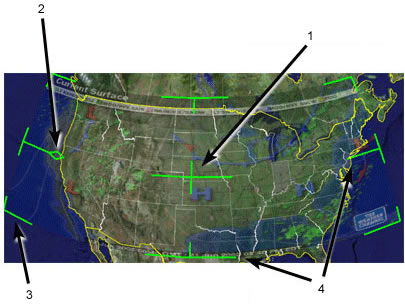
Positioning the Overlay in the Viewer
The following directions are from the "Positioning the Imagery in the Viewer" section in the help section:


  1. Use the center cross-hair marker to slide the entire overlay on the globe and position it from the center. (Tip: do this first.)
  2. Use the triangle marker to rotate the image for better placement.
  3. Use any of the corner cross-hair markers to stretch or skew the selected corner. If you press the Shift key when selecting this marker, the image is scaled from the center.
  4. Use any of the four side anchors to stretch the image in or out of from the selected side. If you press the Shift key when doing this, the image is scaled from the center.

TIP:  Try positioning the center of the image as a reference point first, and then use the Shift key in combination with one of the anchors to scale the image for best positioning.

Directions updated to reflect latest version of Flickr, as of 5/27/13:

To find the image URL for a photo in Flickr that you wish to link on your photo-globe, select your desired photo and right click "Copy Image URL".


Put your curser in the Link section of  the "New Image Overlay" dialog box in Google Earth, and right click to select "paste" from the drop-down menu


Then repeat the process.  It helps to name each picture so that you can find it easily in Google Earth.

To enhance your mash-up, you can add place-marks that contain URLs that link to additional information about the subject of a picture, such as blog posts with embedded videos and/or text related to a picture, and so forth. Directions can be found in Google Earth's help section.

The process of building a photo-globe in Google Earth is a bit tedious.  If someone has a short-cut to share, please let me know!


RESOURCES
Google Earth
Flickr
Programmable Web (My hunch is that this site might provide some information about shortcuts for creating a photo-globe in Google Earth.)
LEAP Motion

Mar 16, 2013

UPDATE: What's New for Kinect? Fusion, real-time 3D digitizing, design considerations, and more.

The Evolution of Microsoft Kinect

I've been following the evolution of Microsoft's Kinect, and recently discovered a few interesting videos that show how far the system has come. According to Josh Blake, the founder of the OpenKinect community and author of the Deconstructing the NUI blog,  the Kinect for Windows SDK v1.7 will be released on Monday, March 18th, from http://www.kinectforwindows.com.  More details about this version can be found on Josh's blog as well as the official Kinect for Windows blog.


It is possible to create applications for desktop systems that work with the Kinect in interesting ways, as you'll see in the following videos. I think there is potential here for use in education/edutainment!

Below is a video of Toby Sharp, of Microsoft Research, Cambridge, demonstrating Kinect Fusion.  The software allows you to use a regular Kinect camera to reconstruct the world in 3D.


KinEtre: A Novel Way to Bring Computer Animation to Life
According to information from the YouTube description, "KinÊtre is a research project from Microsoft Research Cambridge that allows novice users to scan physical objects and bring them to life in seconds by using their own bodies to animate them. This system has a multitude of potential uses for interactive storytelling, physical gaming, or more immersive communications."


The following videos are quite long, so feel free to re-visit this post when you have time to relax and take it all in!

Kinect Design Considerations
This video covers Microsoft's Human Interface Guidelines, scenarios for interaction and use, and best practices for user interactions.  It also includes a preview of the next major version of the Kinect SDK. 


Kinect for Windows Programming Deep Dive
This video discusses how to build Windows Desktop apps and experiences with the Kinect, and also previews some future work.


RELATED
Kinect for Windows Developer Downloads
Kinect for Windows Blog
Deconstructing the NUI Blog (Josh Blake)
Microsoft Kinect Learns to Read Hand Gestures, Minority Report-Style Interface Now Possible
Celia Gorman, IEEE Spectrum, 3/13/13
Kinect hand recognition due soon, supports pinch-to-zoom and mouse click gestures.
Tom Warren, The Verge, 3/6/13
Microsoft's KinEtre Animates Household Objects
Samuel K. Moore, IEEE Spectrum, 8/8/12
Kinect Fusion Lets You Build 3-D Models of Anything Celia Gorman, IEEE Spectrum, 3/6/13
Description of Kinect sessions at Build 2012
Kinect for every developer!
Tom Kerhove, Kinecting for Windows, 2/15/13
Kinect in the Classroom
Kinect Education

Note: Although I recently received my developer kit for Leap Motion, another gesture-based interface, I haven't lost interest in following news for Kinect.

May 21, 2012

Leap Motion: Low Cost Gesture Control for Your Computer Display

Jessica Vascellaro, of the Wall Street Journal, reports about gesture,  motion. and even object control for computers, highlighting the work of  Leap Motion and Flutter.


Apparently the Leap Motion sensor is less expensive than Microsoft's Kinect. It can track movements down to 1/100 of a millimeter and can track fingers and movement. It handles interaction with 8 cubic feet of space.


Below is a video from the Leap Motion website:


RELATED
Leap FAQs
Leap Motion Developer Kit Application
Leap Motion: 3D hands-free motion control, unbound
Daniel Terdiman, CNET, 5/20/12
FYI:  Do a search and you'll find many more articles and posts about Leap Motion!

May 15, 2012

NUITEQ's Latest Multitouch Showreel: Snowflake Suite

I've been following a number of people that have been working in the area of natural user interfaces and interaction for many years.  An example of this work is NUITEQ, a company lead by Harry van deer Veen.  Below is NUITEQ's most recent show reel of Snowflake Suite, an off-the-shelf multitouch SDK.


Here is the description of the software from the naturaluserinterface YouTube channel:


"NUITEQ's award-winning multitouch software product Snowflake Suite comes off the shelf with 30+ apps, a free SDK to develop your own multitouch software apps and its content is easy to customize. The solution is offers high performance, stability, quality and comes with dedicated support. Apps includes presentation, productivity and creativity tools as well as games. The software can be used in different scenarios such as corporate presentations, exhibitions, entertainment, education, public spaces, consumer electronics, retail and digital signage."

FYI: Tutorials about the user of Snowflake Suite can be found on the naturaluserinterface YouTube channel. 


Harry van der Veen has been sharing his NUI journey journey since 2007 on his Multitouch blog.


Mar 7, 2011

Monday Musing and Meanderings: Interesting videos and links about emerging technologies.

INTERACTIVE TANGIBLE TABLETOP MUSIC


Reactable Live! SubMixPro Studio Torino

The Reactable featured in the above video is used for DJ-ing in clubs. The one I've played with is at the science museum in my area - I love it. It is fun to improvise on the Reactable with another person.  For more information, see my previous blog posts featuring the Reactable.

AUGMENTED REALITY
While listening to CNBC on my satellite radio on the way home today,  I heard that investing in Qualcomm might be a good idea.   I wonder if this means that Wall Street analysts think that  AR will become mainstream soon...   


The video below shows a variety of creative AR game applications:


Qualcomm has an AR SDK that comes with tutorials, samples, an API reference, and developer forums. The SDK can be downloaded from the Qualcomm AR web-page.


For more information:
GDC 11:  AR- The Augmented Future of Mobile Serious Games?  Eliane Alhadeff, Serious Games Market, 3/7/11
Qualcomm's secret mobile weapon:  Augmented Reality Robert Enderle,  TG Daily, 2/24/11

This sort of technology has been around for a while. For an example, take a look at  the 2007 MScape game demo of the AR game, Roku's Reward:


THE KINECT FOR MEDICAL DATA VISUALIZATION 
Here is another use of augmented reality, but this time, harnessing the Kinect:
Madhav K. ,  Kinecthacks 

PHOTOELASTIC TOUCH

Transparent Rubbery Interface using a LCD and Photoelasticity
Toshiki Sato, Haruko Mamiya, Taro Tokui, Hideki Koike,  The Unversity of Electro-Communications;  Kentaro Fukuchi, Japan Science and Technology Agency
Abstract (pdf)


ART AND SCREENS

Mar 13, 2010

More Multi-touch: Microsoft's Courier Touch & Stylus Input "Digital Journal"; Pre-order the iPad ---Possibilities for education!

Lately I've been thinking deeply about ways new multi-touch technologies, running on screens and surfaces of all sizes, can support learning and collaboration, in and outside of the classroom.  Microsoft's Courier and Apple's iPad are two tools I'd love to test out in the digital mix in the schools. Here's the latest information about the Courier, via Engadget:

The applications running on this demo look useful!

Apparently the Microsoft Courier, a dual screen 7-inch notebook, accepts multi-touch and stylus input:


-via Deeper2K's YouTube channel

According to Engadget, the Courier is "built on Tegra 2 and runs on the same OS as the Zune HD, Pink, and Windows Mobile 7 Series...We're also hearing that there will be a built-in camera, and there's a headphone jack for media playback. Most interestingly, it looks like the Courier will also serve as Microsoft's e-book device...."

More information can be found on the Engadget website:
Microsoft's Courier "digital journal": Exclusive pictures and details (update: video!)
Also read Ina Fried's article on CNET news:
More details leak on Microsoft's 'Courier'

-Engadget: Courier User Interface Gallery


By the way, you can pre-order your shiny new iPad from the Apple Store right now!

Wi-Fi
-Apple Store

For the Techies and the Tech-Curious:

The iPhone SDK 3.2 beta includes what you'll need for developing applications for the iPad. You can go to the iPad webpage and dowload the SDK, which includes an iPad Simulator, programming guide, sample code, human interface guide, and more.   But first, you must be a member of the iPhone Developer Program.  The fee is $99.00 a year.

I will share my thoughts about these devices and their use for learning/education in future posts.

Jan 26, 2010

There is a need for multi-touch/gesture designers/developers!

If you are a talented interactive web designer/developer, game designer/developer, traditional programmer with a creative bent, or someone who who is thinking about working with technology in the future as a programmer or designer,  I urge you to consider thinking about designing/developing multi-touch applications in the near future.

In my opinion, there will be a need for multi-touch web applications as well as for multi-touch education and collaboration applications for the SMART Table, Microsoft's Surface,  multi-touch tablets like the rumored iTablet from Apple, and the multi-touch laptops and all-in-ones (Dell, HP, etc.).

Below are direct links to some of my blog posts related to multi-touch applications and screens. If you are fairly new to multi-touch, I'm sure that looking through some of my blog posts will be helpful.  All of the posts have links to resources, and most have photos and video clips of multi-touch in action.

If you are new to this blog, I have a great deal of information, links, photos, and video clips of various multi-touch screens and applications. The best way to find the stuff is to enter in a keyword in the search box for this blog:  multitouch, touch screen, gesture, multi-touch, etc. on  this blog.

Also do a search on my other blog: The World Is My Interface http://tshwi.blogspot.com

Here are some links:
Do you have an HP TouchSmart, Dell Studio One or NextWindow touch-screen? NUITech's Snowflake Suite upgrade provides a multi-touch plug-in
http://bit.ly/5tdlhc

The following blog post has a video clip that shows someone from Adobe painting with a multi-touch application in development:
More Multi-Touch!: Rumor of the mobile apple iTablet; AdobeXD & Multitouch; 10-finger Mobile Multitouch: http://bit.ly/4S9Upm

Ideum's GestureWorks: http://bit.ly/4C1p7M

Interactive Walls, Interactive Projection Systems, GestureTek's Motion-Based Games: http://bit.ly/6GRGtW

Intuilab's Interfaces: Multi-touch applications/solutions for presentations, collaboration, GIS, and commercehttp://bit.ly/7RK7qN

For software developers:
How to do Multitouch with WPF 4 in Visual Studio 2010: http://bit.ly/7c4YqC