Showing posts with label free. Show all posts

Nov 5, 2011

GOOGLE CHROME WEB STORE: All sorts of apps, educational and more!

 I'll have to admit, I no longer consider myself an early adopter.  I put off exploring the Google Chrome Web Store until.... today.  Most of my recent explorations have centered on discovering great apps for my iDevices, but since I'm a cross-platform, cross-device, transmedia type of person, I could not neglect the world of interactive web apps!


Here is a screen shot of the educational web apps from the Google Chrome Web Store:
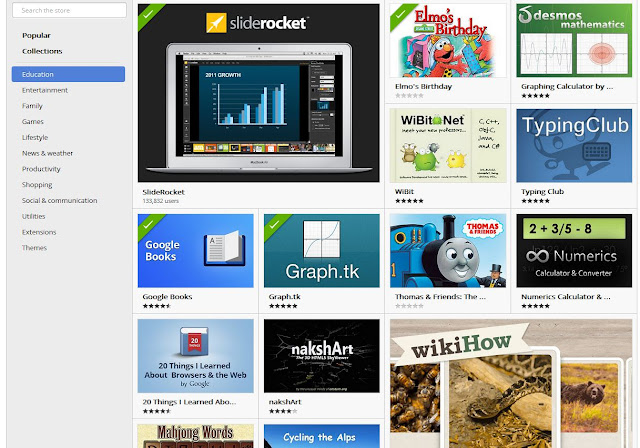


After you select a few web apps, you can access them from your Chrome browser by selecting a new tab or new window.  The screen shot below shows the apps I've currently chosen to explore:

I have an HP TouchSmart, and I found that many of the web app worked out OK with touch interaction, even 3D  "rotate and pan".  My hunch is that many of the web apps will work fine on an interactive whiteboard. 


I took a quick look at the MeeGenius! Children's Books interactive web app and was pleasantly surprised.  This web app is a talking book that highlights each word as it is spoken. A human voice is used for the narration.


I'm looking forward to getting into work early on Monday to see what web apps work well on the SMARTboard!

RELATED and SOMEWHAT RELATED
Free Education Apps from Google's New Chrome Web Store
The Yellin Center for Mind, Brain, and Education, 2/9/11
Below is a list of educational Chrome apps recommended in the above linked post:

  • Planetarium –an interactive star map for kids (or adults!) interested in astronomy
  • Google Books – millions of free e-books in a plethora of subjects
  • 3DTin – A realistic 3D model-maker
  • MathBoard – a math learning tool appropriate for elementary and kindergarten students
  • MeeGenuis! Children’s Books – personalized, “enhanced” web books for younger students
  • LucidChart – a collaborative diagramming tool, not unlike Inspiration or MindManager
  • Picnik Photo Editor – web-based photo manipulation a la Photoshop
  • 20 Things I Learned about Browsers & the Web – a great introduction to how the internet works
  • Springpad – note-taking tool that can incorporate assignments, photos, to-do lists, etc.
  • Bomomo – an innovative illustration and drawing tool
  • variety of flashcard-based apps which can aid memory, vocabulary, math skills and more

Plinks and Tonecraft - two music tools for Chrome
Danny Nicholson, The Whiteboard Blog  10/11/11
Dinahmoe Labs  (creators of Plink and Tonecraft)
The Whiteboard Blog


Sep 16, 2011

MindHabits Online Demo: Useful Serious Game for Social Skills Group Activities


I'd like to share the on-line demo of MindHabit's suite of serious games that I've found useful in my work with teens and young adults who need support in the area of social-emotional skills. 


What I like about the online demo is that it adjusts to the player's responses. This feature made it fun to use during the last few social skills groups I facilitated at work, since it could be played by students with a range of cognitive abilities. I had students take turns playing the game using a SMARTboard, and found that all of the students paid attention to what was going on. In my opinion, using the interactive whiteboard supported "off-the-shoulder" learning among the students who were not at the board. 


MindGames is available for Windows and Macs, and the full version is just $19.99 and provides 100 game levels.  The full version tracks progress and includes four games.


Here's some information from the company's website:  
"Based on social intelligence research conducted at McGill University, these stress busting, confidence boosting games use simple, fun-to-play exercises designed to help players develop and maintain a more positive state of mind." 
 "Based on the principles of social intelligence: Inhibition - uses game mechanics to promote positive habits; Association - connects personal info to positive feedback; Activation - uses personal references"


 MindHabits MindHabits MindHabits MindHabits
 MindHabits
You are playing the MindHabits Trainer online demo. Your progress will not be logged beyond this session.
Copyright © 2008 MindHabits inc. All rights Reserved.

Upcoming: 

Sep 19, 2010

EduTech: ClassDroid, Collaborative PrimaryPad, Android Apps - Lots of Possibilities!

ClassDroid is an application designed for Android-based smartphones. It lets you take a picture of the student's work, or of the student, or anything else,  and instantly upload it to the student's on-line portfolio. 


ClassDroid is available for free from the Android Market. According to Johnny McClear, the app "supports images being stored on the wordpress site which can be accessed through a web browser on any web-enabled device. Parents and pupils can then view their work and grades online."


UPDATE
ClassDroid might be a great app for the new Android-based Galaxy Tablet:


People compare the performance of Apple's iPad (L) and Samsung's Galaxy Tab tablet devices at the Internationale Funkausstellung (IFA) consumer electronics fair at ''Messe Berlin'' exhibition centre in Berlin, September 2, 2010. REUTERS/Thomas Peter
Credit: Reuters/Thomas Peter
Samsung launches Galaxy tablet for U.S. market (Reuters, 9/16/10)
SAMSUNG:  Do More on the Go with the GALAXY Tab


Here is a demo video of ClassDroid:


PrimaryPad is a "web-based word processer designed for schools that allows pupils and teachers to work together in real time"

Primarypad - Etherpad Guide from ian addison on Vimeo.

PrimaryPad is a clone of EtherPad, a web-based collaborative word processor application that is now part of Google.  It is similar to PiratePad, which is powered by EtherPad. The EtherPad code is open source and can be found at http://code.google.com/p/etherpad/   Additional information can be found at http://etherpad.org/

Exciting Ways to Use Primary Pad in the Classroom 
Primary Paint goes public Beta! (Primary Paint is part of Primary Pad, I think.)


RELATED
John McLear's School Technology
Top 10 Google Android Apps for School #education (John McLear)
Richard Byrne's blog: Free Technology for Teachers

Sep 24, 2008

Link to post: Cool Interactive Whiteboard Activities for Teaching Math

Take a look at my recent post on the TechPsych blog to learn more about the math activities created by Spencer Riley for use on interactive whiteboards, then visit his website. The activities are free!

Jun 8, 2008

Engaged Learning and Social Physics: Phun, an Interactive 2D Physics Sandbox

UPDATE 4/24/11:   Phun is commercially available and now optimized for use on the newer multi-touch, multi-user SMARTboards.  It is now known as Algodoo.

For those of you searching for interesting and engaging science activities for use on an interactive whiteboard or display, take a look at Phun. According to the website, "Phun is a playground for the creative mind where machines and toys can be easily created."

It was Emil Ernerfeldt's MSc Computer Science project, created at the Umeå University VR lab in Sweden, under the supervision of Kenneth Bodin.

The Phun application can be downloaded for free. The video provides a good overview of Phun's features, accompanied by soothing music that can you can download at no cost at http://phun.cs.umu.se/files/Phun_theme.mp3


From the creators of Phun:
"Phun is an educational, entertaining and somewhat (!) addictive piece of software for designing and exploring 2D multi-physics simulations in a cartoony fashion. It is part of our long term mission to bring visual physics based simulation to the masses. The application is developed for Umevatoriet, Umeås new science center, where it will run on a large interactive display, but you can also download it and run it on your own pc."

The beauty of Phun is the social aspect. Physics 2.0. There is a YouTube Phun group, where people share videos of their Phun creations. The Phun wiki provides a tutorial, a forum, and links. Phun-makers can share and rate their creations in the Phun Box.


Note: Phun is now part of Algoryx Simulation AB, a spin-off from Umea University. Algoryx focuses on interactive 3D multiphysics simulation. The free version of Phun will continue to be updated and supported, according to Emil Ernerfeldt.


Related Links:
Phun at Algoryx
Forum Thread: How Phun can be used in education
http://phun.cs.umu.se/wiki
Download Page (Mac, Win, Linux)

Feb 22, 2008

Via Tech Psych: Accessible Learning through Entertainment and Recreation - Resources for free or low cost games and applications

The people at Simply Entertainment/ 7-128 Software, make "mainstream, family-friendly, computer games that are designed from the ground up to be accessible to gamers with a variety of special needs, including: blindness, low vision, color blindness, deafness, and motion impairment".

They recently added a free on-line service for people searching for free or low-cost accessible computer games suitable for learning or rehabilitative environments.

According to the website, the Accessible Learning through Entertainment and Recreation service provides the following useful information:
  • Where to get those games, at low cost, or for free
  • What to look for in selecting those games, quickly and with fewer costly mistakes
  • How to apply those games to your learning objectives, without a lot of mystery
  • Who to go to for free help
"This information will be updated over the course of 2008, especially the growing series of How To articles."

Another resource on the Simply Entertainment/1-129 Software website is a section dedicated to links to 25 highest-rated websites that focus on games that are accessible for people who are blind. Many of the linked websites offer free on-line games.

Thanks to John Bannick and his colleagues at 7-128!