Showing posts with label marketing. Show all posts
Showing posts with label marketing. Show all posts
Nov 21, 2012
Nov 4, 2012
Interactive Display at the Local Hyundai Dealership
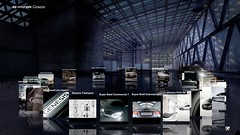
I was at the auto dealership to get my car's oil changed a few weeks ago and noticed a large interactive display that featured an in-depth explanation of Hyundai's BlueLink technology. The display also provided touch-screen interaction to explore information and view videos about the features of new cars.
My toddler grandson loves cars, so when he came to visit, I brought him along. Since it is difficult to interact with a touch screen display and at the same time discreetly video the experience with a toddler in tow, I wasn't able spend much time exploring the display's features. The following video is what I managed to capture.
I am still hunting down information about the story behind the display.
RELATED
HYUNDAI's Interactive BlueLink website
Overview of BlueLink
The Tube (2008)
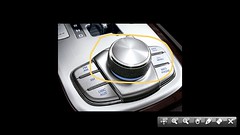
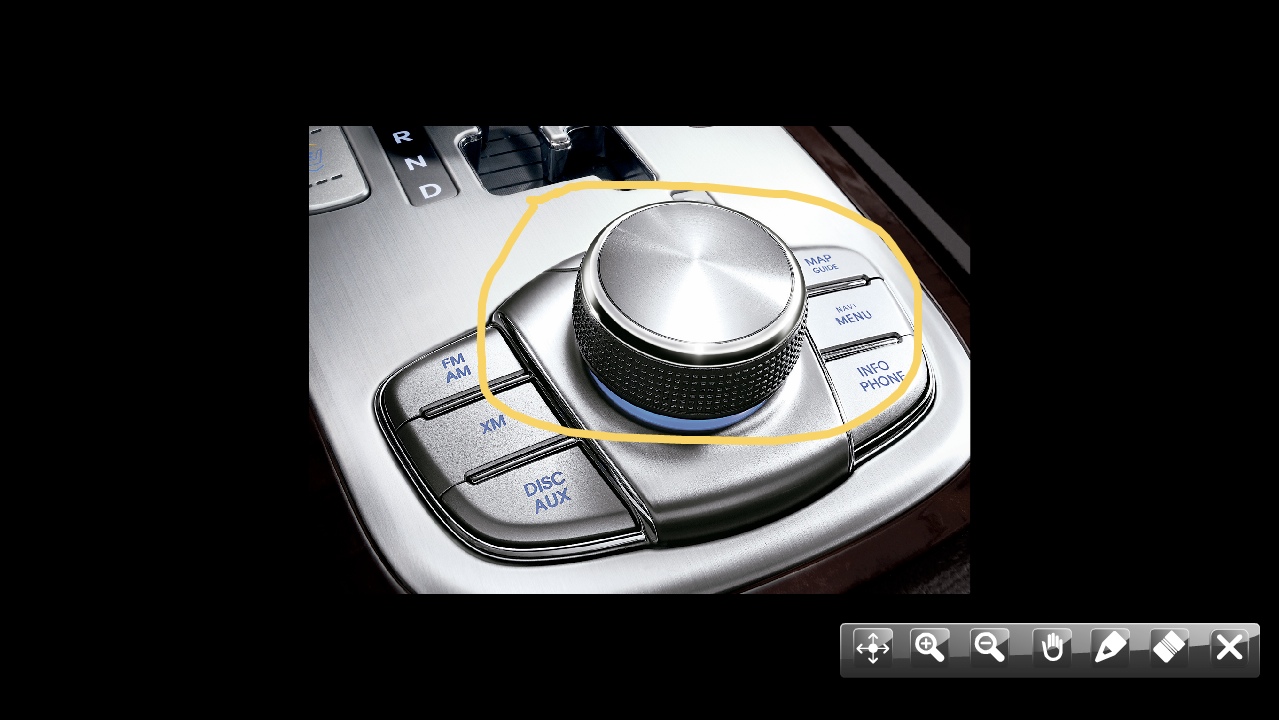
This project was installed in 180 Hyundai dealerships in the U.S. It was created with a Papervision3D menu to display media types such as video, audio, animation, and zoomable bitmaps. The application was designed to run within a local network. I'm not sure if the display I saw at my local dealership was an updated version of this project or something new.
The web-version of the application that was in "The Tube" project does not have all of the features that can be accessed in the local version. The photos were taken from Mike Connor's website: rocketnumber9.org/flash-developer/touchscreen-kiosk-hyunda/
From the Digitally Yours blog:
Audi City: Car Showroom of the Future
Digital at New York Auto Show '12
Note:
The Digitally Yours blog covers lots of topics related to interactive technologies. For your convenience, here are some category links:
Augmented Reality & QR Codes; Interactive Websites; Installations; Shopper Marketing; Infographics; Location Based; Apps and Mobile; Product Launches.
I am still hunting down information about the story behind the display.
RELATED
HYUNDAI's Interactive BlueLink website
Overview of BlueLink
The Tube (2008)
This project was installed in 180 Hyundai dealerships in the U.S. It was created with a Papervision3D menu to display media types such as video, audio, animation, and zoomable bitmaps. The application was designed to run within a local network. I'm not sure if the display I saw at my local dealership was an updated version of this project or something new.
The web-version of the application that was in "The Tube" project does not have all of the features that can be accessed in the local version. The photos were taken from Mike Connor's website: rocketnumber9.org/flash-developer/touchscreen-kiosk-hyunda/

From the Digitally Yours blog:
Audi City: Car Showroom of the Future
Digital at New York Auto Show '12
Note:
The Digitally Yours blog covers lots of topics related to interactive technologies. For your convenience, here are some category links:
Augmented Reality & QR Codes; Interactive Websites; Installations; Shopper Marketing; Infographics; Location Based; Apps and Mobile; Product Launches.
Oct 28, 2012
From a Post-WIMP Perspective: What Happens When Post-Mass Market Goes to Market? Bob Garfield's insightful video, and more (repost)
I came across one of my old posts while putting together More Tablets, More Mobile, More Social. On The Media's The Facebook Show, Adobe's Social 'Metrics, Not Myths" Campaign.
When I wrote the following post in December of 2009, the first iPad had not been released. Google Plus was just a rumor. Facebook was much smaller, worldwide. Even though many things have changed, the post rings true:
From a Post-Wimp Perspective: What Happens When Post-Mass Market Goes to Market? Bob Garfield's insightful video, and more...
Ten years ago, if you had a job coding for a tech company, there wasn't an expectation that you'd have to hone your writing skills to maintain a blog, and learn how to produce short video clips to promote your work and the work of your company. If you preferred NOT to be open and social, it was fine! Now, you are probably just holding on. Maybe.
What inspired this post is a video of a presentation by Bob Garfield, an ad critic and essayist for Advertising Age. a magazine I interact with online. He is the co-host of NPR's On The Media program, and has a lot of insight regarding advertising trends and so forth. He is also hilarious. If you are viewing this in a family setting, know that Mr. Garfield uses a few "bad" words and quite a number of data and financial statistics to make his point. No traditional media institution is untouched.
An eye opener. Worth every 34+ minute!
The Chaos Scenario from Greg Stielstra on Vimeo.
When I wrote the following post in December of 2009, the first iPad had not been released. Google Plus was just a rumor. Facebook was much smaller, worldwide. Even though many things have changed, the post rings true:
From a Post-Wimp Perspective: What Happens When Post-Mass Market Goes to Market? Bob Garfield's insightful video, and more...
I realize that working for the public good has prevented me from developing a thirst for marketing competitiveness. I don't have a greedy bone in my body. The only reason that I've developed a slight interest in advertising and marketing over the past few years is my interest in technology and how our society has been transformed by recent changes. Everyone has a cell phone, everyone wants an iPhone, everyone expects that technology will help us to meet our social, political, financial, health, education, environmental, and humanitarian needs, right?
What is happening to our "mainstream" cornerstones?
By mainstream, I mean traditional newspapers, magazines, network television, cable, and brochure-like websites. All of a sudden, reporters are running to take graduate classes in multi-media journalism, a domain previously "owned" by network TV 10-15 years ago. Newspapers and magazines are now web-based, your favorite radio and television program have their own websites, and just about every one is on MySpace, Facebook, and Twitter.
The Web is easily accessed, ubiquitous, running on SmartPhones and iPhones, netbooks, and now, e-readers, right from your pocket, purse, or bag.
What inspired this post is a video of a presentation by Bob Garfield, an ad critic and essayist for Advertising Age. a magazine I interact with online. He is the co-host of NPR's On The Media program, and has a lot of insight regarding advertising trends and so forth. He is also hilarious. If you are viewing this in a family setting, know that Mr. Garfield uses a few "bad" words and quite a number of data and financial statistics to make his point. No traditional media institution is untouched.
An eye opener. Worth every 34+ minute!
The Chaos Scenario from Greg Stielstra on Vimeo.
"Bob Garfield...forcasts the disintegration of mass advertising structures that have worked in perfect symbiosis for 400 years and prescribes "listenomics" as the way for brands to thrive in the digital, post-advertising age. He warns that all formerly top-down institutions cannot dictate to consumers with advertising through mass media as before, but must use digital tools to forge relationships with them--no longer seeing people as piggy banks, or eyeballs, or votes, but as genuine stakeholders in their enterprise. Amid the ruins of mass media,the choice for business is stark: listen or perish. Learn more at thechaosscenario.net."
(For those of you following the postWIMP discussion, you might be interested in looking at the post on the chaos scenario.net blog: The Problem with Acronyms. What a coincidence!)
Bob Garfield's insights were foreshadowed by the "Prosumer" video from a couple of years ago:
Google and Yahoo are getting it, and demonstrate foresight by providing free Wi-Fi service in urban environments.
Below is a short video clip of Dana Spiegel, the NYCwireless Executive Director, about Yahoo's sponsorship of free Wi-Fi in Times Square in New York City:
And here is a spin from Microsoft:
Windows Mobile 7 User Interface
Jul 18, 2012
Does Scanning This QR Code Make Me Look Silly? Interaction Mishaps with QR Codes Out and About
I am brave.
I am one of the few pioneers who have tried to scan QR codes, no matter what. I have squatted in front of a display to carefully align my phone with a code. I have disregarded many passers-by who had no choice than to walk around me. I have blocked the path to the restrooms at a crowded airport, just to capture that special shot.
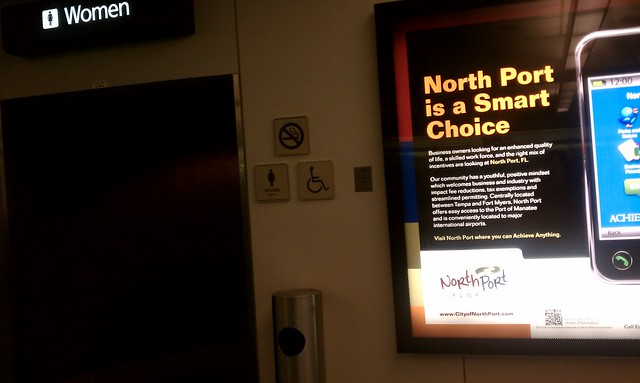
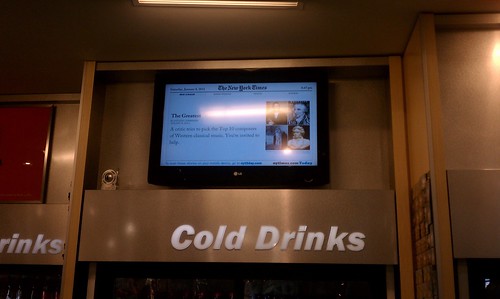
I was so intent on capturing one QR code that I stood on my tip-toes in front of a large refrigerated drink section of an airport convenience store full of thirsty people. I didn't care if I blocking the aisle to the drinks! I just had to watch the ads cycle on a dynamic display for the right moment to scan and snap the QR code.
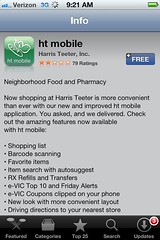
My last QR encounter was at a Harris Teeter supermarket in Charlotte, NC. The purpose of the QR code was to link customers to the store's mobile app. It turned out to be a laborious process. It had little to do with the QR code or my iPhone's scanning software. It had nothing to do with my ability to steady my iPhone and quickly capture a QR code. It had everything to do with a poorly-planned spot for this transaction to take place. Even though QR codes have been around for a while, it seems that little thought has been given to the user/customer experience at the "point of scan".
This QR code made me look especially silly. I got a few strange looks from other shoppers entering and exiting the store.
Imagine what I looked like as I approached the automatic sliding door! After a sashaying around for a few minutes, I captured the code. I guess I was suffering from QR Code Fatigue by that point, because after I downloaded the mobile app, I left the store and forgot all about it.
App store and mobile app screen shots:

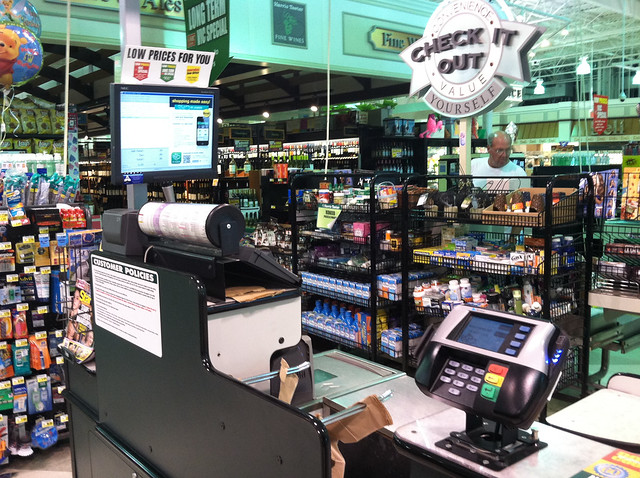
There was another option for scanning the Harris Teeter QR code. At the checkout counter, there was one located on the screen on top of the cash register. It was not possible to reach over everything in order to scan the code. Even if I could access the QR code while checking out, it wouldn't be wise. I'd be holding up the line, and no-one wants to be "that guy".
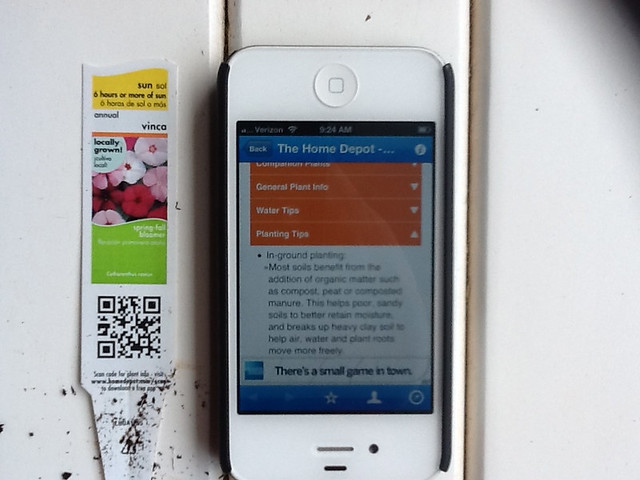
A couple of weeks ago, I decided to relax a bit and do some gardening. I noticed that every single plant had a tag, and every single tag had a QR code. Instead of taking a break to sip some iced tea, like other neighborhood ladies, I got my iPhone, wiped a plant tag clean (you don't want to scan a QR code obscured with garden soil), found a flat surface, and scanned. I spent too much time learning more than I ever cared to know about vincas and begonias.

The following section is from one of my previous posts on this topic, reviewing my second encounter with a QR code at the Orlando airport. This particular QR code was on a display in a very crowded convenience store.
I spotted another QR tag!
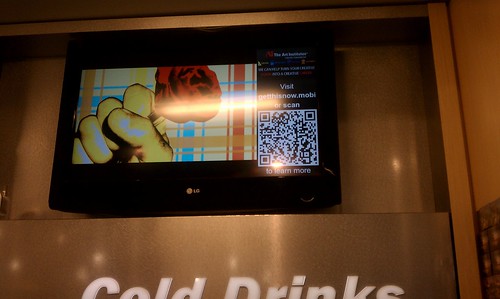
There were a few problems with this set-up. First, the display was located on a wall close to a ceiling, making it very inconvenient to scan with my phone. The page with the QR tag didn't stay up long enough for me to attempt to scan it, although waited around until it cycled back in view- three times. I gave up and took a picture instead, standing on my tip-toes with my arms extended over my head, the same position required to scan the QR tag, if it would stay put!
Another problem was that the display was perched above a high-traffic area, right above the refrigerated drinks. The only place to scan the QR tag was in a narrow aisle, behind the throngs of thirsty travelers making a bee-line to the cold drink section of the store. I was in the way of a number of people in this bee-line.
What were they thinking when they decided that the best place this large display featuring a QR tag should be several feet above eye-level in this particular location?
The displays in front of the store at the airport were located on either side of the doorway, at "body" level. This is a logical place to put a display. Potential customers can view the displays without getting in the way of other travelers.
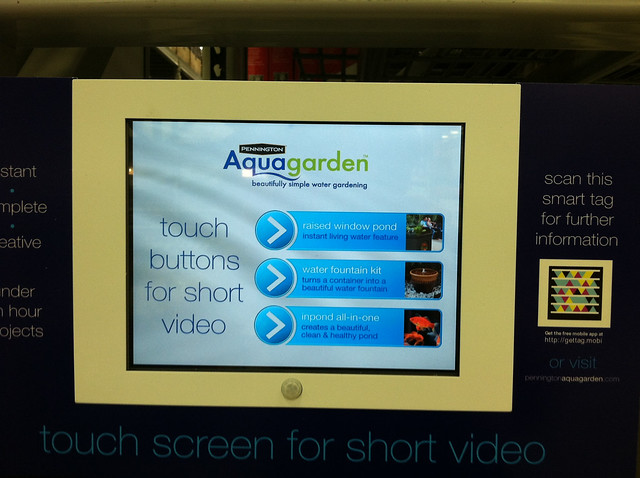
Here's a picture of one display, found at a garden center, that provided an adequate user-experience. Instead of a QR code, the display had a Microsoft Smart Tag. The display was located in a spot where I didn't feel silly. The tag was easy to scan, and it linked me to a website that had the same basic content as the touch screen below. I could "scan and go" if I was in a hurry, scan and look at the screen of my iPhone if I wanted to walk around the store, or stand in front of the display and watch the infomercials.
The following picture is a screen shot of a site someone put up as a joke, no pictures, of course, because there are so few that do!

Update 3/13
I was going through the drive-through pharmacy at CVS and spotted this QR code on the window. I asked the pharmacy technician what she knew about the QR code, and she said, "What QR code". From our discussion, not much was known about this QR code, and no one to her knowledge had ever tried to scan it. I tried, and failed to succeed.

RELATED
Interactive Display with QR Tag: Close Encounter at the Orlando Airport
When The Web Meets The Real World: Moving Beyond QR Codes
Eric Savitz, Forbes, 8/4/11
"The 9 million users of the most popular QR code scanner for the iPhone scan just 4,000 QR codes per day."
How to Make It Easy for People to Scan Your QR Codes
Joe Waters, Dummies.com
Big box garden centers embrace QR tags
Garden Center, 5/9/11
GARDENING: QR codes can be a Gardener's Best Friend
Urban Domestic Diva, 6/11
Harris-Teeter Mobile Website
I am one of the few pioneers who have tried to scan QR codes, no matter what. I have squatted in front of a display to carefully align my phone with a code. I have disregarded many passers-by who had no choice than to walk around me. I have blocked the path to the restrooms at a crowded airport, just to capture that special shot.
I was so intent on capturing one QR code that I stood on my tip-toes in front of a large refrigerated drink section of an airport convenience store full of thirsty people. I didn't care if I blocking the aisle to the drinks! I just had to watch the ads cycle on a dynamic display for the right moment to scan and snap the QR code.
My last QR encounter was at a Harris Teeter supermarket in Charlotte, NC. The purpose of the QR code was to link customers to the store's mobile app. It turned out to be a laborious process. It had little to do with the QR code or my iPhone's scanning software. It had nothing to do with my ability to steady my iPhone and quickly capture a QR code. It had everything to do with a poorly-planned spot for this transaction to take place. Even though QR codes have been around for a while, it seems that little thought has been given to the user/customer experience at the "point of scan".
This QR code made me look especially silly. I got a few strange looks from other shoppers entering and exiting the store.
Imagine what I looked like as I approached the automatic sliding door! After a sashaying around for a few minutes, I captured the code. I guess I was suffering from QR Code Fatigue by that point, because after I downloaded the mobile app, I left the store and forgot all about it.
App store and mobile app screen shots:
There was another option for scanning the Harris Teeter QR code. At the checkout counter, there was one located on the screen on top of the cash register. It was not possible to reach over everything in order to scan the code. Even if I could access the QR code while checking out, it wouldn't be wise. I'd be holding up the line, and no-one wants to be "that guy".
A couple of weeks ago, I decided to relax a bit and do some gardening. I noticed that every single plant had a tag, and every single tag had a QR code. Instead of taking a break to sip some iced tea, like other neighborhood ladies, I got my iPhone, wiped a plant tag clean (you don't want to scan a QR code obscured with garden soil), found a flat surface, and scanned. I spent too much time learning more than I ever cared to know about vincas and begonias.
The following section is from one of my previous posts on this topic, reviewing my second encounter with a QR code at the Orlando airport. This particular QR code was on a display in a very crowded convenience store.
I spotted another QR tag!
There were a few problems with this set-up. First, the display was located on a wall close to a ceiling, making it very inconvenient to scan with my phone. The page with the QR tag didn't stay up long enough for me to attempt to scan it, although waited around until it cycled back in view- three times. I gave up and took a picture instead, standing on my tip-toes with my arms extended over my head, the same position required to scan the QR tag, if it would stay put!
Another problem was that the display was perched above a high-traffic area, right above the refrigerated drinks. The only place to scan the QR tag was in a narrow aisle, behind the throngs of thirsty travelers making a bee-line to the cold drink section of the store. I was in the way of a number of people in this bee-line.
What were they thinking when they decided that the best place this large display featuring a QR tag should be several feet above eye-level in this particular location?
The displays in front of the store at the airport were located on either side of the doorway, at "body" level. This is a logical place to put a display. Potential customers can view the displays without getting in the way of other travelers.
Here's a picture of one display, found at a garden center, that provided an adequate user-experience. Instead of a QR code, the display had a Microsoft Smart Tag. The display was located in a spot where I didn't feel silly. The tag was easy to scan, and it linked me to a website that had the same basic content as the touch screen below. I could "scan and go" if I was in a hurry, scan and look at the screen of my iPhone if I wanted to walk around the store, or stand in front of the display and watch the infomercials.
The following picture is a screen shot of a site someone put up as a joke, no pictures, of course, because there are so few that do!

Update 3/13
I was going through the drive-through pharmacy at CVS and spotted this QR code on the window. I asked the pharmacy technician what she knew about the QR code, and she said, "What QR code". From our discussion, not much was known about this QR code, and no one to her knowledge had ever tried to scan it. I tried, and failed to succeed.

RELATED
Interactive Display with QR Tag: Close Encounter at the Orlando Airport
When The Web Meets The Real World: Moving Beyond QR Codes
Eric Savitz, Forbes, 8/4/11
"The 9 million users of the most popular QR code scanner for the iPhone scan just 4,000 QR codes per day."
How to Make It Easy for People to Scan Your QR Codes
Joe Waters, Dummies.com
Big box garden centers embrace QR tags
Garden Center, 5/9/11
GARDENING: QR codes can be a Gardener's Best Friend
Urban Domestic Diva, 6/11
Harris-Teeter Mobile Website
Labels:
customer experience,
marketing,
mobile app,
people scanning,
picture,
QR codes,
scan,
silly,
user experience,
UX,
video

 No comments:
No comments:
Mar 14, 2012
Future of Gaming Report SlideShare, from PSFK
Labels:
2012,
education,
fitness,
future of gaming,
future trends,
game,
game mechanics,
games,
gamification,
gaming,
marketing,
non-profit,
psfk,
report,
Serious Games,
social good,
tecnology,
trends
No comments:
No comments:
Nov 27, 2011
Starbucks Cup Magic: Augmented Reality App for iPhone and Android!
"Blast Radius is a global agency that takes a strategic approach to tackling the complex issues of growing brand and revenue in a digitally connected world."
For more information, tak a look at the Starbucks Cup Magic iTunes preview.
Thanks to Ajit Jaokar for the link!
For more information, tak a look at the Starbucks Cup Magic iTunes preview.
Thanks to Ajit Jaokar for the link!
Feb 8, 2011
Toyota Vision Multi-Touch Wall at the 2011 Detroit Autoshow: Good example of a collaboration between PUSH, Juxt Interactive, GPJ, and Hush (updated)
GOOD EXAMPLE!
I didn't have the chance to get up to the Detroit Auto Show and interact with the iWall, so I watched the videos.
Toyota iWall from Justin Micklish on Vimeo.
From Justin Micklish's Vimeo site:
"Named "Belle of the Ball" at the 2011 Detroit Auto Show, the Toyota Vision Wall is a large-format interactive installation leveraging a great deal of UX intelligence and bleeding edge technology."
This project was a collaboration between a team at PUSH Offices and Juxt Interactive (lead agency), GPJ (experience marketers), and Hush (motion graphics).
Toyota Vision Multi-Touch Wall Case Study: A good explanation of the "how and why" of this project:
Toyota Vision Multi-Touch Wall Case Study from JUXT Interactive on Vimeo.
From the JUXT Interactive Vimeo site:
"In January, Toyota debuted the largest digital multi-touch installation ever seen at the 2011 North American International Auto Show in Detroit. GPJ and JUXT Interactive created the digital touch wall experience to deliver a feast for the senses, allowing consumers to explore videos, photos and custom content through a larger-than-life, interactive surface."
RELATED
PUSH
"PUSH is a marketing & design research firm based in Venice, CA. We shirk labels and defy classifications. We have been called strategists, writers, technologists, marketers, typographers, entrepreneurs, and designers. Above all, we are curious. We make a living creating compelling experiences with our clients. Recent collaborations include work with Yahoo, West, and Sony."
Juxt Interactive I didn't have the chance to get up to the Detroit Auto Show and interact with the iWall, so I watched the videos.
Toyota iWall from Justin Micklish on Vimeo.
From Justin Micklish's Vimeo site:
"Named "Belle of the Ball" at the 2011 Detroit Auto Show, the Toyota Vision Wall is a large-format interactive installation leveraging a great deal of UX intelligence and bleeding edge technology."
This project was a collaboration between a team at PUSH Offices and Juxt Interactive (lead agency), GPJ (experience marketers), and Hush (motion graphics).
Toyota Vision Multi-Touch Wall Case Study: A good explanation of the "how and why" of this project:
Toyota Vision Multi-Touch Wall Case Study from JUXT Interactive on Vimeo.
From the JUXT Interactive Vimeo site:
"In January, Toyota debuted the largest digital multi-touch installation ever seen at the 2011 North American International Auto Show in Detroit. GPJ and JUXT Interactive created the digital touch wall experience to deliver a feast for the senses, allowing consumers to explore videos, photos and custom content through a larger-than-life, interactive surface."
RELATED
PUSH
"PUSH is a marketing & design research firm based in Venice, CA. We shirk labels and defy classifications. We have been called strategists, writers, technologists, marketers, typographers, entrepreneurs, and designers. Above all, we are curious. We make a living creating compelling experiences with our clients. Recent collaborations include work with Yahoo, West, and Sony."
"JUXT is a company that creates from the ground up, top to bottom, or even sideways. It kinda makes sense since we were started by a couple of architects....Lots of people ask us if we only do digital work. Well we like to think and play where people are, and these days that just happens to be the Internet. That suits us just fine because the online space has far less restrictions and barriers than other media. JUXT does not take kindly to limits, or being put in a box."
GPJ: George P. Johnson
"GPJ is the world's premier experience marketing agency, working with leading companies who are looking for innovative marketing solutions that motivate their audiences and activate their brands through live experiences."
Hush
"Hush is a design and direction studio crafting stories for digital, broadcast, mobile and physical installations. Whether using the latest technology or the most classic of techniques, we unifyu stories for agencies and brands alike."
Comment: This post was revised on 2/11/11 to reflect a clarification from Justin MicKlish. He's a partner and producer with Push and worked on this project with others in the role of technology consulting and software development.
Labels:
2011,
Detroit Auto Show,
GPJ,
HCI,
Hush,
interactive display,
Juxt Interactive,
marketing,
multi-touch,
NUI,
offices,
Push,
Toyota,
UX,
video,
Vision Multi-touch Wall
No comments:
No comments:
Jan 18, 2010
Facebook Settings and Privacy: Jeff Elder's post. "Walk through Facebook Privacy Settings". A must-read & do!
I use Facebook at least once a day to keep up with relatives, friends, colleagues, colleagues of colleagues, and interest groups. In many situations, I find that Facebook is much more efficient than relying on e-mail, Twitter, and RSS feeds. Sad to say, the frequent use of Facebook without regularly inspecting and modifying privacy settings (and other settings) will result in exposing parts of your life to the world, seeming without your informed consent.
One person I rely on for good advice regarding privacy issues and social networking sites is Jeff Elder. His recent blog post, "Walk through Facebook privacy settings" is something I recommend members of Facebook read read and follow. It might take up to 30 minutes of your time, but the time you spend will be important.
Through blogging, so much of "me" is out there, and this is the case for many others. Even so, it is important for me to have control over what Jeff Elder calls "the giant peephole". What people can see through the peephole of Facebook changes, often in the periphery of our awareness, and as a result, we might be sharing more information to others, including marketers, than we would like.
(Jeff Elder is a longtime Charlotte Observer columnist who studied social media on a Knight fellowship at Stanford University, blogs about social media and networking for folks in the Charlotte, NC region.)
One person I rely on for good advice regarding privacy issues and social networking sites is Jeff Elder. His recent blog post, "Walk through Facebook privacy settings" is something I recommend members of Facebook read read and follow. It might take up to 30 minutes of your time, but the time you spend will be important.
Through blogging, so much of "me" is out there, and this is the case for many others. Even so, it is important for me to have control over what Jeff Elder calls "the giant peephole". What people can see through the peephole of Facebook changes, often in the periphery of our awareness, and as a result, we might be sharing more information to others, including marketers, than we would like.
(Jeff Elder is a longtime Charlotte Observer columnist who studied social media on a Knight fellowship at Stanford University, blogs about social media and networking for folks in the Charlotte, NC region.)
Jan 5, 2009
IKEA's Interactive Dancing and Musical Website "Welcome to the Closet", via Kinetic Interface
Doug Fox, of the Kinetic Interface blog (part of Great Dance), shared IKEA's new promotional site that allows for tons of multimedia interaction. The website features a series of rooms to highlight various products.
Visit Come into the Closet!
IKEA Interactive Multimedia Game
Unlike most static, or even flash-based websites, the user has control over many dimensions of experience:
According to Duncan, of the The Inspiration Room Daily, the site won an award at the Epica Awards.
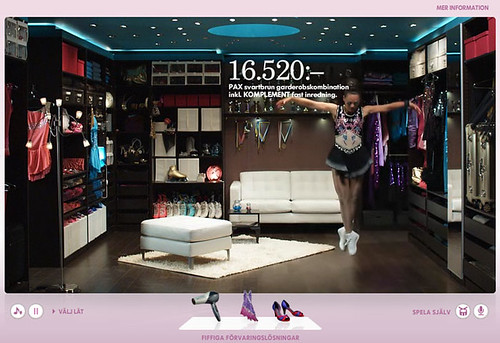
Here is a video preview of some of the dance interaction in the site:


Duncan, of the Inspiration Room, also posted credit information regarding the IKEA website:
The following credits were posted by Duncan on the Inspiration Room Daily:
Visit Come into the Closet!
IKEA Interactive Multimedia Game
Unlike most static, or even flash-based websites, the user has control over many dimensions of experience:
- Simply watch the dancers and listen to the music, navigating from room to room
- Control the dancers by tapping on your computer's keyboard
- Control the dancers by clapping, singing, or making other noises
- Combine tapping your keys while watching and listening
- Upload your own Mp3's and watch the dancers dance
Here is a video preview of some of the dance interaction in the site:
Duncan, of the Inspiration Room, also posted credit information regarding the IKEA website:
The following credits were posted by Duncan on the Inspiration Room Daily:
"The site was developed at Forsman Bodenfors, Sweden by web director Mathias Appelblad, copywriter Fredrik Jansson, art director Anders Eklind, designers Anton Robsarve and Christoffer Persson, agency producers Peter Gaudiano, Charlotte Most, Asa Jansson, account director Philip Mascher."
"An earlier version of the site was developed in 2006, winning a Yellow Pencil at the DandDs, and can be viewed online at Forsman Bodenfors."
"Web development was done at Kokokaka, Gothenburg."
"Filming was shot by director Amir Chamdin via Chamdin & Stöhr, Stockholm, with director of photography Gosta Reiland."
"Music is by Dead Mono."
Dec 1, 2008
BMW and Surface Computing: Video of Tabletop Interaction
This is a promotional video from BMW, showing how potential buyers can interact with a tabletop computing system to preview various ways they can customize the car. The system in the video is Microsoft's Surface:
Via Gizmodo Australia
(I wonder if Microsoft is working on a few educational games for the surface....)
Via Gizmodo Australia
(I wonder if Microsoft is working on a few educational games for the surface....)
Subscribe to:
Posts (Atom)