Take a look at a a Usability Geek blog that is a repository of guidelines from an assortment of well-known corporations. I'm bookmarking the page for reference!
October 11, 2011 is a special day. A number of software programmers will be working to develop "innovative, touch-enabled applications for the autism cimmunity and make this software available for free on HackingAutism.org." Take a moment to watch the following video clip, and then explore the Hacking Autism website! "When touch-enabled computing was introduced to the world, no one could have anticipated that this technology might help open up a new world of communication, learning and social possibilities for autistic children. Yet it has.
Hacking Autism is a story of technology and hope and the difference it's making in the lives of some people who need it most.Hacking Autism doesn't seek to cure autism, but rather it aims to facilitate and accelerate technology-based ideas to help give those with autism a voice." -hackingautism.org Touch technology + people with autism spectrum disorders = One of the reasons why I returned to school to take computer courses and explore natural user interfaces and interaction.
The HP Slate would be very useful in education, especially for students working in pairs or small groups during activities such as digital storytelling, "kid-reporting", and so forth!
I've written about the need for more appropriate form factorsin the past, and the idea that Miller proposes is quite intriguing, since I've toyed with the idea of using something like a flexible mouse pad as an adaptive interface for students who have problems with fine-motor control, limiting their ability to use a mouse, keyboard, or even some of the adaptive switches that are available.
(It is interesting to note that Siegler's blog post was written on 10/13/09, and as I write this post on 10/15/09, it has 92 comments and 460 tweets. My guess this is a hot topic, especially now that HP has released new versions of the all-in-one HP TouchSmart PC).
Siegler discusses Michael Arrington's 10/12/09 post, Why Desktop Touch Screens Don't Really Work Well For Humans. Arrington's post discusses the reasons why he's not happy with the TouchSmart, because the desktop on which most people use it requires them to keep their hands up on the screen, above the heart, which can be fatiguing.
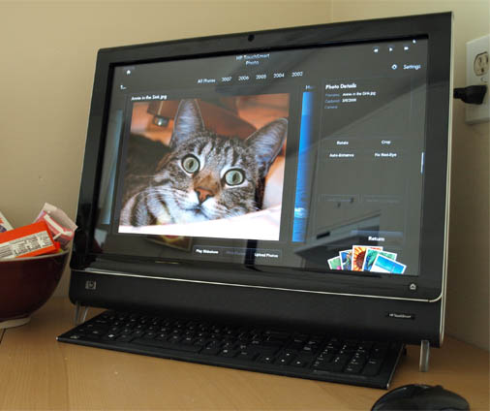
I have an HP TouchSmart, and I switch back and forth, depending on what I'm doing. I didn't think of this before, but I have a very adjustable chair that I raise up when I use my hands on the touch screen. Without thinking, I've made the appropriate adjustment. Not everyone has the luxury of a fancy adjustable deskchair!
From what I can tell, Miller is focused on how multi-touch technology can support the work or pleasure of just one person, which is still how many people interact with their computers. What is needed is more thought about ways this technology could support two or more people working together. My HP TouchSmart works well with two people, even when when running single-touch programs. But it is better when it runs duo-touch enabled programs!
Looking for something techy, yet touchable? More multi-touch screens will be on the market soon from HP.
Video of the HP TouchSmart PC 300 and 600
Information from the HP YouTube website:
Two new HP TouchSmart PCs packed with exclusive touch applications, the HP TouchSmart 300 and HP TouchSmart 600, feature stunning HD displays with a multitouch enabled screen. Consumers can now stream Netflix movies, watch TV programs, listen to music and internet radio, create photo collages and bring out their inner chef all by simply touching the PC screen. The new consumer PCs feature exclusive built-for-touch applications including: Hulu Desktop, Netflix, Twitter, the HP Music Store powered by Rhapsody, Pandora Internet radio the TouchSmart Recipe Box, and Canvas. The 16:9 widescreen tiles make multimedia, social media and other applications a rich and engaging touch experience. Some models of the HP TouchSmart 600 easily connect to gaming consoles, including Xbox, PlayStation and Wii, via HDMI or composite video ports. The HP TouchSmart 300 starts at $899 and is offered in a 20-inch diagonal widescreen (available Nov. 1). The HP TouchSmart 600 starts at $1,049 and is offered in a 23-inch diagonal widescreen (available Oct. 22).
I like the new features, especially the tilt webcam, the swivel that lets you swivel the screen around as needed, and the recipe box application. The a digital recipe box "scrapes" recipes from on-line websites, and allows you to listen to the recipe through a blue-tooth earphone. The recibe box applications will talk to you as you prepare a meal, hands-free!
For businesses that are looking for high-definition interactive kiosks, 43-inch HP LD4200, diagonal digital signage touch display might be a great solution:
"Aimed specifically at the digital signage market, with HP noting is suitability for kiosks, retail, point of sale, shopping malls, travel terminals, hotel lobbies, recreational venues, universities, stock exchanges and hospitals, the new 42” HP LD4200tm multitouch LCD display offers Full HD (1080p) resolution and, thanks to utilising infrared and imaging sensors, will happily acknowledge touch commands such as zoom pinching and drag scrolling thus bringing true interactivity to information and advertising visualisations...On top of its mulittouch capabilities the HP LD4200tm boasts ultra-wide 178 x 178 degree viewing angles and is set to ship from December with a price tag of just shy of $2,800" - Andrew Tingle, TFTS
Note: NextWindow is the creator of the touchscreens.
Every week or so, I hear about a new multi-touch enabled laptop.Today, I came across a review on Gizmodo about the Lenovo ThinkPad T400, which is a 14.1 capacitive touchscreen laptop that can handle four touches at once:
SCREENSHOT "The screen is pure beauty. Like a capacitive touchscreen phone, light taps on the display are responsive and you don't have to think about positioning your finger in a certain way to open apps or rearrange windows." - Joanna Stern, Gizmodo, 9/15/09
It looks like there will be a growing need for Windows 7 application developers. Here's some code examples using Windows Presentation Foundation and the Windows 7 Multitouch API
The HP TouchSmart Notes application can be used in a variety of interesting ways. I have an HP TouchSmart PC, and I like how easy it is to slide the notes about the screen using this multi-modal application. It allows the user to take capture pictures, video, or audio to create notes, as well as traditional "stickies" that allow for typing or finger-writing input. You can even draw or write over photos. It is an application that has many accessibility features. It also supports many of the principles of Universal Design for Learning (UDL).
The various notes can be put together in a variety of ways, and allow for video or photo storytelling and interesting ways of leaving messages- even a song or two. I did some hunting and found the more information about some non-verbal students with autism who are learning verbal skills through this technology at Hope Technology School in Palo Alto, California. Video of student using the HP TouchSmart Notes application at Hope Technology School:
Here are a few "How Two" videos that demonstrate the TouchSmart Notes features and interactions:
The new HP TouchSmart tx2 Notebook is duo-touch, with a swivel display. You can use a stylus or your fingertips to interact with the screen. The price listed on the site is $1,149.99, but it s a bit more expensive if you order "the works".
According to the HP website, some models of the notebook come with a built-in fingerprint reader to assist with log-on or lock-up functions. It includes integrated Altec Lansing stereo speakers and supports multimedia entertainment applications. The screen is 12.1", with an HP BrightView LED display. It is capable of playing HD content.
"The enhanced HP MediaSmart digital entertainment software suite on the tx2 allows users to more naturally select, organize and manipulate digital files such as photos, music, video and web content by simply touching the screen.
"Breezing through websites and enjoying photos or video at the tap, whisk or flick of a finger is an entirely new way to enjoy digital content on a notebook PC," said Ted Clark, senior vice president and general manager, Notebook Global Business Unit, Personal Systems Group, HP. "With the introduction of the TouchSmart tx2, HP is providing users an easier, more natural way to interact with their PCs, and furthering touch innovation." "
The notebook uses capacitive touch technology, and supports gestures such as "pinch, rotate, arc, flick, pres and drag, and single & double tap."
For more information, see Hugo Jobling's recent post on the TrustedReviews website. The touch-screen in HP's products are from NextWindow. NextWindow now has drivers that will work with the upcoming Windows 7, which will allow for multi-touch applications.
FYI: Video clip of HP's TouchSmart single-touch interaction, from July 2008:
If you follow my blog, you know that I have a TouchSmart, and that I'm a little obsessed about surface-gesture-touch-screen-multi-touch-multi-user computing....
Here is some good news!
According to a recent article from Rich Brown's Crave blog (CNET news), programming guidelines for the TouchSmart require developers to be know C# and Windows Presentation Foundation. That's great for me, since I can program in C# and I've been playing with WPF for nearly a year.
Despite what Rich Brown says, I know that the TouchSmart has at least duo-touch capabilities, since the touch-screen technology was provided by NextWindow, and the TouchSmart has been used for multi-touch demos created by FingerTapps. It is possible for the TouchSmart to handle input from multiple mice, too.
Hopefully Windows 7 will make it easier for developers to harness the power of the TouchSmart. I have so many ideas I'd like to see come to fruition.
If you are interested in learning more about Mediascapes (mscapes) and Create-A-Scape, the educational version of mscapes, take a look my recent post and related video clip on the TechPsych blog.
"Mediascapes are mobile, location-based experiences that incorporate digital media with the sights, sounds, and textures of the world around you. A mediascape blends digital images, video, audio and interactions with the physical landscape. Games, guided walks, tours, and destinations are among the mediascapes created to date. Download a mediascape onto a portable device, and see how your landscape comes alive as you move through the environment." -Hewlett-Packard
According to Microsoft, "The Microsoft Windows Presentation Foundation provides the foundation for building applications and high fidelity experiences in Windows Vista, blending to gether application UI, documents, and media content, while exploiting the full power of your computer. The functionality extends to the support for Tablet and other forms of input, a more modern imaging and printing infrastructure, data driven UI and visualization, as well as the integration points for weaving the application experience into the Windows shell."
I think this PC has possibilities for use in libraries, school media centers, and in classrooms.
This is a short video clip about the HP TouchSmart PC, a medium-sized touch-screen display that runs on Window's Vista. From what I understand, it uses technology from NextWindow.
If you use TouchSmart PC or something similar, or if you develop applications for the TouchSmart or other interactive touch applications, let me know what you think!