Here is a link to usability design guidelines for touch-screen applications on the SAP design guild website, posted by Gerd Waloszek, of the Product Design Center.
Although these guidelines were written in 2000, they still hold true in 2007, especially now that larger touch-screen applications such as Microsoft Surface (Madrid) have recently been unveiled.
Touch Screen Design Guide
Showing posts with label Milan. Show all posts
Showing posts with label Milan. Show all posts
Jun 1, 2007


May 31, 2007
Microsoft Surface multi touch screen table - I wish I had one for my projects last semester!
Microsoft Research recently unveiled Microsoft Surface: http://microsoft.com/surface
This multi - touch table can be used for a variety of applications, as outlined in the video from CNET and YouTube below:
I'd like to work on applications for use on a touch-table to support students with special needs, especially those who have autism spectrum disorders.
Last semester, I worked on prototype applications for use on a touch-screen surface -here is a photo. We used a NextWindow Human Touch large-screen display, which provided great screen resolution and touch-response.

This application was part of a travel-planning prototype developed for a course in Human-Computer Interaction. The application was demonstrated on a NextWindow Human Touch large screen display. Would it work on the iPhone?
Update: Examples from some of my other posts:

Here is another demo videoclip of a globe created in GoogleEarth using photo-overlays, with links to video clips uploaded to YouTube and embedded in individual posts on a blog. The above photo and the video clip show the application on a NextWindow Human Touch large-screen display.
This application would be great on a touch-table or touch-table set up on a drafting board. Although it was designed for a travel-planning application, it would work well in educational settings in subjects such as geography.
Poetry Picture Share

This was my first attempt at a "poetry picture share" application. It was designed for use on a multi-touch table and can be accessed remotely so people in different places can move things around on the screen. The video shows how the application works on a NextWindow Human Touch interactive large-screen display.
I am planning on adapting this application for use with students with special needs, such as those who have autism or other communication disorders.
This multi - touch table can be used for a variety of applications, as outlined in the video from CNET and YouTube below:
I'd like to work on applications for use on a touch-table to support students with special needs, especially those who have autism spectrum disorders.
Last semester, I worked on prototype applications for use on a touch-screen surface -here is a photo. We used a NextWindow Human Touch large-screen display, which provided great screen resolution and touch-response.

This application was part of a travel-planning prototype developed for a course in Human-Computer Interaction. The application was demonstrated on a NextWindow Human Touch large screen display. Would it work on the iPhone?
Update: Examples from some of my other posts:
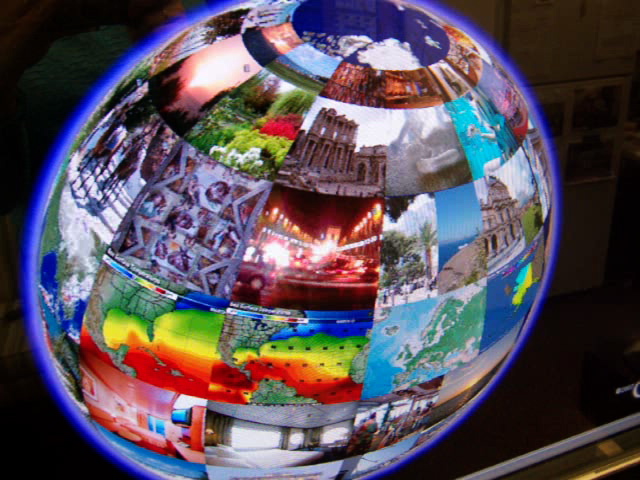
Here is another demo videoclip of a globe created in GoogleEarth using photo-overlays, with links to video clips uploaded to YouTube and embedded in individual posts on a blog. The above photo and the video clip show the application on a NextWindow Human Touch large-screen display.
This application would be great on a touch-table or touch-table set up on a drafting board. Although it was designed for a travel-planning application, it would work well in educational settings in subjects such as geography.
Poetry Picture Share

This was my first attempt at a "poetry picture share" application. It was designed for use on a multi-touch table and can be accessed remotely so people in different places can move things around on the screen. The video shows how the application works on a NextWindow Human Touch interactive large-screen display.
I am planning on adapting this application for use with students with special needs, such as those who have autism or other communication disorders.
May 21, 2007
NextWindow Human Touch Interactive display using photo overlays on Google Earth
This application was part of a travel-planning prototype developed for a course in Human-Computer Interaction. The application was demonstrated on a NextWindow Human Touch large screen display.
Would it work on the iPhone?
Mar 27, 2007
Multimedia: Interactive touch-tables and large displays
This semester I'm taking a class in Human Computer Interaction and another class called "Ubiquitous Computing". I'm working on two projects that involve the use of interactive touch-screen displays. One is for travel-planning, and the other is for games that are located in social gathering places.
I've come across lots of interesting applications during the course of my research that I'd like to share on this blog. (Check back for more information!)
Right now, my dream is to get my hands on an interactive touch table that has multi-touch capability. The table needs to be wi-fi enabled, with an adjustable surface so that it can function horizantally, vertically, or in any position in between, like a drafting table.
Here is the "Multi-Touch Interaction Experiments" video demo of Jeff Han's work with a multi-touch interactive table/screen. I know this was included in an earlier post, but if you haven't seen it, you have to take a look!
Here is a link to Jeff Han's multi-touch wall, his latest work.
Stefano Baraldi's blog, "onthetabletop" is a good resource for people interested in interactive tables. He has a link to the recent Classroom of the Future conference, which focuses on collaborative learning spaces.
Here is one of Stefano Baraldi's demo videos:
Concept Matching
Working with photographs:
Here are more links about the use of interactive tables:
Interactive Tables: Supporting Collaborative Casual Learning
SIDES: A Cooperative Tabletop Computer Game for Social Skills Development
SIDES is a game that was designed for use on a MERL DiamondTouch tabletop. The researchers studied the use of social skills games for middle school students who have Asperger Syndrome.
I've come across lots of interesting applications during the course of my research that I'd like to share on this blog. (Check back for more information!)
Right now, my dream is to get my hands on an interactive touch table that has multi-touch capability. The table needs to be wi-fi enabled, with an adjustable surface so that it can function horizantally, vertically, or in any position in between, like a drafting table.
Here is the "Multi-Touch Interaction Experiments" video demo of Jeff Han's work with a multi-touch interactive table/screen. I know this was included in an earlier post, but if you haven't seen it, you have to take a look!
Here is a link to Jeff Han's multi-touch wall, his latest work.
Stefano Baraldi's blog, "onthetabletop" is a good resource for people interested in interactive tables. He has a link to the recent Classroom of the Future conference, which focuses on collaborative learning spaces.
Here is one of Stefano Baraldi's demo videos:
Concept Matching
Working with photographs:
Here are more links about the use of interactive tables:
Interactive Tables: Supporting Collaborative Casual Learning
SIDES: A Cooperative Tabletop Computer Game for Social Skills Development
SIDES is a game that was designed for use on a MERL DiamondTouch tabletop. The researchers studied the use of social skills games for middle school students who have Asperger Syndrome.
Mar 25, 2007
Google Earth on a touch screen table - video demo
The interactive table used in this video demonstration is Diamond Touch, from MERL. In this application, navigation through Google Earth is controled through speech.
Here is a picture of how the table works:

Jan 25, 2007
Link to info about a "super touch screen" for Google Earth - it has multiple uses.
Watch this video about a "super touch screen" for Google Earth from Perceptive Pixel! More information about this can be found on the TechPsych blog, and from the Google Earth Blog. I think this application would be great for visual learners.
Applications like this are immersive and engaging. If you are an educator, think about the ways you could use this application in your classroom!
Link to related article.
-Lynn
Applications like this are immersive and engaging. If you are an educator, think about the ways you could use this application in your classroom!
Link to related article.
-Lynn
Subscribe to:
Posts (Atom)