Showing posts with label touch table. Show all posts

Jan 14, 2010

Shared computing with Windows MultiPoint in classrooms: Why not use Mouse Mischief (beta version)?

I came across this post this on Long Zheng's I Started Something blog:

Windows MultiPoint Server -- a multiseat computing solution worthy for the home?
Long Zheng points out that Window's MultiPoint server is an outgrowth of the Multi-Mouse project, in which students multiple numbers of students can work together to interact with content a PC screen or a projected PC screen.

The picture below shows how a Windows MultiPoint server can work in a classroom.

-Microsoft

I'm not so sure I like the set up in the picture of the Multi-Point 2010 system in the above picture. The students all have huge monitors in front of them, so the opportunities for shared or collaborative interaction are limited.  I like the multi-mice concept better, since the children can really be together

Mouse Mischief
Neema Moraveji, of the Stanford University HCI group, has videos and information about the multiple mice-related work on his project Page:

Teachers provide content using an add-on for PowerPoint that allows for simultaneous input from multiple mice.  The teacher can set up limits regarding how the mice are used by  the students.


I tried this with a few students during the 2008-09 school year, and they liked it.  Since I serve more schools this current year, I haven't had the opportunity to explore this further. I plan to download a newer version and try it out soon.

Good news!
The free beta version of Microsoft Mouse Mischief from the Microsoft website was recently released: Microsoft Mouse Mischief: Make your PowerPoint presentations interactive

Below is information about Mouse Mischief from the Microsoft website:

"Mouse Mischief is a tool that Microsoft makes available free of charge, and that allows teachers to work with Microsoft Office PowerPoint to make interactive presentations. With Mouse Mischief, teachers can add multiple choice questions to their presentations, and large groups of students can answer the questions using mice connected to the teacher’s PC."
"Mouse Mischief not only gives students the ability to engage, have fun, and learn in new, interactive ways, but it also provides teachers with a more affordable alternative to purchasing expensive student response systems, commonly known as clickers, by letting students use affordable wired or wireless USB mice that their school already own."
"It’s simple. After Mouse Mischief is installed, the Mouse Mischief toolbar will appear as part of the PowerPoint ribbon when a new or old PowerPoint presentation is opened. This intuitive Mouse Mischief toolbar lets teachers add interactive elements such as multiple-choice question slides with a single click. When the teacher opens a Mouse Mischief enabled presentation, students in the classroom can answer each question by clicking it with their uniquely designed mouse cursor. Once the students have selected their answers, the teacher can display the correct answer...The best part? Mouse Mischief gives teachers the option to have their students answer questions individually or as part of a team, in order to encourage both competition and collaboration in the classroom...Special teacher controls allow the teacher to disable student’s mouse cursors, navigate between slides, set timers, and more. With Mouse Mischief the teacher is always in control, whether there are two or 25 cursors on the screen."

If you are interested in developing applications for Mouse Mischief, you can download Windows MultiPoint Software Development Kit 1.5  This kit allows developers to enable up to 25 mouse devices to work at the same time on one computer. It was released on 1/12/2010 and can be downloaded from the Microsoft website.

Here a plug from Microsoft about the benefits of the MultiPoint Mouse SDK:
"Applications built on the MultiPoint Mouse SDK can provide teachers with tools to gain real-time assessment information to help them provide a personalized learning experience for each of their students...Applications built on the MultiPoint Mouse SDK can increase student learning comprehension through interactive methods.MultiPoint Mouse applications can further a student’s engagement, collaboration, interaction and overall cognitive and social skills within a classroom or lab environment."

Here is the information about the MultiPoint SDK:
"The Windows MultiPoint Mouse SDK version 1.5 is a development framework that allows developers to build applications that enable up to 25 individual mouse devices to work simultaneously on one computer. As a developer, you can use the MultiPoint Mouse SDK to create educational applications that take advantage of collaborative learning methodologies. In schools with minimum infrastructure, MultiPoint Mouse greatly enhances the shared computing experience. Initial pilot programs conducted in India by Microsoft Research show that for certain subjects, MultiPoint Mouse can enhance learning when compared to a 1:1 computing scenario."

"MultiPoint Mouse should not be confused with applications that allow multiple people to control multiple mouse devices to perform standard operations. In those cases, the system traditionally cannot identify which mouse has made which changes, and there is normally no option for controlling the permissions of the various devices. MultiPoint Mouse is a development framework that enables developers to build applications to take advantage of multiple mouse devices, including the ability to handle mouse clicks from different users independently and to assign different permissions to each mouse. For example, the mouse belonging to a teacher in a learning application might need additional permissions to control the activity."


The MultiPoint SDK is compatible with Windows 7, Windows Vista Service Pack 2, Windows XP Service Pack 3, the .NET Framework version 3.5 SP1 or higher, Microsoft Expression Blend (you can use the trial version), Visual Studio 2008 or 2010 (you can use the free Express version), 2-4 mice devices for testing, and USB ports on the computer


Other thoughts:
Schools with money for advanced technology tools have purchased SMARTTables, and few have Microsoft Surface tables.  They are expensive, and don't offer a range of form factors to choose from.

I sort of like the concept behind the multi-user poker table that was in the casino on my cruse ship:


Near the poker table is a display that shows the action from the poker game. In classroom settings, this display could be an interactive whiteboard, a projected display, or even a flat-panel screen.


There is a need for tables of different shapes in the schools. Speech pathologists, school psychologists, counselors, and others who provide guided group activities in the schools could use a multi-user table that follows this tried and true configuration:
http://www.qualitychurchfurniture.com/images/activitytablecolors/lrg_48KID72LOset.jpg
I'd love to hear from anyone who is using MultiPoint or Mouse Mischief, and also from anyone who is experimenting with various multi-touch table form factors.

Related:
Multple Mice for Computers in Education in Developing Countries (pdf)

Oct 8, 2009

The Visual Autopsy Table : Interactive Health Science

Interactive Virtual Autopsy Table


The Virtual Autopsy Table from NorrköpingsVisualiseringscenter on Vimeo.


Virtual Autopsies from NorrköpingsVisualiseringscenter on Vimeo.


How it works: Information from a true case, from the Virtual Autopsy Table website.

"A living patient was treated for cerebral hemorrhaging. X-rays sent through the body during computed tomography grow weaker according to the density of the tissue through which they pass. By assigning density values with varying degrees of transparency and identifying colors, a sort of palette can be created by the computer to use in the imaging process. It becomes possible, for example, to remove clothing, skin or blood vessels. In this case the patient has been operated for a ruptured aneurysm in a small brain vessel. A metal clips has been added that can be seen in the image.
"

RELATED

The Norrkopings Visualization Center
"The installation is financed within the framework of the Visualization program and developed by Norrköping Vi sualization Center in cooperation with CMIV (Center for Medical Image Science and Visualization)."

Aug 12, 2009

Do you have an HP TouchSmart, Dell Studio One, or NextWindow touch-screen? NUITech's Snowflake Suite upgrade provides a multi-touch plug-in.

If you have a NextWindow touch screen display, HP TouchSmart PC, or Dell Studio One PC, you might be interested to know that NUITech has upgraded their multi-touch software, Snowflake Suite. There is an evaluation download available on the NUITech website created for the NextWindow platform. (The TouchSmart and Studio One have NextWindow touchscreens.)

Here is a short clip of Snowflake 1.6 in action:

Snowflake Suite 1.6 provides users with an opportunity to change the standard content that is delivered with the software, which includes images, videos, 3D models, and backgrounds, so it can be customized according to need.

RELATED

Natural User Interface AB has adopted new branding and a new name, Natural User Interface Technologies AB, or NUITech.

Press Release (8/12/09)

Evaluation version of Snowflake Suite for NextWindow systems (including TouchSmart, Studio One)

Snowflake Suite running on multiple NextWindow 2150 overlays for 22-inch screens:

(The previous version of Snowflake, depicted in the above video, was a finalist for the 2009 Stevie Award, "Best New Product or Service of the Year- Media & Entertainment)


Singapore's Public Utility Board display, Singapore International Water Week, featuring NUITech systems and software.

SOMEWHAT RELATED
Press Release: Next Window Earns Coveted Windows 7 Logo Certification pdf

Nov 20, 2007

More touch-screen videos...

Here is an interesting video about TouchTable's $59,000.00 system:


ESRI's ArcGIS running on a TouchTable:


The application supports collaboration. People can interact with one another around a single table, with others at remote tables, and people using laptops and mobile devices out in the field.

Link: ESRI's GIS for K12 Schools

Aug 6, 2007

About Interaction: Bill Buxton and Multi-Touch Systems

Based on data from SiteMeter, there are a number of my readers who are searching for information about touch screen interaction design and multi-touch systems. A great resource for anyone interested in these topics is Bill Buxton's website, "Multi-Touch Systems that I have Known and Loved".

Bill provides a good overview of the various flavors of multi-touch interaction and interfaces, along with a an annotated chronology of multi-touch and related technologies, starting before 1982. The chronology includes some interesting pictures.

Bill Buxton works for Microsoft Research. The following information is from his bio:

"Bill Buxton is a designer and a researcher concerned with human aspects of technology. His work reflects a particular interest in the use of technology to support creative activities such as design, film making and music. Buxton's research specialties include technologies, techniques and theories of input to computers, technology mediated human-human collaboration, and ubiquitous computing."

Jul 14, 2007

Women in Technology: My editorial on the NCWIT blog -UPDATE

The above link is to my editorial, "Gender Beneath the Surface", posted on the NCWIT blog.

Although women make up half the population, they are under-represented in computer science and related technological fields. If your are interested in issues related to women and technology, the National Center for Women in Information Technology -NCWIT- is a great place to start.

I wrote the post on the day I learned that all of the members of the executive team for Microsoft Surface (Madrid) were male.

UPDATE:

The Microsoft Surface website now includes photos and bios of other team members, including women.  One woman,  Gretchen R., was originally hired to develop games for children on the Surface. 


(dually posted - techpsych and interactive multimedia technology blogs)

May 31, 2007

Microsoft Surface multi touch screen table - I wish I had one for my projects last semester!

Microsoft Research recently unveiled Microsoft Surface: http://microsoft.com/surface

This multi - touch table can be used for a variety of applications, as outlined in the video from CNET and YouTube below:


I'd like to work on applications for use on a touch-table to support students with special needs, especially those who have autism spectrum disorders.

Last semester, I worked on prototype applications for use on a touch-screen surface -here is a photo. We used a
NextWindow Human Touch large-screen display, which provided great screen resolution and touch-response.


This application was part of a travel-planning prototype developed for a course in Human-Computer Interaction. The application was demonstrated on a NextWindow Human Touch large screen display. Would it work on the iPhone?


Update: Examples from some of my other posts:


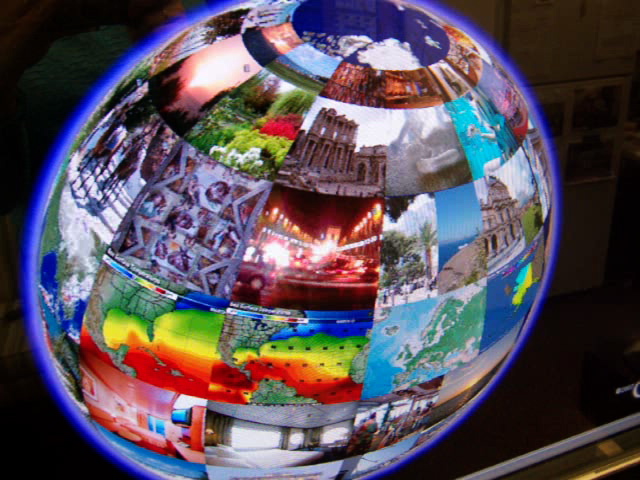
Here is another demo videoclip of a globe created in GoogleEarth using photo-overlays, with links to video clips uploaded to YouTube and embedded in individual posts on a blog. The above photo and the video clip show the application on a NextWindow Human Touch large-screen display.

This application would be great on a touch-table or touch-table set up on a drafting board. Although it was designed for a travel-planning application, it would work well in educational settings in subjects such as geography.


Poetry Picture Share


This was my first attempt at a "poetry picture share" application. It was designed for use on a multi-touch table and can be accessed remotely so people in different places can move things around on the screen. The video shows how the application works on a NextWindow Human Touch interactive large-screen display.

I am planning on adapting this application for use with students with special needs, such as those who have autism or other communication disorders.

May 21, 2007

First attempt at a touch-screen "Poetry Picture Share" application


This was my first attempt at a "poetry picture share" application. It was designed for use on a multi-touch table and can be accessed remotely so people in different places can move things around on the screen.   The video shows how the application works on a NextWindow Human Touch interactive large-screen display.

Version 2 will be posted soon. I am planning on adapting this application for use with students with special needs, such as those who have autism or other communication disorders.

Google Earth with photo overlays on a touch screen 2


Here is another demo videoclip of a globe created in GoogleEarth using photo-overlays, with links to video clips uploaded to YouTube and embedded in individual posts on a blog. The above photo and the video clip show the application on a NextWindow Human Touch large-screen display.

This application would be great on a touch-table or touch-table set up on a drafting board. Although it was designed for a travel-planning application, it would work well in educational settings in subjects such as geography.

NextWindow Human Touch Interactive display using photo overlays on Google Earth


This application was part of a travel-planning prototype developed for a course in Human-Computer Interaction.   The application was demonstrated on a NextWindow Human Touch large screen display.

Would it work on the iPhone?


Mar 27, 2007

Multimedia: Interactive touch-tables and large displays

This semester I'm taking a class in Human Computer Interaction and another class called "Ubiquitous Computing". I'm working on two projects that involve the use of interactive touch-screen displays. One is for travel-planning, and the other is for games that are located in social gathering places.

I've come across lots of interesting applications during the course of my research that I'd like to share on this blog. (Check back for more information!)

Right now, my dream is to get my hands on an interactive touch table that has multi-touch capability. The table needs to be wi-fi enabled, with an adjustable surface so that it can function horizantally, vertically, or in any position in between, like a drafting table.

Here is the "Multi-Touch Interaction Experiments" video demo of Jeff Han's work with a multi-touch interactive table/screen. I know this was included in an earlier post, but if you haven't seen it, you have to take a look!


Here is a link to Jeff Han's multi-touch wall, his latest work.

Stefano Baraldi's blog, "onthetabletop" is a good resource for people interested in interactive tables. He has a link to the recent Classroom of the Future conference, which focuses on collaborative learning spaces.

Here is one of Stefano Baraldi's demo videos:

Concept Matching


Working with photographs:


Here are more links about the use of interactive tables:

Interactive Tables: Supporting Collaborative Casual Learning

SIDES: A Cooperative Tabletop Computer Game for Social Skills Development


SIDES is a game that was designed for use on a MERL DiamondTouch tabletop. The researchers studied the use of social skills games for middle school students who have Asperger Syndrome.