Showing posts with label google TV. Show all posts

Feb 6, 2011

Another close encounter with in-store digital display marketing at Best Buy, bad internet TV controllers, bowling with the Kinect, and more...

Not long ago I visited a Best Buy. While I was there, I wanted to play around with the Kinect, but the demo system hadn't arrived.  As I wandered around the store, I encountered quite a few digital displays, part of  Best Buy's recent in-store digital media marketing effort.  I later shared my experience in a blog post,  Close Encounter with "Best Buy On": Example of a multi-channel marketing approach using in-store digital media that includes an on-line magazine.  


During today's visit to Best Buy,  I noticed that there were more display centers in various departments in the store, and many of the displays had useful and informative content. The Kinect demo was up and running, too.


Within the store,  I noticed a strong emphasis on HDTVs with internet capabilities. I  was hoping that the new Internet HDTVs would come with user-friendly touch-screen controllers, or at least an app for use on touch-screen smartphones, iPads, or other touch-screen tablets. 

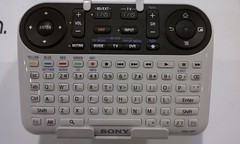
What I found was disappointing.  On display were traditional-looking multi-button remote controllers, controllers that looked like PC keyboards,  and of course, Sony's confusing multi-featured contribution to the Internet TV scene.


None of the controllers seemed to be easy-to-use, or capable of supporting web-navigation and other web interactions on HDTVs from a distance, especially when the goal is to watch movies and video from a recliner in a darkened family room.  


What sort of user-centered design or usability studies were in place during the hatching of Sony's Internet TV controller?!  (For more about bad remote controls, one of my pet peeves,  see  "Oh! No! Sony's "Mother of Remote Controls" for Google TV, 74 Buttons and Counting")


Below is a partially annotated slideshow of pictures I took of some of the displays and other things I encountered at Best Buy.  Enjoy!


Close Encounter with Kinect Bowling
It wasn't easy trying to bowl and take video with a phone at the same time! 
(Please excuse the shaky video effects and the view of my fingers.)

Oct 30, 2010

Philipp Geist: Blending the Physical with the Digital; Google TV/Leanback, Vimeo's new Couch Mode, oh...and ViewSonic's 3D (glasses-less) pocket camcorder...

I'm thinking about getting one of the new "internet ready" TVs.  I have a serious reason to do this. I'm working on some interactive video projects, and a couple of my projects are geared for teens and young adults who have autism.*   My hunch is that many of my students would like to watch- and interact with-content optimized for Google TV and Vimeo's Couch Mode.  The content is designed to look good on larger high-resolution flat-screen displays, and I'm sure it would be great on my school's newer SMARTBoards.  I need to learn more about  developing applications for this purpose.

(Currently I use my HP 22-inch TouchSmart PC to view web-based video content, and to evaluate websites that provide "touchable" and interactive content that might work well on interactive whiteboards.)

At any rate,  I've been looking for great videos that have the potential for use at work with older students who have autism. I'm also looking for effective ways that the students can use to interact with multimedia and video content. This is important, since the students have minimal verbal communication skills, have limited reading ability- if they can read at all.  They learn about their world through visual means, and are capable of learning much more - but not through traditional means.

Since our school is focusing on globalization and learning about the cultures of other countries, I've been on the lookout for some interesting videos that might appeal to our students.  

Today I came across a great find- Philipp Geist.  Who is Philipp Geist?  According to his bio, Philipp works internationally as a light and multi-media artist in the mediums of video, performance, photography and painting. Some of his work focuses on architecture, history, and cultural heritage.  A good example of his work is the installation he created for a festival in Thailand in 2009:

"The one-hour show is the central part of the celebrations and will be seen by thousands of visitors.  It interprets artistically the king's life and his work dedicated to public welfare. The art installation combines images of the kings and his social projects in the past and present with 3D animations of Thai natural and cultural heritage and abstract painterly passages." (from the Vimeo site)

Phillip Geist's Showreel

HIGH-RES MULTIMEDIA WEB CONTENT ON LARGE PANEL HD TV!
This might boost holiday gift sales and in turn, give a little jolt to the economy. To do my duty for my country, I will continue to research Internet TV as I narrow down my selection for my new Internet-ready TV.... Below is some Information about Google TV, Google Leanback, and Vimeo's Couch mode that I've recently gathered to share with my IMT followers:

GOOGLE TV:  "The web is now a channel"

"With Google Chrome and Adobe Flash Player 10.1, Google TV lets you access everything on the web. Watch your favorite web videos, view photos, play games, check fantasy scores, chat with friends, and do everything else you're accustomed to doing online. Plus, the world's best websites are now being perfected for television -- check out our Spotlight gallery for examples."  "The worlds' favorite websites are being tweaked and perfected for the television." -Google TV


I'm not too excited about the design of the application that transforms your Android phone or iPhone into a remote control.  I hate most remote controls.  According to Google TV, multiple phones can control the same TV, and you can use your voice to search, which seems like it would be a good thing...  I wonder if they tested this out with real families, not just families of Google TV techies .


GOOGLE LEANBACK Video (Integrated into GoogleTV)


Google Leanback 
When I visited the Leanback website, I encountered the following screen with a suggestion that I type in what I was looking for.  I typed in "lynnvm", the name of my YouTube channel.  Apparently Google provides you with a randomly generated featured video that appears in the background that has nothing to do with what you are looking for.  


In this screen shot, my YouTube channel offerings are in the foreground. "Maleficent Halloween Tutorial" is what played in the background: 


VIMEO INTRODUCES COUCH MODE: Vimeo's version of Google's Leanback is Couch Mode.  It is optimized for use on Google TV, so that makes things less complicated in the world of videoviewingland.   According to Ryan Hefner's article on the Vimeo staff blog, "Couch Mode is a special new section of Vimeo that allows you to watch collections of videos (such as Staff Picks, your inbox, your videos, etc.) completely uninterrupted like a TV channel."
Couch Mode works on computers, but since it relies on HTML5 and CSS3, without Flash, it only works with Chrome and Safari browsers.  For more information, see the video below:


RELATED
"A few of our favorites include Net-A-Porter, which lets you watch runway videos and shop for high fashion; Meegenius, a place where you can read and customize children’s books; TuneIn, a personal radio for your TV; and The Onion which always gives us a good laugh." - Google TV Blog
MeeGenius If you are a teacher, parent, kid, or lover of children's books, visit this interactive website ASAP. It is optimized for Google TV and works nicely on touch-enabled screens and devices.

As I was wrapping up this post, I came across information about Viewsonic's new 3D, glassesless pocket camcorder.  I'll update information about this new gadget when I have a chance to learn more about it. !


Comment: The idea of developing interactive multimedia apps in 3D intrigues me. At this point, the technology is too new for an "armchair technologist" like me to pursue with my incredibly busy work obligations.  I don't have the money to buy a 3D video camera.  But I might try this out, if it is true that it only costs $238.00!

Viewsonic introduces 3Dv5 3D pocket camcorder, no glasses required
Darren Murph, Engadget, 10/20/10
Film Videos In 3D for Under $250 With Viewsonic's 3DV5
HotHardware, 10/28/10


* About me:  
I presently work full time as a school psychologist at a high school and at a program for students with more severe disabilities, including autism.  The students I work with have made amazing gains through the use of interactive multimedia applications, and also have responded well to video presented on the large IWB screens.   


I went back to school to take computer courses, initially so I could make interactive multimedia applications and games. I continue to blog about interactive multimedia,  emerging/ new technologies, and topics related to post-WIMP HCI/UX/ID/IA.  Although my "spare time" is limited,  I try to keep up my technical skills whenever I can by working on projects that can support the students I work with.  

Oct 12, 2010

Oh! No! Sony's "Mother of Remote Controls" for Google TV. 74 Buttons and Counting.

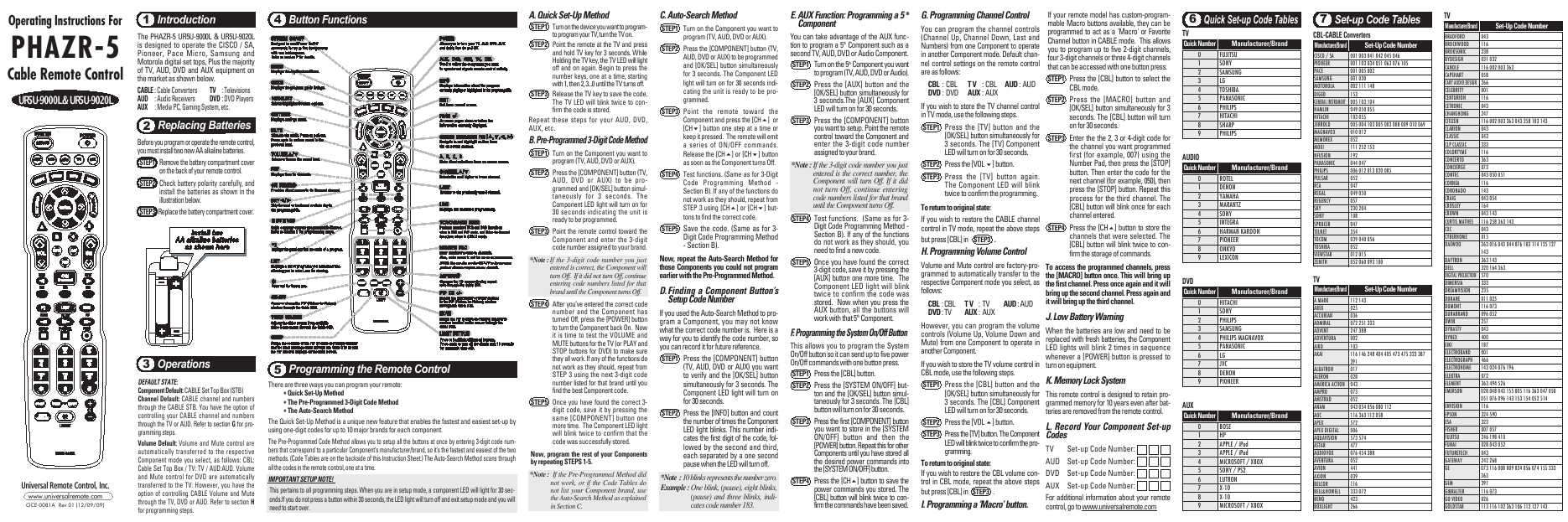
Today we switched from DISH to Time Warner Cable, and tonight I had to battle with a new remote control, the UR5U-8780L.  The experience with this remote led me to search for something better. What a coincidence!  In this day and age of touch-screens,  I was hoping for something better than....


Sony's Mother of Remote Controls!

-From the SonyStyle website: Television, meet internet., 

I first learned of this complex addition to the world of TV/Internet surfing from an article and a video in a recent article in Engadget:  Sony's Google TV controller outed on ABC's Nightline (video) Ross Miller,10/5/10.  Harry Brignull also posted about the new controller- Sony, Sony, what have you done?
(Harry is a UX Consultant at Madgex, and author of the 90percent of everything blog.)


ABC Video, via engadget

It is 2010, and with TVs connected to the internet, we'll be interacting with content in ways we could only dream of in the recent past.  Interactive TV is here.  Do I really have to push a lot of buttons in order to have the best "interactive" experience?  


OTHER OPTIONS
Xfinity Remote Prototype for the iPad


Turn Your iPhone into a TV Remote Samuel Axon, Mashable/Apple
L5 Remote: Turn your iPhone or iPod touch into a universal remote control:
L5 remote


Not Yet Available:  Vizio's XRT100 touchscreen remote
Vizio_touch_remote.jpg

My Fancy New Remote, Instructions Included:

May 22, 2010

Video and Links about Google TV : Another Flavor of Android - "Google TV brings everything you love about the web to your television"


"Google TV brings everything you love about the web to your television"


INTRODUCING GOOGLE TV


Transcript of the Google TV video:


"Back when there were only a few networks, watching TV was pretty simple.  You turned on the TV, and if you didn't like what was playing, you changed the channel. But these days, TV can be pretty complicated. Figuring out what you want to watch is hard enough, and that's only the beginning. Once you've chosen a program, you have to figure out when it's playing, and which of hundreds of channels it's on.  It's like you have to change your schedule to fit your TV's schedule.  In fact, many of us end up watching videos on the web, because it is easier to find things that you want.  I mean think about it, more and more of our favorite shows and videos are showing up online these days, and you can get to them really easily, whenever you want, just by typing in what you're looking for."


"The problem is, these smaller screens don't really compare to our home entertainment systems.  Which leads us to a pretty big question:   If the web is so smart, and our TVs are so fun to watch, why do we have to choose?  Why can't they work together?   


"Well, now they can.  Introducing Google TV.  Google TV brings everything you love about the web to your television. Some new TVs will come with it built-in, or you can get a separate box for the TV you already own. Either way, the way it works is very simple. Right on your TV screen, you simply type in what you're looking for...anything you're looking for, and Google TV will find it."


"It's basically an entertainment hub that searches all of your channels, recorded shows, YouTube, and other web sites. If you find something you like, you can add it to your home screen where you will always see your favorite channels, shows, websites, even music playlists and photo albums. That way, you can get to things really quick.  And with a full web browser, you get unlimited access to the entire Internet, so you can do stuff like browse photos or update your status.  And that's just scratching the surface."


"By opening up your TV to all of the improvements and innovation that the web has to offer, Google TV will make your TV smarter and easier to use.  So you'll be able to spend a lot less time finding what you want, and a lot more time watching what you want."


Here is some information from the Google TV website:

Watch
Google TV is coming to a living room near you.
Learn
Learn about the partners we're working with.
Visit Sony, Logitech and Intel.
Develop
Optimize your web apps for Google TV.
Android SDK coming soon. Learn more.
Google TV is a new experience made for television that combines the TV you know and love with the freedom and power of the Internet. Watch an overview video below, sign up for updates, and learn more about how to develop for Google TV.


More Information about Google TV from Google


"Google TV is a new experience for television that combines the TV that you already know with the freedom and power of the Internet. With Google Chrome built in, you can access all of your favorite websites and easily move between television and the web. This opens up your TV from a few hundred channels to millions of channels of entertainment across TV and the web. Your television is also no longer confined to showing just video. With the entire Internet in your living room, your TV becomes more than a TV — it can be a photo slideshow viewer, a gaming console, a music player and much more."


Related Google TV News and Links
Tom Krazit, CNET News  5/20/2010

Google tries where others failed: shaking up TV biz
Yinka Adegoke and Jennifer Saba, Reuters  5/21/10
Google Introduces Google TV, New Android OS
Priya Ganapati, Gadget Lab, Wired 5/20/10
Sony Internet TV
Logitec and Google TV
Logitec Google TV Box Will Have Special Powers
Matt Buchanan, Gizmodo, 5/20/10
Google Combines TV, Android, and All of the Internet
Jason Chen, Gizmodo, 5/20/10

Picture of Google TV Box, from Gizmodo:

Google TV Combines TV, Android and All of the Internet


SOMEWHAT RELATED
I wonder what the user interface will be for navigating around Google TV.   This just might be the opportunity for a next-gen universal remote control to emerge.   I hope so, because I've had usability issues with the current state of my remote controls and my DVR +  HDTV viewing experiences.


FYI:   A few of my previous posts related to remote controls, web-browsing on HD TV's, and so on:

Usability of a Remote Control
The UX of ITV:  The User Experience and Interactive TV (or Let's STamp Out Bad Remote Controls)
WebTaps HDTV and Touch-Screen Web Browser:  Share the view of the web on your couch!
Silverpac's Multi-touch website, by Ciplex features Evolution 5500, a user-freindly universal remote control, using Wiindows 7 SlideShow
Jonathan Kessler's Hand Eye Technologies:  Coordinating your cell phone with Interactive TV
An Example of Convergence:  Interactive TV:  uxTV 2008

UPDATE:

Maybe a something like the iPad app below will be created for a slate-application for Google TV?

Remote Control News:  Comcast Shows Off Sweet iPad Remote Control Prototype
comcast ipad app

This application supports socializing remotely via your remote....watch the video to see how it works:

Xfinity Remote Powered by Comcast (on an iPad)